UC2000-VE/F/G GSM/CDMA/WCDMA VoIP Gateway User Manual
_______________________________________________________________________________
Shenzhen Dinstar Co., Ltd.
54
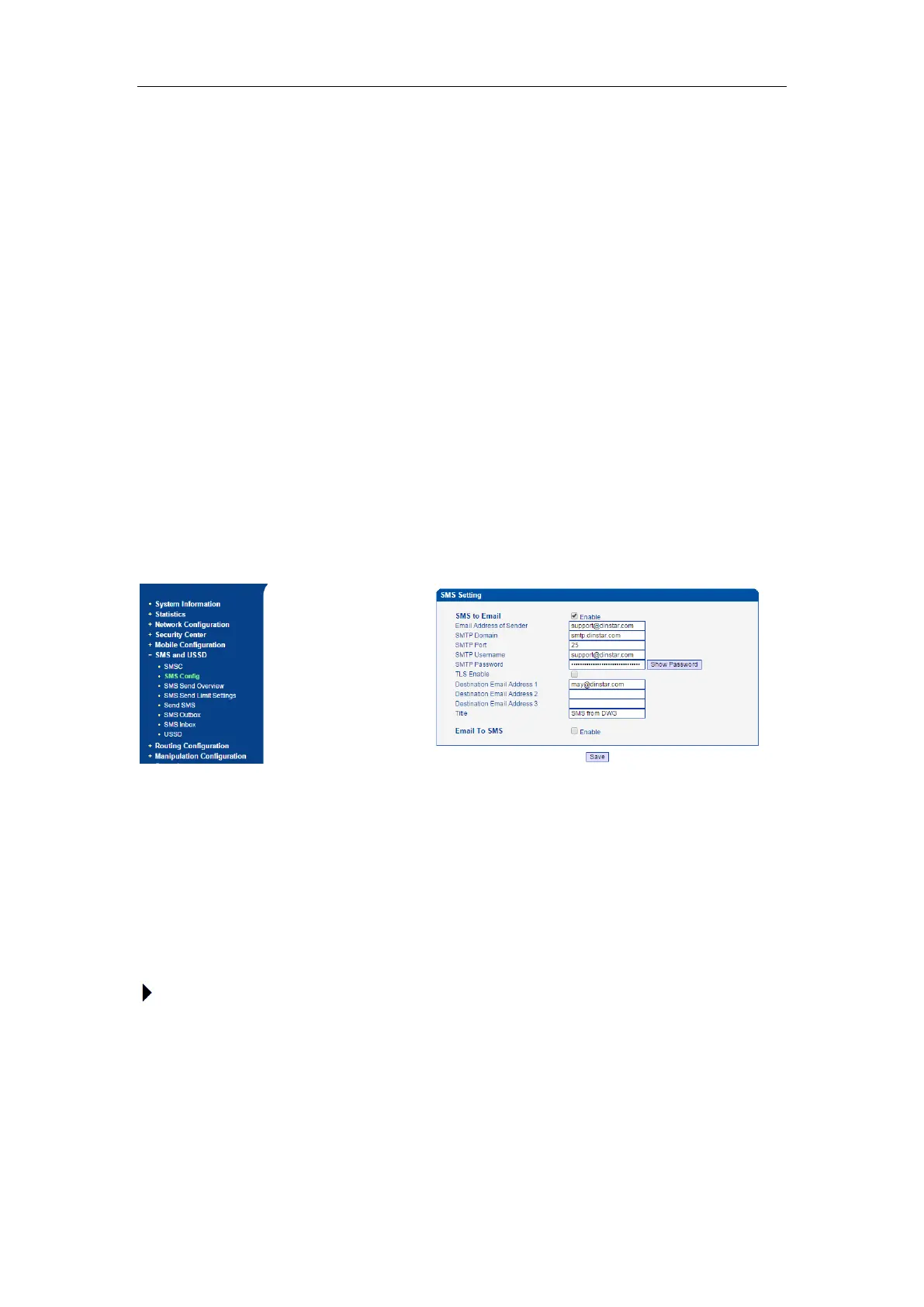
SMTP Domain: Configure the SMTP server domain here, different e-mail address server have
different server addresses, please confirm this with your e-mail provider or search from
Internet.
SMTP Port: configure the SMTP port, usually 25, please also confirm this with your e-mail
address provider.
SMTP Username: Enter your e-mail address username.
SMTP Password: Enter the password of the e-mail address you configured, please make sure
it is correct.
TLS Enable: Enable the TLS or not. If your e-mail address server requires TLS, please enable
it.
Destination Email Address 1/2/3: Enter the e-mail address to receive the SMS content.
Title: Configure the title of the e-mail, which will be used as the e-mail title when send the SMS
to destination mail.
Here is one example:
4.9 CALL CONFIGURATION
4.9.1 SIP Configuration
This section is describes how to configure SIP server and SIP parameters.
Configure SIP server and Outbound Proxy server



 To Next Page