Setting Up the Eluent Reservoir
Doc. 031879-01 3/03 B-25
B.11 Setting Up the Eluent Reservoir
1. Rinse the eluent reservoir.
2. Prepare the eluent as instructed in the manual for the column being installed.
The column manual is included on the Dionex Reference Library CD-ROM
(P/N 053891), located in the Ship Kit.
3. Fill the reservoir with the prepared eluent.
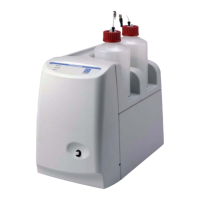
4. Place the reservoir on top of the ICS-1000.
5. Install the cap and hand tighten.
NOTE The ICS-1000 does not require pressurized reservoirs.
However, if eluent is manually degassed or is sensitive to
contamination, Dionex recommends pressurizing the
reservoir with helium or nitrogen. See Section B.20
for
instructions.
6. Go on to Section B.12.
VERSCHLIESSEN SIE DEN ABFALLBEHÄLTER NICHT: Der ICS-1000
verwendet einen Elektrolyseprozess, wodurch kleine Mengen an
Sauerstoff und Wasserstoff entstehen. Führen Sie einen schwarzen
Gasabscheiderschlauch (ID = 1,3 cm; Bestell-Nr. 045460) in einen
offenen (unverschlossenen) Abfallbehälter, damit sich das Gas nicht
in einem geschlossenen Behälter sammelt und aufkonzentriert.
Verbinden Sie die mit Waste, Gas Separator bezeichnete Leitung mit
dem Abfallschlauch.


 To Next Page