3 • Operation and Maintenance
Doc. 031879-01 3/03 3-9
3.5 Check All Connections
1. Make sure the reservoir is filled and the tubing connecting the reservoir to the
ICS-1000 tubing is securely connected.
2. Make sure the USB cable from the computer is connected to the USB
receptacle on the ICS-1000 rear panel.
3.6 Prime the Pump
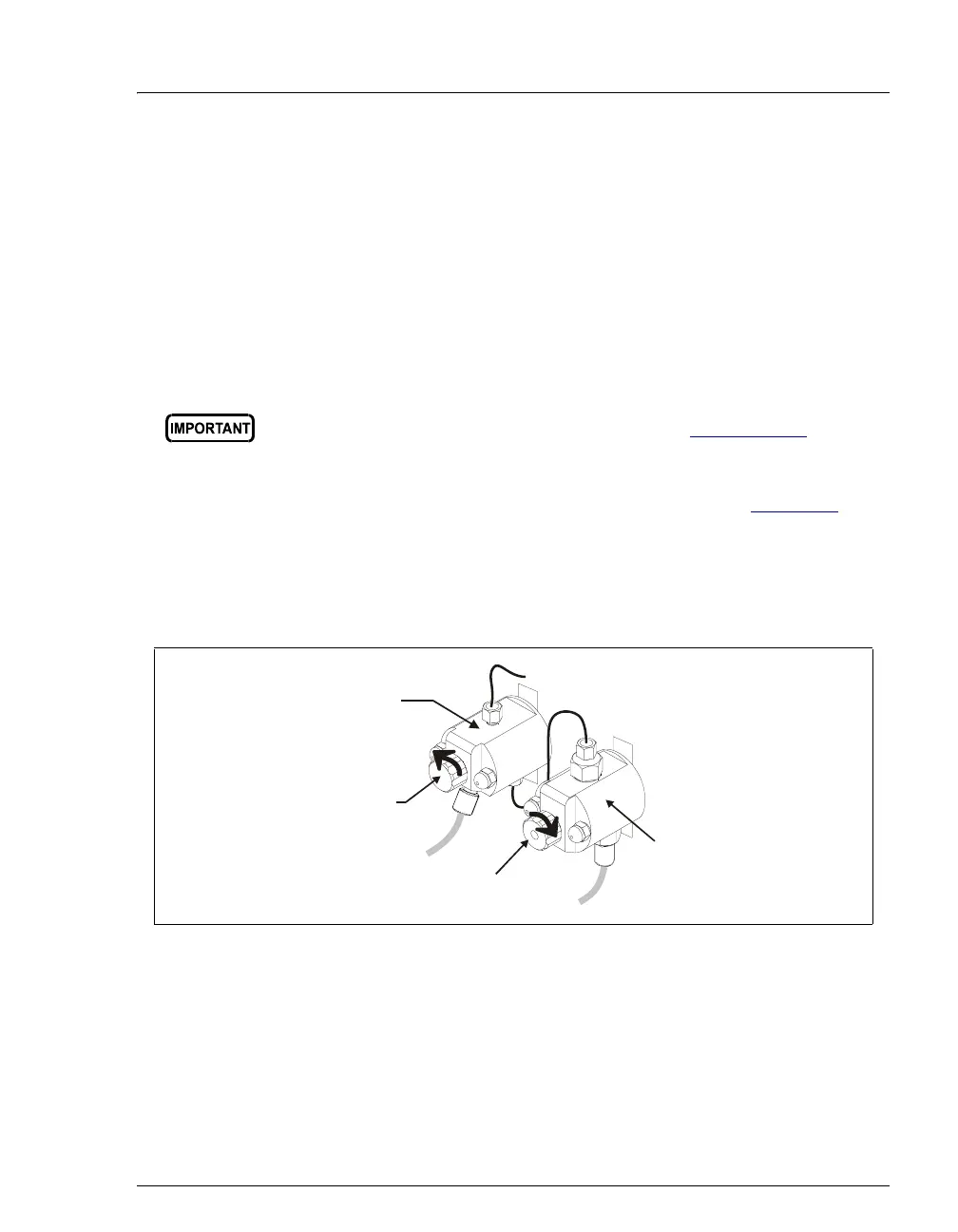
1. Verify that the priming valve on the primary pump head (see Figure 3-8) is
closed (turned all the way clockwise).
2. Open the waste valve on the secondary pump head by turning the knob one-
quarter to one-half turn counterclockwise. Opening the valve directs the
eluent flow path to waste and eliminates backpressure.
3. Press
Prime on the Chromeleon Control Panel. A confirmation message is
displayed, asking if you opened the waste valve. Select
Yes. The pump will
begin pumping at approximately 3.0 mL/min.
4. Continue priming the ICS-1000 until all air and previous eluent are purged
and no air bubbles are exiting the waste line.
If you changed eluent or if the eluent lines are dry, prime the lines first
with a syringe before priming the pump. See Section B.14.1 for
instructions.
Figure 3-8. Priming the Pump
Priming Valve
Waste Valve
Primary
Pump Hea
Secondary
Pump Head
(open)
close


 To Next Page