Operating Instructions RF-2000
27
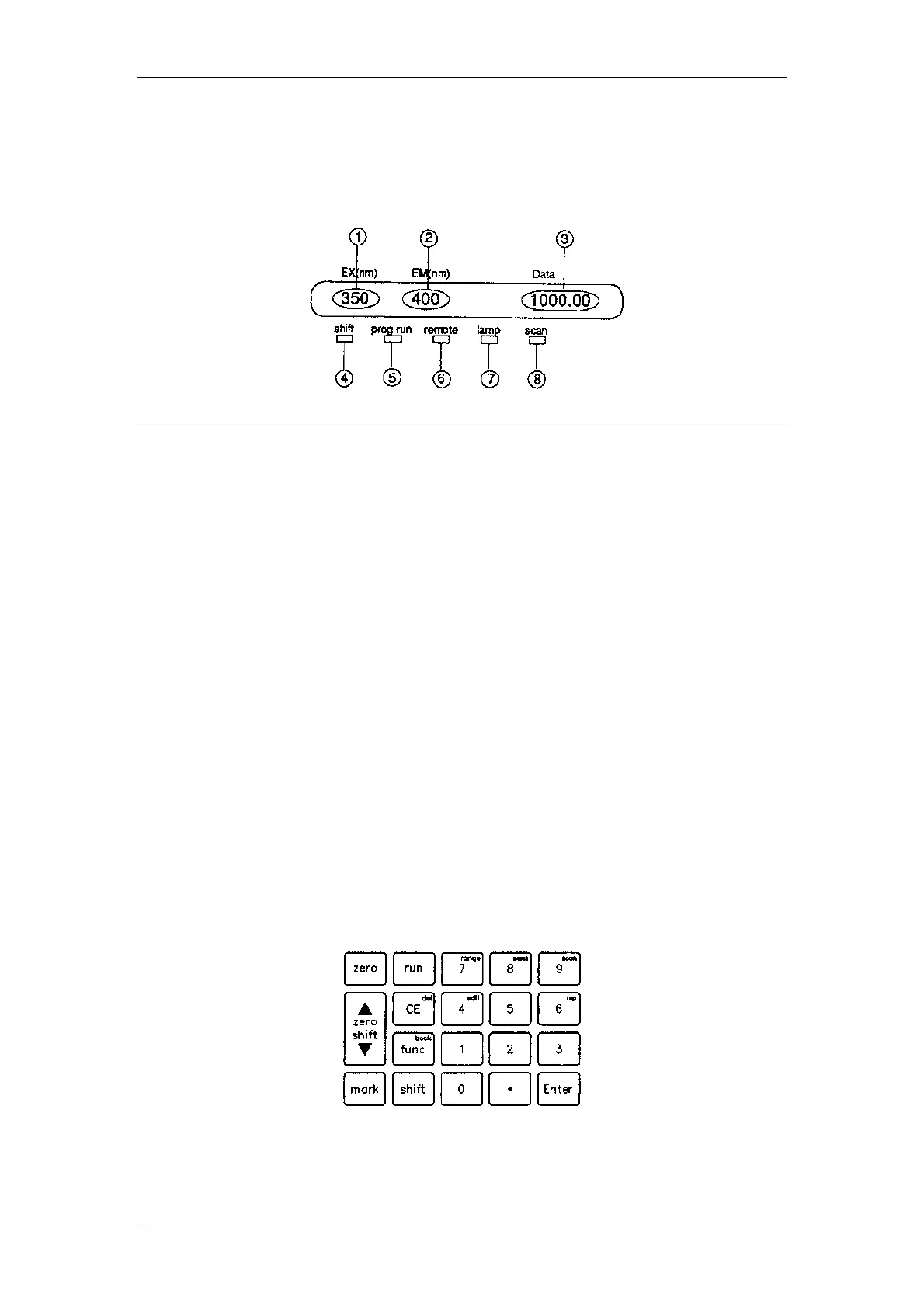
5.2.2 Display unit
The display unit consists of display screen and indicator lamps. Their descriptions
and functions are as follows.
No. Display or description Function
1) EX (nm) Displays excitation wavelength (unit: nm)
2) EM (nm) Displays emission wavelength (unit: nm)
3) Data Displays emission intensity (no unit)
4) shift Shift key indicator lamp
5) prog run Time program operation indicator lamp;
Lights when time program is being executed.
6) remote Remote mode indicator lamp
7) lamp Light source lamp;
Lights when the Xe light source is lighting.
8) scan Scan lamp;
Lights during wavelength scanning.
5.2.3 Keyboard
19 keys on the front are used for operation and setting. They are classified into the
following three types:
1) STD-func key
After pressing this key, the specified operation is immediately executed (zero
key, etc.).
2) shift-func keys
Pressing this key after pressing the shift key, the specified operation is
executed (9
scan
key, etc.).
3) edit keys
Used for inputting parameters and editing a time program (ten keys, etc.).



 To Next Page