3 Setting Up a Job AIM User’s Manual
31
Starting a Job
To start a job, enter the account number for the installation. The AIM stores
information about the tasks you perform for the installation in records associated
with the account number.
For the first job at an installation, you also set the ODU type, switch type, zip code,
and notes either by accepting the default settings (based on the previous job), or by
changing the default settings. See “Modifying the Setup for a Job” on page33.
To star t a job :
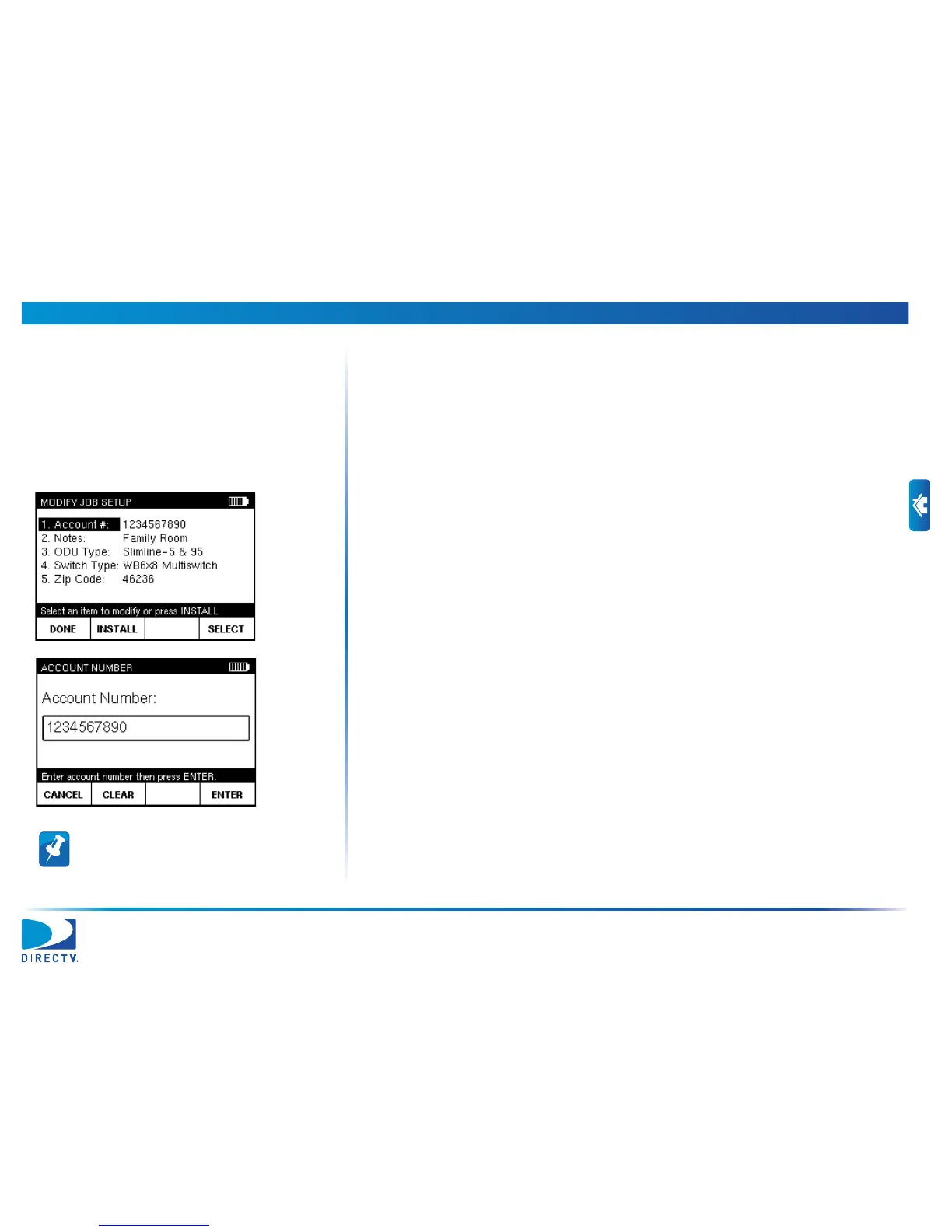
1 From the HOME screen, press SETUP to go to the MODIFY JOB SETUP screen.
2 Use c or d to highlight Account #. Then press SELECT to go to the ACCOUNT
NUMBER screen.
3 Using the numeric keypad, enter the account number for the job. Then press
ENTER.
Note: To delete a character, press Back. You
also can use e or f to navigate within your
entry, or press CLEAR to delete the entry and
start over. Press CANCEL to exit without saving.


 To Next Page