Chapter 3
20
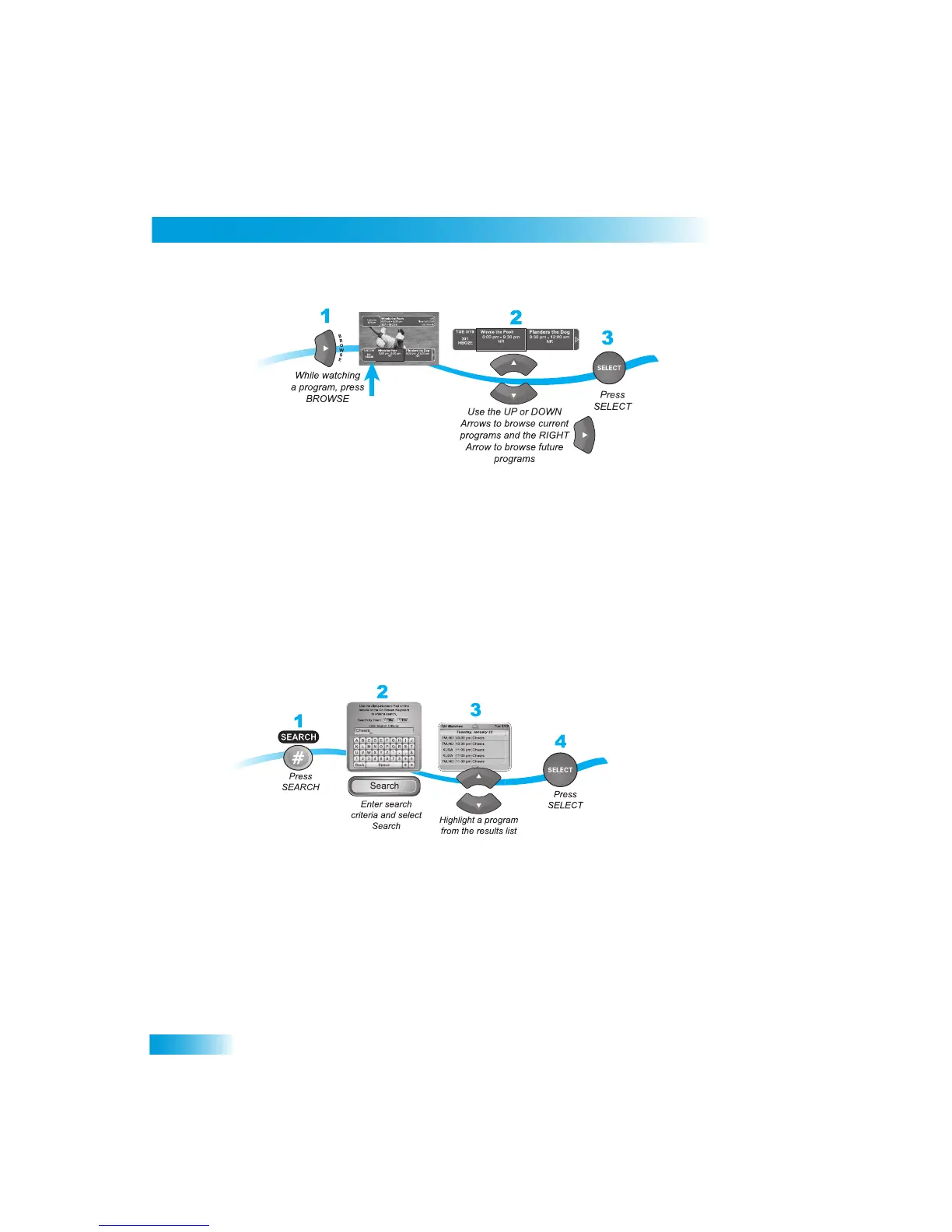
Using Search to Find a Program
If you select a cu
rrent program, the receiver will tune
to that channel. If you choose a
future program, th
e Create Timer scre
en will display. See
Chapter 8 - Timers
on page 41
for more information.
USING
S
EARCH
TO
FIND
A
P
ROGRAM
You can find programs to watch by using the Se
arch feature of the receiver. This feature
will search all channels, including off-air channels (if an off-ai
r antenna is c
onnected to the
receiver as described on page 77), and find
programs that match keywords that you enter.
Using the Search Feature
You can search for events two ways:
•
Select Title to search for the words that appear in the title of a program.
• Select Info to search for words that are in the program description
or title.
Enter the search word(s) in the Search Criteria Field in one of two ways
(see page 15):
• Use the virtual keyboard.
• Use the letters on the NUMBER PAD.
If you select a program that is on now, the rece
iver tunes to that program. If you choose a
future program, th
e Create Timer scre
en will display. See
Chapter 8 - Recording Future
Programs
on page 41 for more information.



 To Next Page