00:00.
51:00
51:00
51:02
51:00
1 32 4 5
5a 6
18
IP2358EN
8. WORKING TIME SET-UP
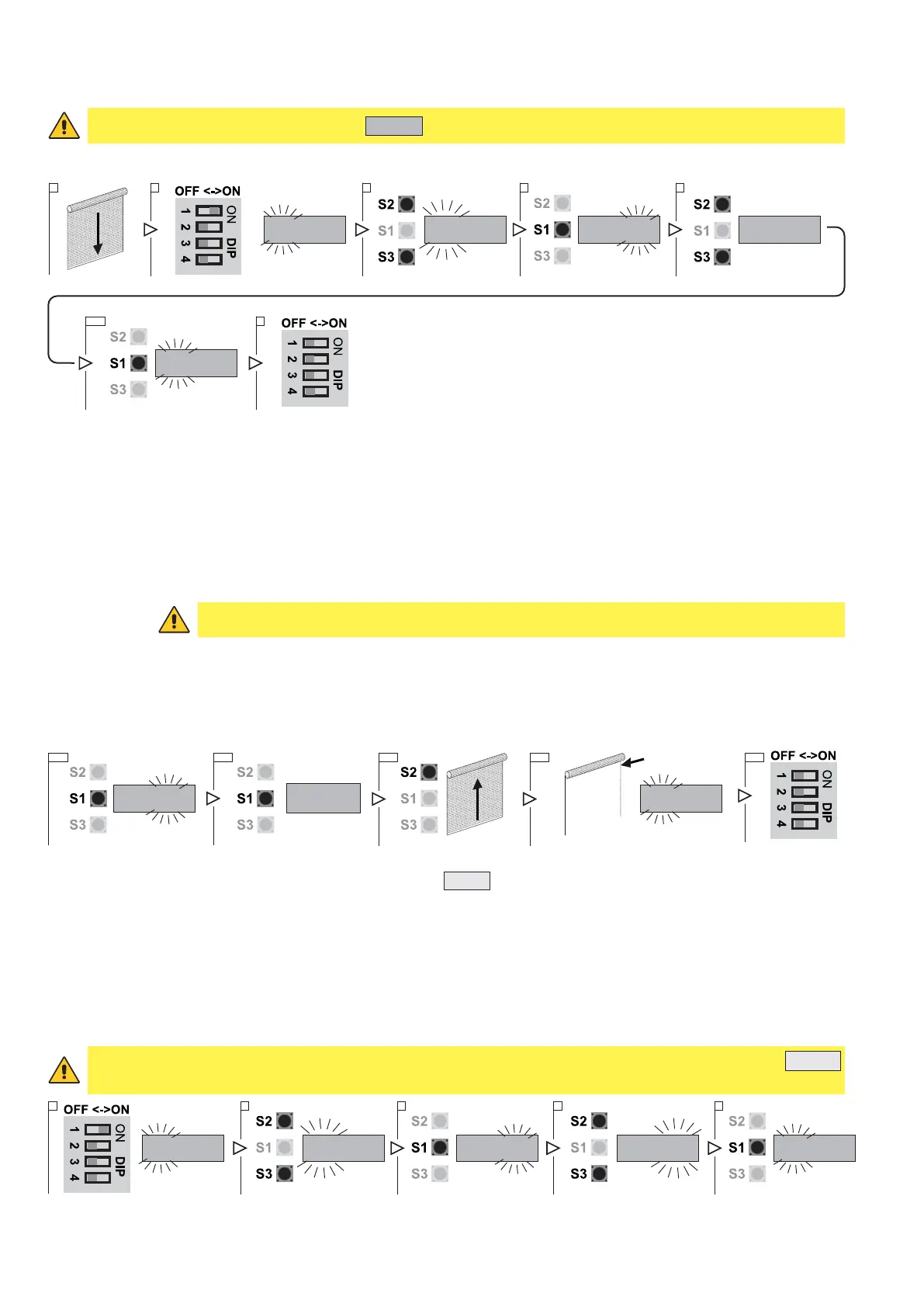
PARAMETER 51 defines the working time of the door.
WARNING! The default parameter is the
51:02
that is to say a working time of 40 seconds.
To turn off or modify the working time, follow this procedure:
1. Close the door and stop at the DOWN limit position.
2. Put DIP 1 (S4) in ON position, PARAMETER digits start blinking
3. Using the buttons OPEN (S2) and CLOSE (S3) select the parameter 51
4. Access the field VALUE pressing STOP (S1)
5. Using the buttons OPEN (S2) and CLOSE (S3) vary the value:
- VALUE 00: Function inactive.
- VALUE 01: Working time 20 seconds.
- VALUE 02: Working time 40 seconds (default).
- VALUE 03: Activate the self learning function to determine the working time.
CAUTION: In order to use this function the limit switches must be already adjusted.
- VALUE 04: Working time 60 seconds
5a. Select the value 00 / 01 / 02 / 04 > press STOP (S1) to confirm
6a. Place the DIP1 again in OFF to be out of the set-up mode.
By selecting a working time, the control unit verify if the door moving time exceeds the predetermined value: if this
happens the door will stop and the display will shows the error code E:03.
5b. Select value 03
6b. Press STOP (S1) to confirm. The control unit, showing
RUN
is ready to move the door
7b. Using the OPEN button (S2) move the door from the closed position to the open position without interruptions.
8b. Once the UP limit switch is reached, the door stops, RUN stops flashing and the display will automatically return
to field PARAMETER.
9b. To leave the set-up mode, place the DIP1 in OFF.
5b 6b 9b
51:03 51:03
RUN
7b 8b
9. AUTOMATIC CLOSING
Parameter 32 allows the selection of the door automatic closing after a selectable period of time.
IMPORTANT: parameter 32 is visible and accessible only if parameter 01 has been set in impulsive mode
01:03
.
It will be activated only if on parameter 31 is selected at least one photocell (par. 13.1)
00:00.
32:00
32:00 32:03
32:03
1 2 3 4 5
1. Put DIP 1 (S4) in ON position, PARAMETER digits start blinking
2. Using the buttons OPEN (S2) and CLOSE (S3) select the parameter 32


 To Next Page