00:00.
36:00
36:00 36:00
36:00
01
1 2 3 4 5
19
IP2358EN
3. Access the field VALUE pressing STOP (S1)
4. Using the buttons OPEN (S2) and CLOSE (S3) vary the value
- The value 00 in the field VALUE inhibits the automatic closing;
- A value greater than 0, from 1 to 99, indicates the number of seconds to wait before the activation of the automatic
closing:
i
NOTE: From 0 to 99 the change is made every second by using the buttons OPEN and CLOSE.
Over 99 the change is made every 10 seconds and the value will flash quickly: for example, the VALUE 18
corresponds to 180 seconds, the value 19 to 190 seconds ...
If you keep the OPEN button pressed you will get a fast increase of the value.
5. Press STOP (S1) to confirm.
6. To leave the set-up mode, place the DIP1 in OFF.
10. “CAR WASH” FUNCTION
Count down of auto closing time starts, only if photo has been activated more than ”photo active time”. Door shall be
complete closed before start of a new cycle.
To enable the temporary disabling of automatic closing:
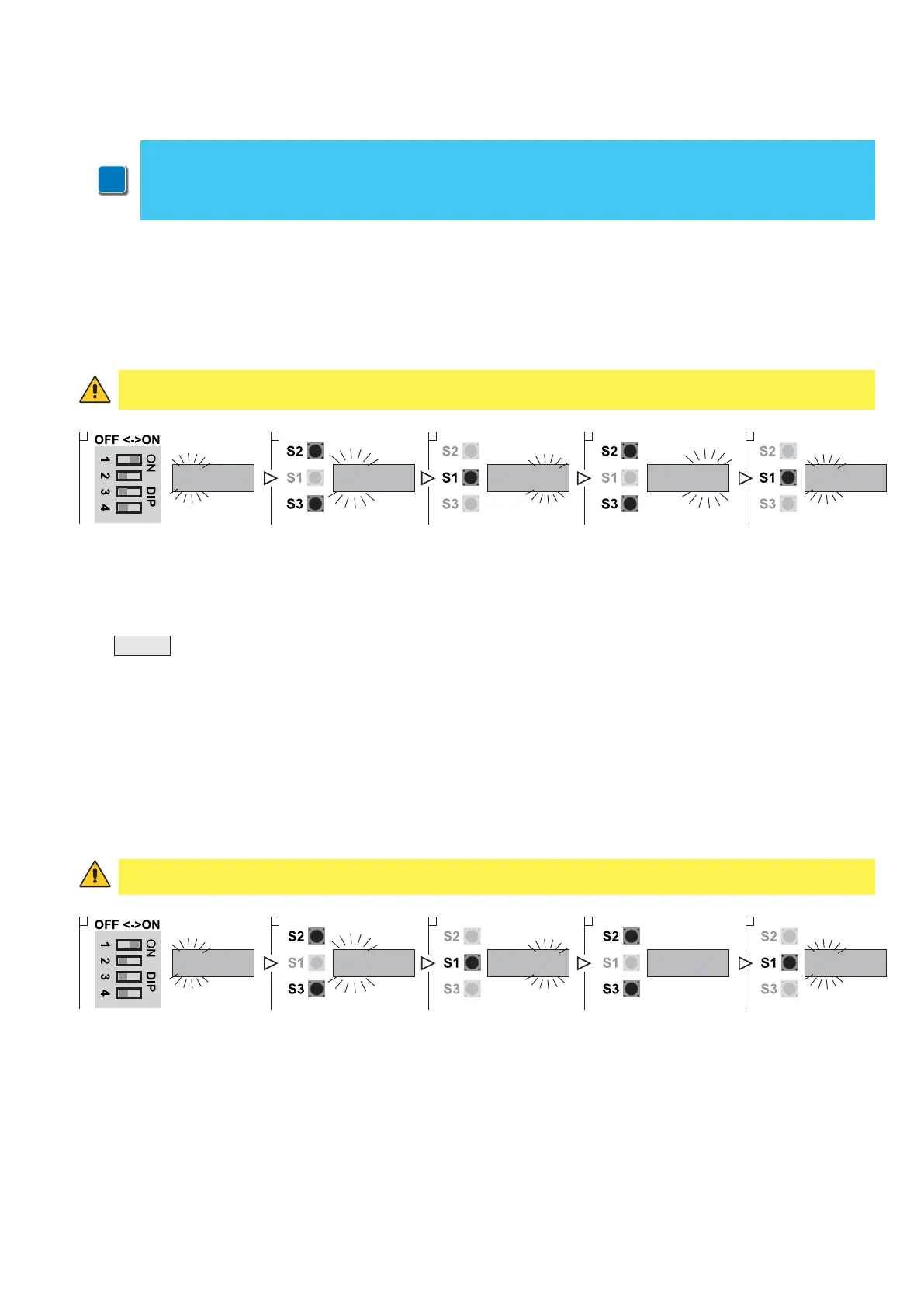
1. Put DIP 1 (S4) in ON position, PARAMETER digits start blinking
2. Using the buttons OPEN (S2) and CLOSE (S3) select the parameter 36
3. Access the field VALUE pressing STOP (S1)
4. Using the buttons OPEN (S2) and CLOSE (S3) vary the value:
- VALUE 00: function OFF;
- VALUE 01: function ON.
5. Press STOP (S1) to confirm.
6. To leave the set-up mode, place the DIP1 in OFF.
ATTENTION!
Parameter 36 is visible and selectable only if the automatic closing has been selected in parameter 32.
ATTENTION: parameter 33 is selectable only if in the parameter 31 is selected at least one photocell.
00:00.
33:00
33:00 33:03
33:03
1 2 3 4 5
1. Close the door and stop at the DOWN limit position.
2. Put DIP 1 (S4) in ON position, PARAMETER digits start blinking
3. Using the buttons OPEN (S2) and CLOSE (S3) select the PARAMETER 51
4. Access the field VALUE pressing STOP (S1)
5. Using the buttons OPEN (S2) and CLOSE (S3) vary the value:
-
>00
Photo active time in 0,1 sec. Units (e. g. 15 = 1,5 sec.) - (Adjustable 1 – 30 units – 0,1 sec. to 3,0 sec.)
6. Press STOP (S1) to confirm.
7. To leave the set-up mode, place the DIP1 in OFF.
11. TEMPORARY DISABLING OF AUTOMATIC CLOSING
The function stops the automatic closing if activated.
The countdown on the display shows the value of the pre-set waiting time. To activate the temporary lock, with the door
in its UP limit position, hold the STOP button or the emergency stop button for more than 5 seconds.
To restore the automatic closing press CLOSE button or the closing on “GO Function”.


 To Next Page