30
IP2358EN
17.1 ERROR CODES - D15 ERROR LED
(used when electronic limits is selected)
8k2 OR
PNEU.
EDGE
SAFETY
PHOTO
X3
SAFETY
HOT
HOTO
4 V
OUTPU
SPEED INPU
1/2 OPEN
IMIT SW
+24V
OPE
IMIT SW
CLO
IMIT SW
O FUNCTION
CLO
OPE
STOP
MER. STO
N
I
OFF <->O
1
17. TROUBLESHOOTING
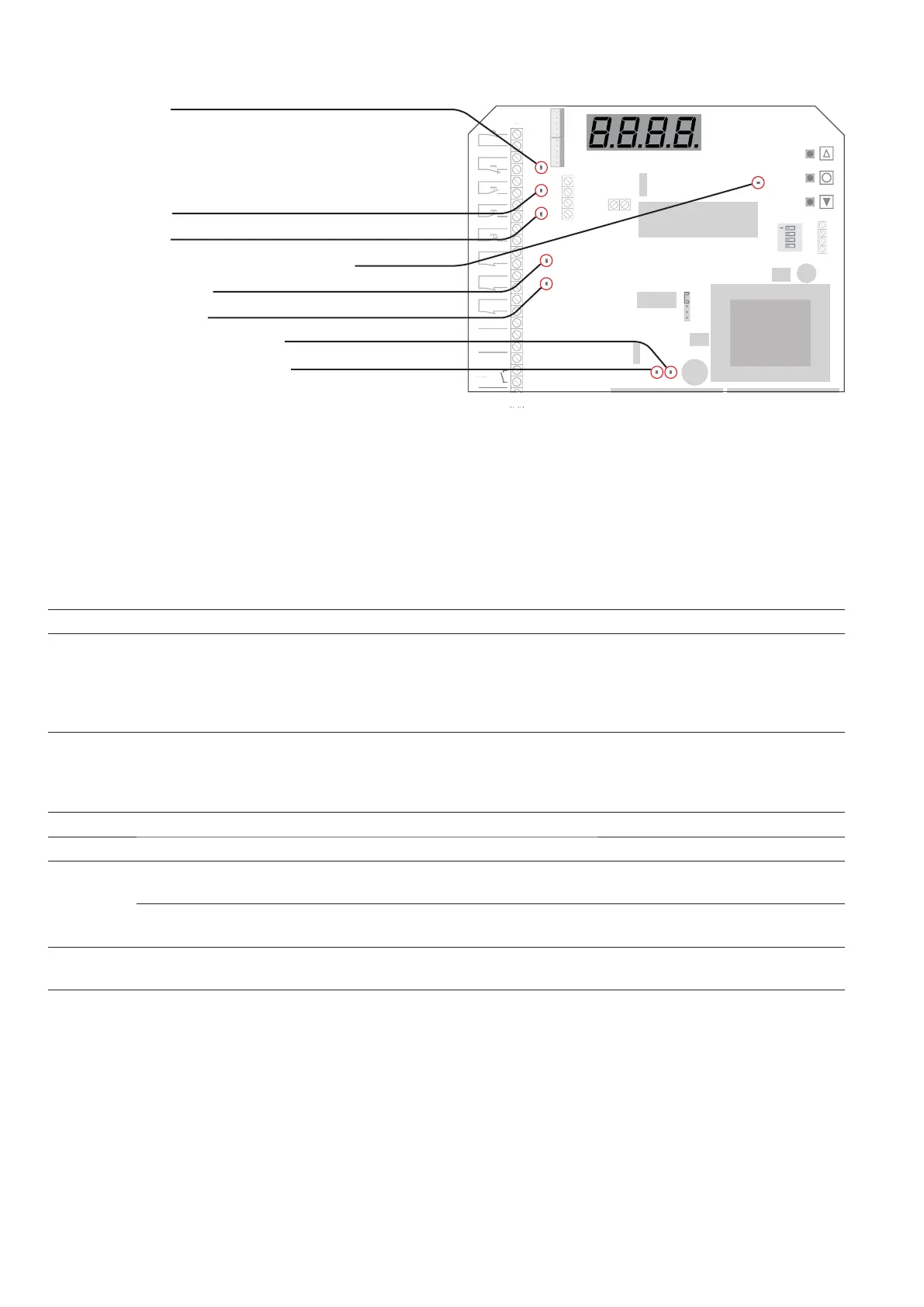
D10 - STOP active
( X3:1-2, X3:3-4, X3:28-29, X13:2-5, X2:4-5 )
LED is also active in fail mode. Observe display and
D15 ERROR LED
D13 - Open Limit
D12 - Close Limit active
D28 - Power ON to Open contactor
D16 - Close Limit
D14 - Open Limit active
D29 - Power ON to Close contactor
D15 - Error diode - it shows the error code
Flashes on
error LED
D15
Error explanation Solving error
1
No answer from encoder
(No 24Vdc control voltage)
Check connections
Check the 24VDC voltage in terminal 18-19 of X3
2 Limits not learned Learn limits
3 Motor running unintended
Service needed. Fatal error. Move the door manual to middle position
without power. Change from normal mode to programming mode on
DIP switch no.1. This will clear the SER error. If the door is running
again in 1 sec. without command when power is on then the PCB is
defect.
4 Calculation error
Check that parameter 11 value is correct selected. (Left/right turning
select).
Possible user error – both limits are the same.
Encoder error.
5 Not in use
6 Not in use
7
Encoder: position out of
learned range.
Re-learn limits
Encoder – wrong selection of
left/right turning
Check that parameter 11 value is correct selected. (Left/right turning
select) or re-learn limits
8
Encoder – Failure operating
voltage
Check connection and supply voltage. Change encoder
9
EEPROM failure on IC4 by pow-
er up
Re-learn limits and make a new power-up. (In that order!)
Or
Make a factory resetting and a new power-up. (In that order!)


 To Next Page