70%
60%
50%
70%
60%
50%
00:00.
16:00
16:00 16:00
16:00
01
02
07
06
1 2 3 4 5
20
IP2358EN
12. PARTIAL OPENING WITH ENCODER LIMIT SWITCHES
With encoder limit switches type, the partial opening can occur through the use of a selector or of an additional button.
To use this feature, the parameter 16 must be configured with a value >01.
If you are using a selector, this one must be connected to terminals 15 and 16 of X3.
If you open the contact of the selector, the use of the partial opening is inhibited.
If you close the contact of the selector, pressing the UP button, the door stops at the partial opening.
The partial opening can be adjusted by setting the PARAMETER 16 at values from 02 to 07 with a progressive change
of the partial opening from 50% to 75% of the travel.
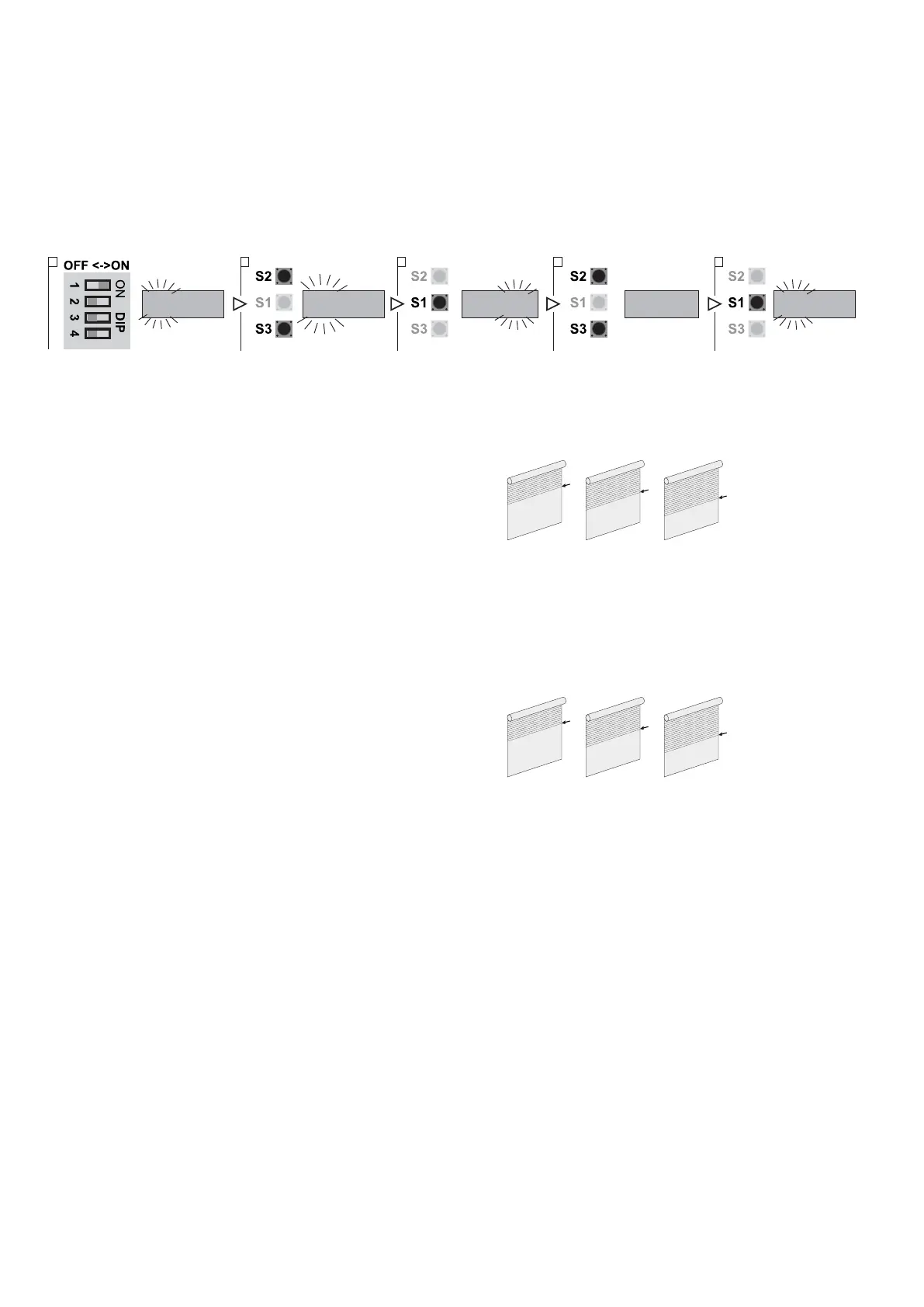
1. Put DIP 1 (S4) in ON position, PARAMETER digits start blinking
2. Using the buttons OPEN (S2) and CLOSE (S3) select the parameter 16
3. Access the field VALUE pressing STOP (S1)
4. Using the buttons OPEN (S2) and CLOSE (S3) vary the value:
- VALUE 02: Partial opening at 50% of the travel
- VALUE 03: Partial opening at 55% of the travel
- VALUE 04: Partial opening at 60% of the travel
- VALUE 05: Partial opening at 65% of the travel
- VALUE 06: Partial opening at 70% of the travel
- VALUE 07: Partial opening at 75% of the travel
5. Press STOP (S1) to confirm
If you are using an additional button, this one must be connected to terminals 15 and 16 of X3.
In this case the UP button allows the opening of the door up to the UP limit position.
While, to move the door to the partial opening you have to press the additional button.
The partial opening can be determined by setting the PARAMETER 16 with values from 08 to 13 with a progressive
change of the partial opening from 50% to 75% of the travel:
- VALUE 08: Partial opening at 50% of the travel
- VALUE 09: Partial opening at 55% of the travel
- VALUE 10: Partial opening at 60% of the travel
- VALUE 11: Partial opening at 65% of the travel
- VALUE 12: Partial opening at 70% of the travel
- VALUE 13: Partial opening at 75% of the travel
12.1 AUTOMATIC CLOSING FROM PARTIAL OPENING
You can set the automatic closing even from the partial opening setting the PARAMETER 17.
1. Activate the automatic closing function (chapter 9).
2. Set the PARAMETER 17:
- VALUE 00: Automatic closing (from partial opening) OFF.
- VALUE 01: Automatic closing (from partial opening) ON.


 To Next Page