42
IP2246EN
EN
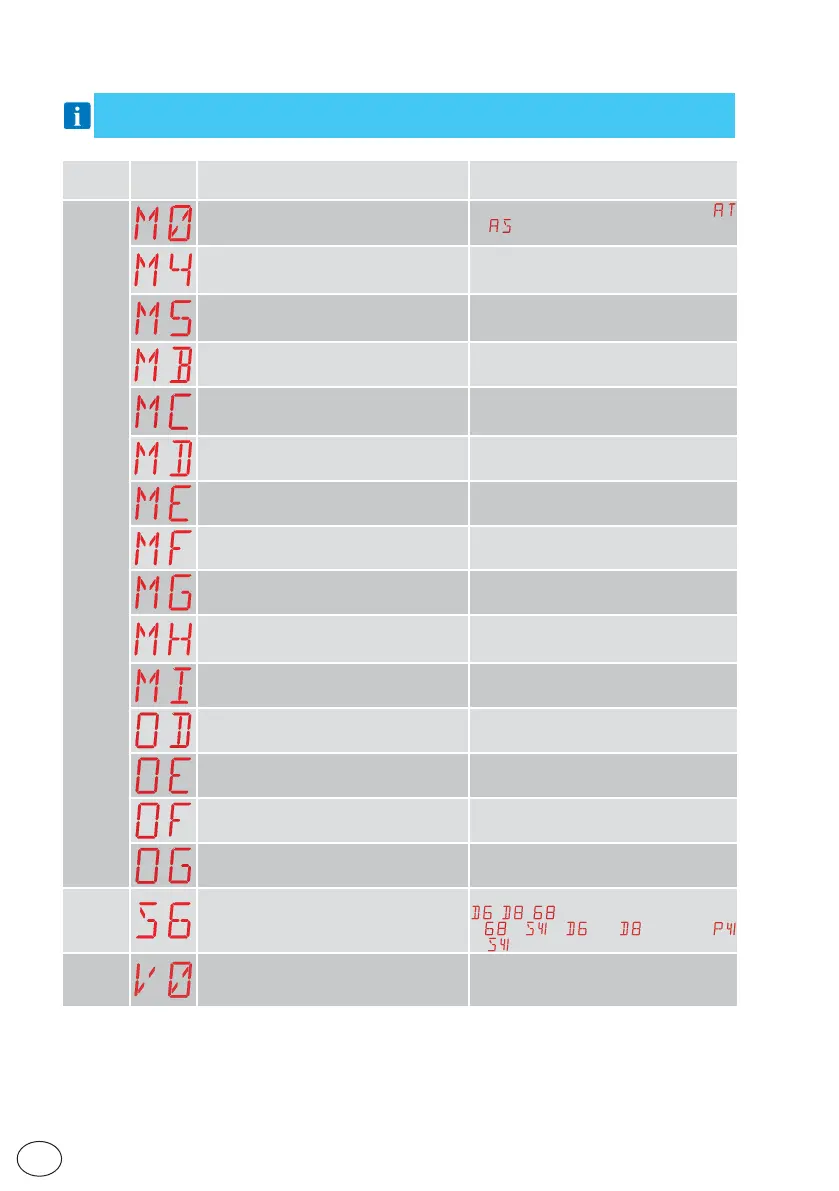
13.3 Visualisation of alarms and faults
WARNING: the visualisation of alarms and faults is possible with any visualisation selec-
tion. The signalling of alarm messages takes priority over all other displays.
Type of
alarm
Display Description Operation
Mechanical alarm
M0 - Automation type not selected
Select a type of automation from the
→
menu
M4 - Short circuit - motor 1 Check the connection of motor 1.
Check that the wing is not locked.
Check the operation of the electric lock
M5 - Short circuit - motor 2 Check the connection of motor 1.
Check that the wing is not locked.
Check the operation of the electric lock
MB - Absence of motor 1 during an oper-
ation
Check the connection of motor 1.
MC - Absence of motor 2 during an oper-
ation (if 2-motor functioning has been
set)
Check the connection of motor 2.
MD - Irregular functioning of motor 1 open-
ing limit switch
Check the connection of the motor 1 opening
limit switch.
ME - Irregular functioning of motor 1 clos-
ing limit switch
Check the connection of the motor 1 closing
limit switch.
MF - Irregular functioning of motor 2 open-
ing limit switch
Check the connection of the motor 2 opening
limit switch.
MG - Irregular functioning of motor 2 clos-
ing limit switch
Check the connection of the motor 2 closing
limit switch.
MH - Door wing overlap not correct Check that the motor which is the first to
make the opening (M1) is connected as
shown in fig. 1.
MI - Detection of third consecutive obstacle Check for the presence of permanent obst-
acles along the stroke of the automation.
OD - Obstacle during opening - gate wing 1 Check for the presence of obstacles along
the automation stroke.
OE - Obstacle during closure - gate wing 1 Check for the presence of obstacles along
the automation stroke.
OF - Obstacle during opening - gate wing 2 Check for the presence of obstacles along
the automation stroke.
OG - Obstacle during closure - gate wing 2 Check for the presence of obstacles along
the automation stroke.
Settings
alarm
S6 - Incorrect setting of safety device test Check the configuration of parameters
, , .
If
→ , and cannot be
or
.
Service
alarm
V0 - Request for maintenance intervention Proceed with the scheduled maintenance
intervention.


 To Next Page