AS/400 User Guide
3. Setting up a display through the display terminal it is attached to. Refer to the
terminal manufacturer’s documentation for specific instructions.
Warning: Do not set up a display at the same address as another existing device.
The OS/400 will issue an “address conflict” message.
The AS/400 uses controllers (designated as CTL) to determine where to set up specific
addresses for devices. To setup a display, you must know:
• Controller display will be connected to
• Port on the controller the display will be attached to
• Address on the port display connected to
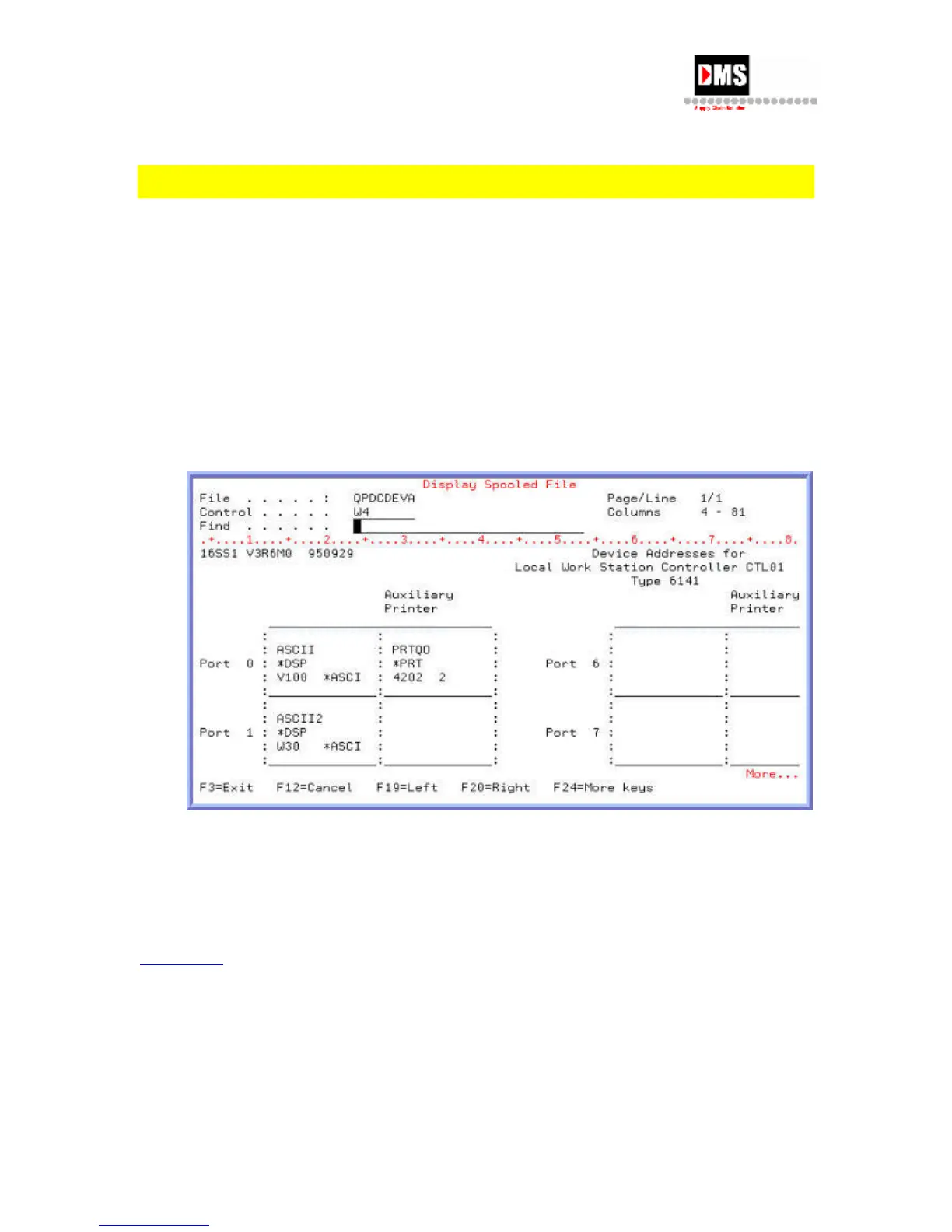
For a visual layout of what is currently set up in the system:
• Type "PRTDEVADR xxxx", where "xxxx" is the controller name and press ENTER
Key. A spooled file named QPDCDEVA is generated. It can be view and/or printed.
NOTE: Device controllers have ports that are numbered beginning with 0 (which is considered
the first port). Each port has a limitation of 7 addresses. These addresses can be for any
combination of devices but no more than 7 individual devices can be set up on any each port.
As an example, if you have an 8-port controller the maximum number of devices supported
would be 56 (this may be less depending upon how your location establishes the system
console).
Back to Top
Determine Status of Display
Steps:
1. Type "WRKCFGSTS *dev" on the command line and ENTER Key. All devices are
displayed.
60 DMS Systems Corp.
October 13, 2003
Version 1.0



 To Next Page