Dobot Nova Series User Guide
Issue V1.3 (2023-07-19) User Guide Copyright © Yuejiang Technology Co., Ltd.
25
The nominal voltage of the robot is 48V. You can use the AC to DC power supply shown in
Appendix to connect to the mains power. If you use your own DC power supply, ensure that the
voltage fluctuation ranges within 30V~60V.
Emergency stop switch interface
It is used to connect the emergency stop switch for controlling the emergency stop of the robot
arm.
Nova series robot arm includes an emergency stop switch in its delivery accessories. The wiring
terminals has been connected. You just need to plug it into the corresponding interface.
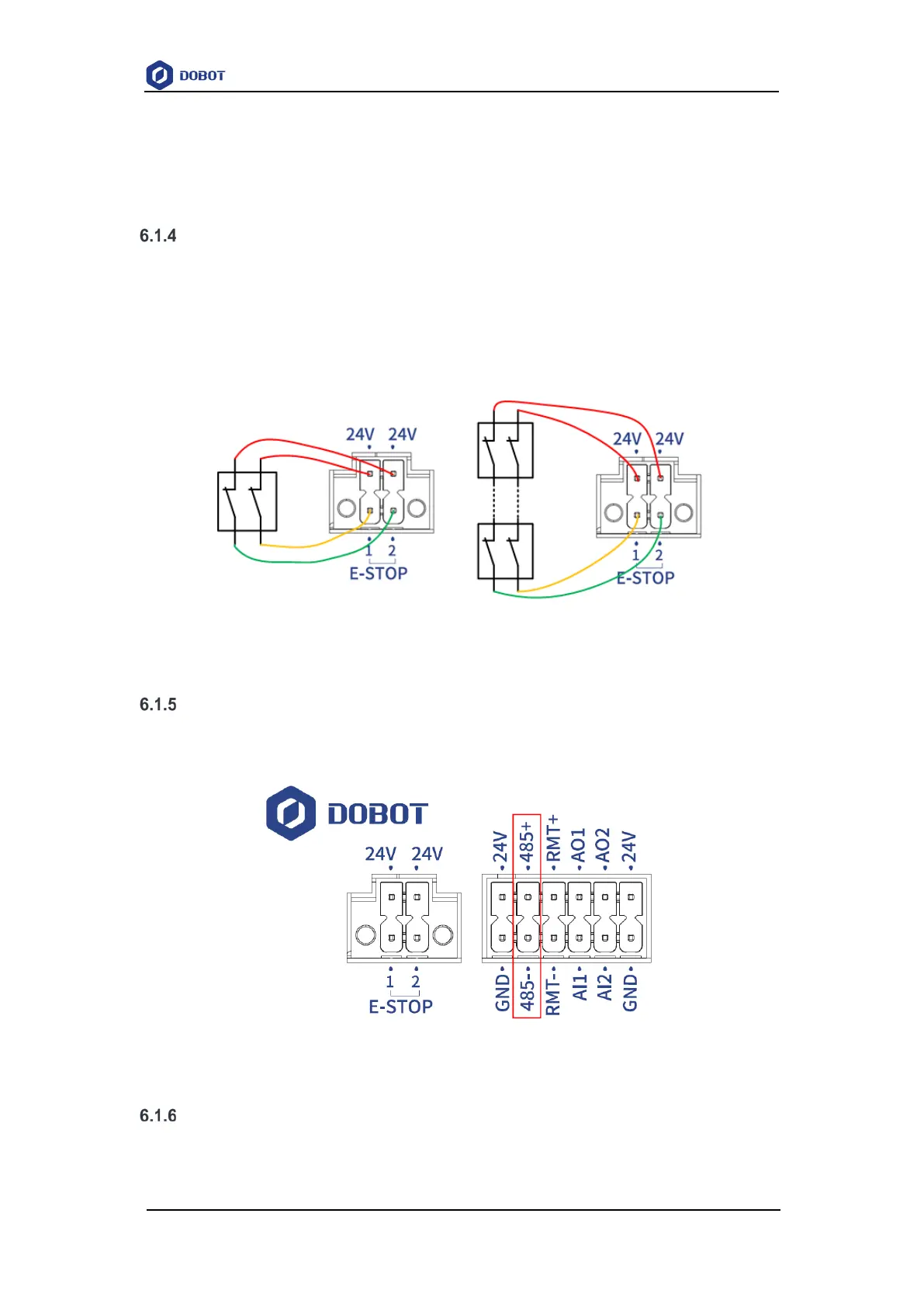
If you use your self-prepared emergency stop switch, please connect as shown below.
Figure 6.2 Connect one or more emergency switches
RS485 interface
The RS485 interface is shown in Figure 6.3, which can be used for Modbus RTU
communication (not available now).
Figure 6.3 RS485 interface
Remote switch interface
The remote switch interface is shown in Figure 6.4, which can be used for turning on/off the
CCBOX remotely.


 To Next Page