Dobot Nova Series User Guide
Issue V1.3 (2023-07-19) User Guide Copyright © Yuejiang Technology Co., Ltd.
29
USB interface
The CCBOX has two USB interfaces. You can use any of them to connect wireless receiver,
and the other can be reserved.
Energy feedback resistance interface
When the robot arm moves at a fast speed and decelerates for a short time, the overvoltage may
occur (the control software will report an overvoltage alarm). If the overvoltage often occurs, you
can connect an additional energy feedback resistance to the CCBOX to inhibit.
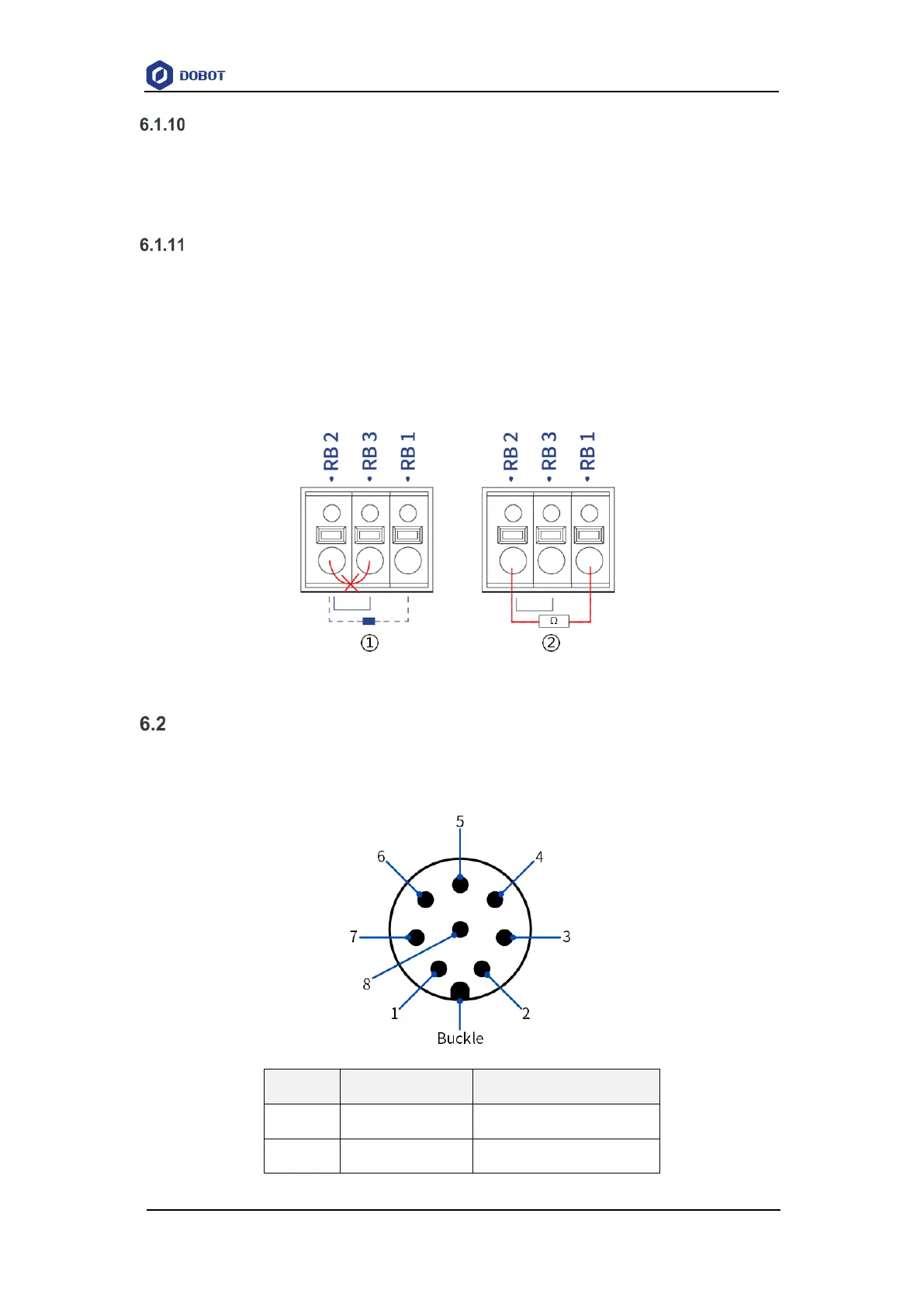
It is recommended to use a 150W 2R aluminum shell resistance. During installation, you need
to remove the cable between RB2 and RB3, and then connect the resistance between RB1 and RB2,
as shown in Figure 6.13.
Figure 6.13 Connecting feedback resistance
Tool I/O interface
The tool I/O interface is an aerial socket located on the end flange. The socket pins are
distributed and defined as follows.
Pin Name Description
1 485A 485A
2 485B 485B


 To Next Page