100
Applications
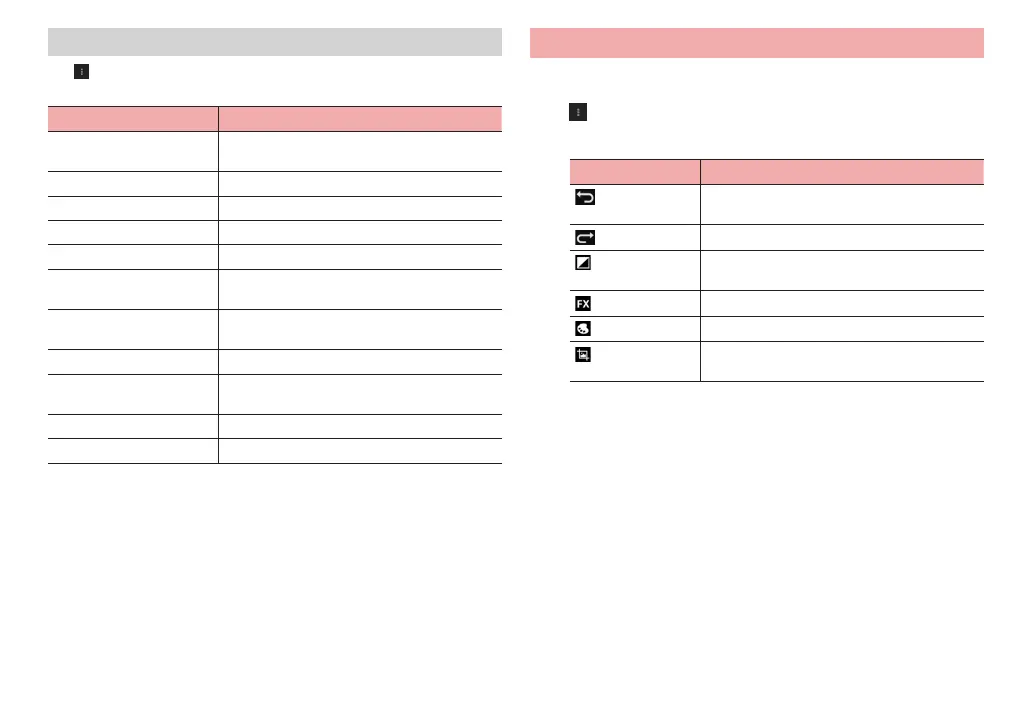
Menu on the playing screen
Tap on the playing screen to show the following menu items.
·
Displayed menu items differ between still images and videos.
Item Description
Slideshow Show slideshow of still images in a folder. Tap
an image to stop slideshow.
Edit Edit still images (P. 100).
Rotate Left Rotate a still image to the left at 90 degree.
Rotate Right Rotate a still image to the right at 90 degree.
Crop Crop still images.
Set picture as Set a still image as wallpaper or contact
picture.
Details Show detailed information of a still image/
video.
Resize Set t
he display size for videos.
Gestures setting Set the function when dragging the scr
een
during video playback.
Load subtitle You can load subtitle files for videos.
Auto Rotation Set auto rotation for videos.
Editing still images
1
Tap a still image in the thumbnail screen
2
→ “Edit”
3
Edit image using icons
Item Description
Undo editing operation which has been done
and return to the previous status.
Redo canceled operation.
Set fill light, high light, shadow, and automatic
correction.
Set expression method.
Add color effect and graffiti.
Crop, reduce red eye, correct tilt, rotate, invert,
or set sharpness.
4
“SAVE”



 To Next Page