28
Before using the terminal
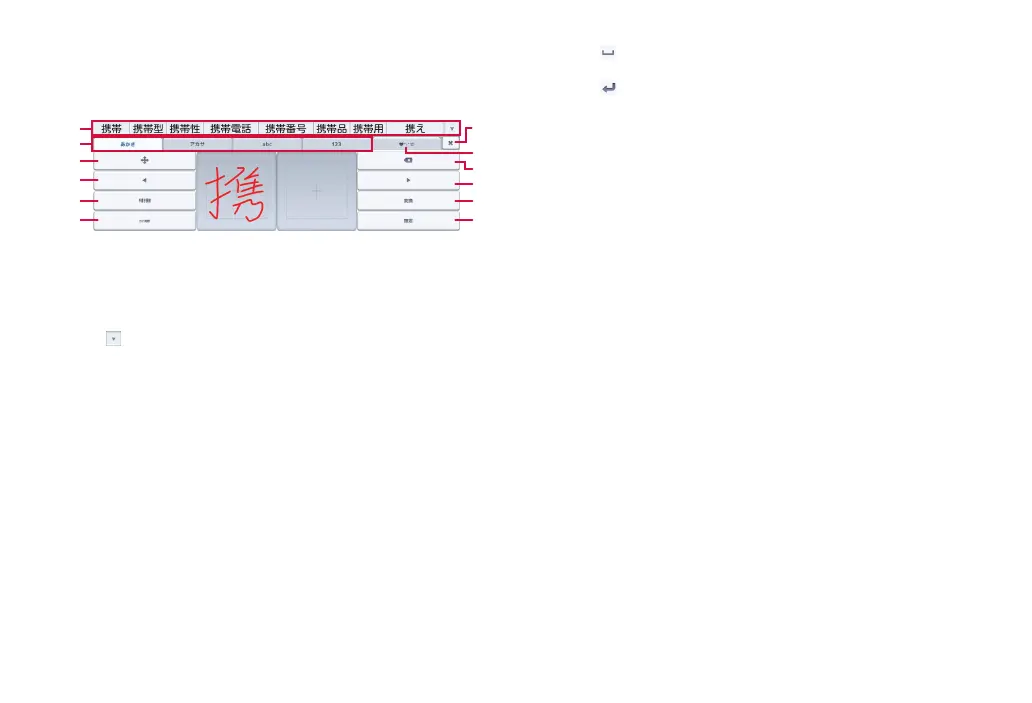
■ Handwriting
Enter characters by handwriting input.
·
Depending on touch panel recognition condition or character shape,
recognition may not be accurate.
❶
❷
❸
❹
❼
❽
❾
❿
⓫
⓬
❺
❻
Handwriting
❶ Display conversion candidates. Tap a candidate to enter characters.
·
To switch conversion candidate display, swipe the conversion candidate
field left/right.
·
Tap to expand conversion candidate field.
❷ Change character input mode.
❸ Display the cursor screen.
·
Move the cursor or select a range of text to copy/cut/paste.
❹ Shorten the conversion range by 1 character.
·
Move cursor to left when there is no unfinalized text.
❺ Display candidates of handwriting character.
❻ Convert to katakana and alphanumerics.
·
When “Menu” is displayed, the input method can be changed or the
keyboard type can be set.
❼ Close the keyboard.
❽ Use smileys/symbol list (P. 30).
❾ Delete a character on the left of the cursor. Touch and hold to delete
characters continuously.
Expand conversion range 1 character.
·
Move cursor to the right when there is no finalized text.
Convert.
·
When is displayed, enter a space.
Finalize entered characters.
·
When appears, add a linefeed.



 To Next Page