30
Before using the terminal
Change the keyboard type
1
When the keyboard is displayed, “Menu”
2
Tap the keyboard type
■ Information
·
You can also tap / to switch 10 key/QWERTY.
Using symbols/smileys/phrases
1
When the keyboard is displayed, “Menu”
2
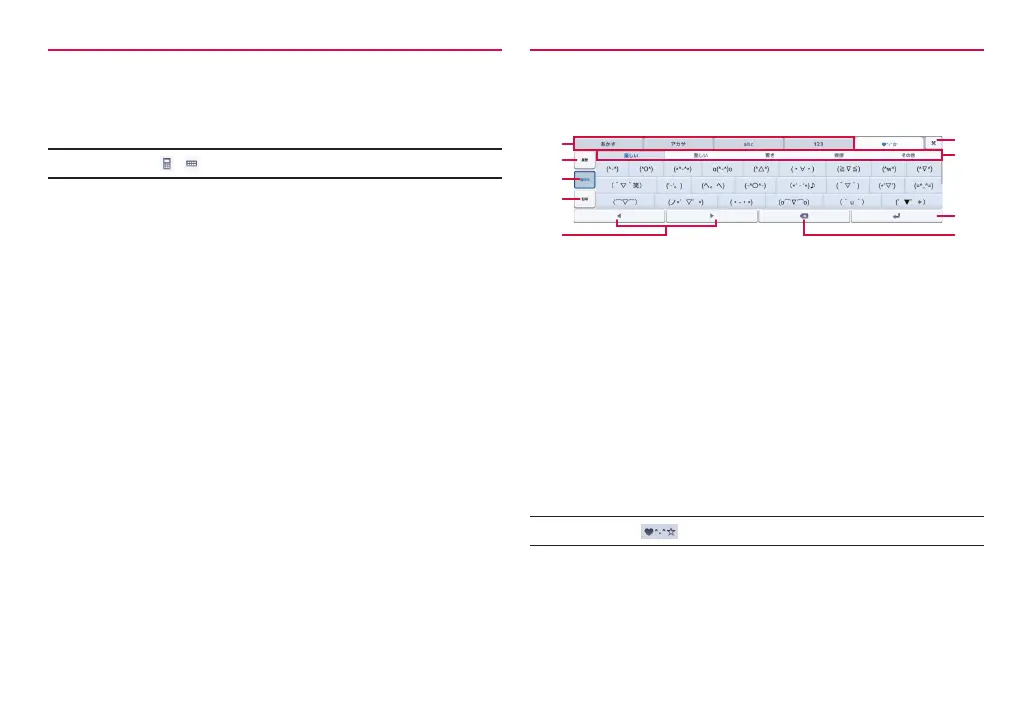
“Emoticons”/“Symbols”/“Templates”
❶
❷
❸
❹
❻
❼
❽
❾
❺
Example: Smiley list
❶ Change character input mode.
❷ Display the input history for smileys/symbols.
❸ Display the smileys list.
❹ Display the symbols list.
❺ Move the cursor left/right.
❻ Close the keyboard.
❼ Switch the category.
·
In the symbol list, switch one-byte/two-byte.
❽ Enter a linefeed.
❾ Delete a character on the left of the cursor. Touch and hold to delete
characters continuously.
■ Information
·
You can also tap to display the smileys/symbols list.



 To Next Page