31
Before using the terminal
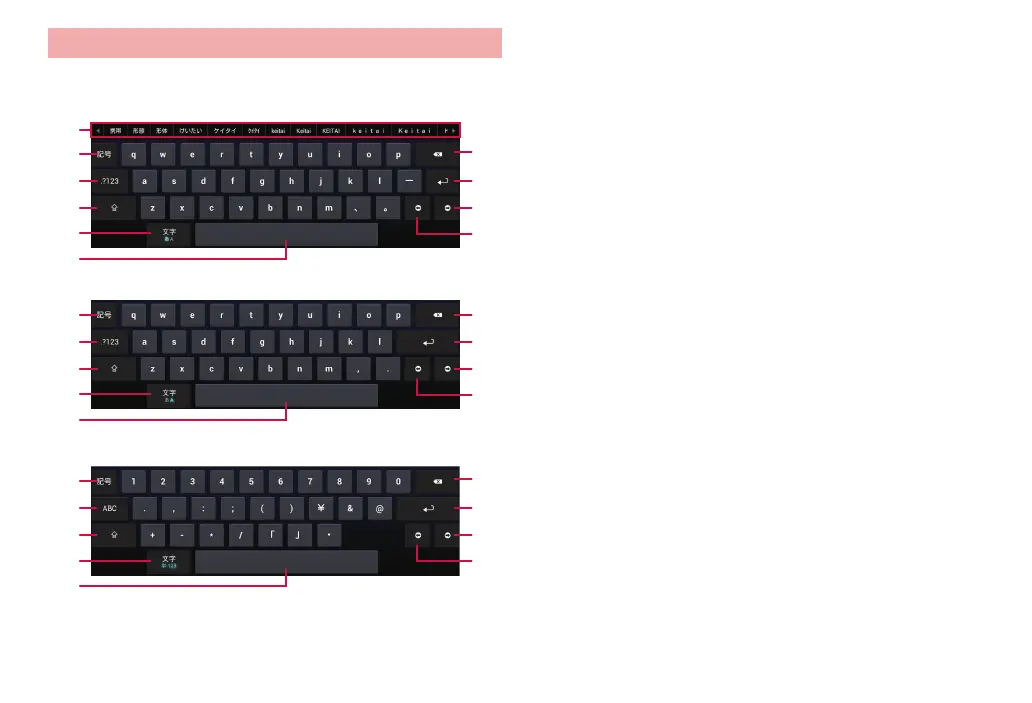
Entering with Japanese IME
Use a layout similar to a PC keyboard to enter Japanese using the
alphabet.
❶
❷
❸
❼
❽
❾❹
❺ ❿
❻
Japanese input
❷
❸
❼
❽
❾❹
❺ ❿
❻
One-byte alphabet input
❷
❸
❼
❽
❾❹
⓫ ❿
❻
Number input
❶ Display conversion candidates. Tap a candidate to enter characters.
·
To switch conversion candidate display, swipe the conversion candidate
field left/right.
❷ Use symbols/smileys list. Select a category and tap the symbol/smiley you
want to enter.
·
Tap “Cancel” to return to the keyboard display.
❸ Switch the input mode to Japanese or one-byte alphabet/numbers.
❹ Switch upper/lower case
. Switch type of symbol in a number entry scr
een.
❺ Switch to Japanese/one-byte alphabet input.
❻ Enter a space. When entering alphabet, moves the cursor through
conversion candidates in order.
❼ Delete a character on the left of the cursor. Touch and hold to delete
characters continuously.
❽ Enter a linefeed or execute. Finalize characters during character input.
❾ Move the cursor to the right. When t
he cursor cannot move and depending
on the entr
y box, move the cursor to the next input box.
Move the cursor to the left. When the cursor cannot move and depending
on the entry box, move the cursor to the previous input box.
Switch one-byte/two-byte.



 To Next Page