32
Before using the terminal
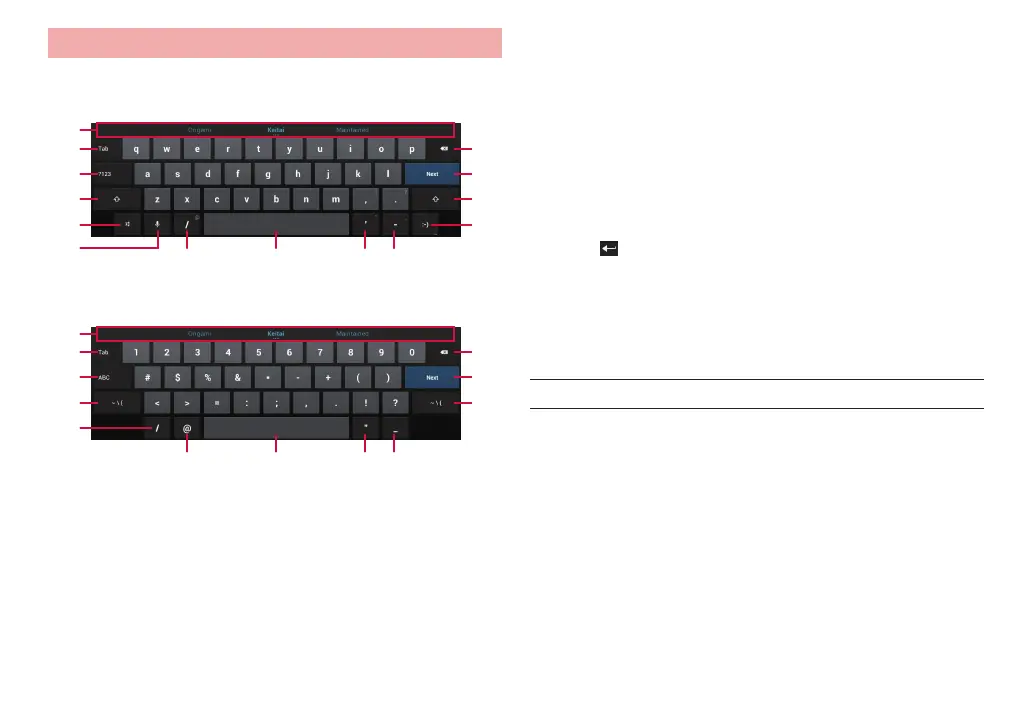
Entering with Android keyboard
It is a QWERTY keyboard whose key arrangement is the same as a PC.
One-byte alphabets, one-byte numbers/symbols can be entered.
❶
❷
❸
❹
❺
⓫
❿
⓬
❾❽❼
❻
❹
⓭
Enter one-byte alphabets
❶
❷
❸
⓮ ⓮
❼
⓫
⓱
⓬
⓰❽⓯
Enter one-byte numbers/symbols
❶ Entry candidate or auto correct candidate appears. After tapping a
candidate, tap it again and then “OK” to register it to the user dictionary
for the Android keyboard.
❷ Enter a tab. If a tab cannot be entered, the cursor moves to the next entry
box.
❸ Switch input mode to one-byte alphabet input mode or one-byte number/
symbol input mode.
❹ Switch upper case/lower case. Double-tap to switch to capitals lock.
❺ Displays input options.
❻ Use voice input.
❼ Enters a slash.
❽ Enter a space.
❾ Enters a quotation mark.
Enters a hyphen.
Delete a character on the left of the cursor. Touch and hold to delete
characters continuously.
Finalize entry or move the cursor.
·
When “Next” appears, move the cursor to the next entry field.
·
When “Done” appears, finalize the entry.
·
When appears, enter a linefeed.
Enters a smiley. Touch and hold to change smiley types.
Switches symbol to enter.
Enters an “@” mark.
Enters double quotations.
Enters an underbar.
■ Information
·
For some keys, touch and hold to display another character to enter.



 To Next Page