ParaMon-Pro X instruction manual DOC.60391-01/21
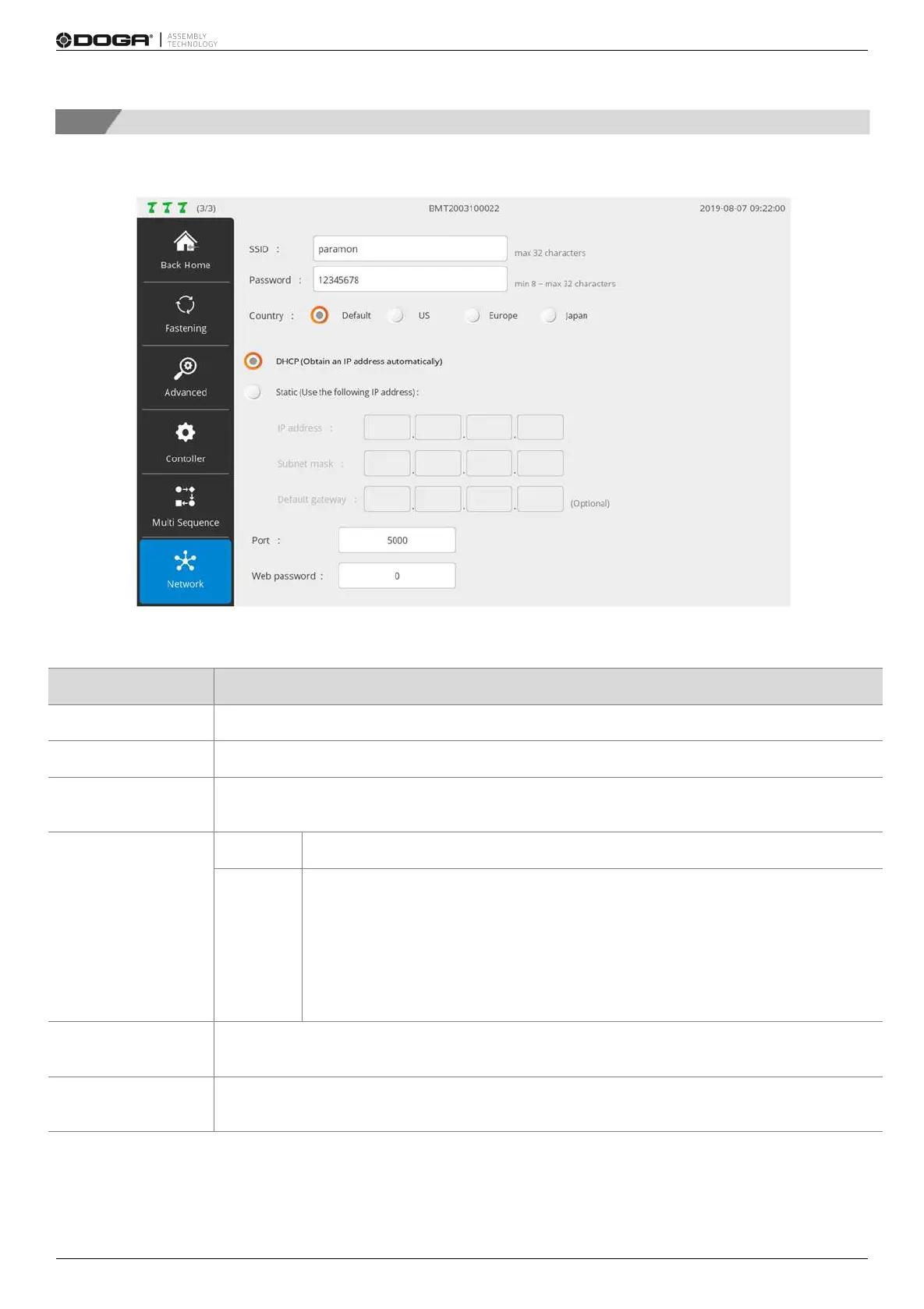
8.5 Network
Able to set the WiFi network of the BM; needed to reset the system to apply the new settings
Enters the SSID of the target WiFi AP
Enters the password of the target WiFi AP
Sets an area
‘Default’ is recommended for general users
An IP address automatically allocated from the server
Sets an IP address manually
When an IP address is manually set, set it according to the IP band of AP.
If ParaMon-Pro X’s internal AP is used, set the IP address in the range of
192.168.131.2-192.168.131.254. Set subnet mask and default gateway to
255.255.255.0 and 192.168.0.1 respectively.
For the use of external AP, contact the network manager.
BM’s Modbus-TCP server port No.
Recommended to use the default (5000)
A password used to get access to the BM’s web server
For more information about the web server, refer to the BM user manual.


 To Next Page