Activating the Master Code
The Master Code must be activated with the secure storage unit open to have every time
access to the secure storage unit and the lock.
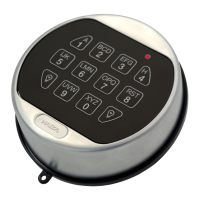
1. Press P.
2. Press the ENTER key.
ð The green light is on and the acoustic signal sounds twice.
3. Enter the new Master Code 00XXXXXX.
00 = ID; X = freely selected 6-digit combination (0...9)
4. Press the ENTER key.
ð The green light is on and the acoustic signal sounds twice.
5. Confirm the new Master Code with 00XXXXXX.
6. Press the ENTER key.
ð The green light turns off and the acoustic signal sounds twice.
If the red light blinks 3 times and the acoustic signal sounds 3 times, all steps must be
repeated since both codes do not match or the ID (here OO) has been entered incorrectly.
It is possible to cancel the change of the Master Code any time by pressing the P key twice. It
is also possible to cancel the process if no code is entered within 30 seconds.
6.2 Configuration functions of the Master Code
All configuration functions require the Master Code for authorization.
For security reasons, the configuration and testing of the configuration must always be
performed with an opened secure storage unit. This is necessary to have always access to the
secure storage unit and the lock.
The configuration can be performed any time individually and without waiting times
(exception - lockout periods), even if Dual Mode or OD/CW are activated. It is possible to
cancel all configuration processes by pressing the P key twice.
It is possible to cancel the code entry if no code is entered within 30 seconds.
6.2.1 Changing the Master Code
For security reasons, the configuration and testing of the configuration must always be
performed with an opened secure storage unit. This is necessary to have always access to the
secure storage unit and the lock.
The entire procedure must be repeated if these errors occur:
The red light blinks 3 times and the acoustic signal sounds 3 times if the current Master Code
has been entered incorrectly.
The red light blinks 3 times and the acoustic signal sounds 3 times after the second attempt
to enter the new Master Code for code confirmation.
The 2 codes entered do not match.
After changing the Master Code, the old Master Code is invalid. The functions of the new
Master Code must be checked by opening the lock with the secure storage unit open.
Operation User Manual
14 - 02/2022dormakaba Combi B 90 with metal input unit







 To Next Page