6.4 Lock functions of all users
There is a maximum of 10 sec. for each individual key press. If no key is pressed during these
10 sec., the electronics will shut down automatically. Uncompleted operations must be
restarted after the shutdown.
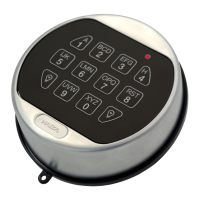
Every key press is confirmed by an acoustic signal. It is possible to cancel code entries and all
further functions (e.g. configuration operations) until the last key press by pressing the P key
twice.
6.4.1 Opening the lock without configured OD and CW
Every key press is confirmed by an acoustic signal. It is possible to cancel the code entry any
time by pressing the P key twice. Alternatively, it is also possible to cancel the code entry if no
code has been entered within 10 seconds.
After 3 incorrect code entries the lock switches to the lockout period.
1. Enter a valid opening code IDXXXXXX.
ID = 00 to 89 or 95 respectively; X = configured 6-digit combination for the corresponding ID
2. Press the ENTER key.
ð The green light blinks twice and the acoustic signal sounds twice.
3. Turn the actuating knob within 4 seconds through 90° clockwise to the stop.
If the red light blinks 3 times and the acoustic signal sounds 3 times after a code has been
entered, the code entry must be repeated. After 3 incorrect code entries the lock switches to
the lockout period.
6.4.2 Opening the lock with configured OD and CW
It is possible to cancel the running Opening Delay any time by pressing the P key twice.
1. Enter a valid opening code IDXXXXXX.
ID = 00 to 89 or 95 respectively; X = configured 6-digit combination for the corresponding ID
2. Press the ENTER key.
ð The green light blinks twice and the acoustic signal sounds twice.
3. If you have not entered the Courier Code (ID 95), the signal for the running Opening Delay
will be displayed.
ð The red light blinks every 5 seconds.
ð The Confirmation Window starts after the Opening Delay has elapsed. The green light
blinks once and the acoustic signal sounds once every 5 seconds.
ID = 00 to 89; = configured 6-digit combination for the corresponding ID
4. Enter a valid opening code IDXXXXXX.
5. Press the ENTER key.
Operation User Manual
28 - 02/2022dormakaba Combi B 90 with metal input unit







 To Next Page