VigorSwitch G2080 User’s Guide
70
2
2
.
.
1
1
2
2
.
.
3
3
S
S
t
t
a
a
t
t
i
i
c
c
F
F
o
o
r
r
w
w
a
a
r
r
d
d
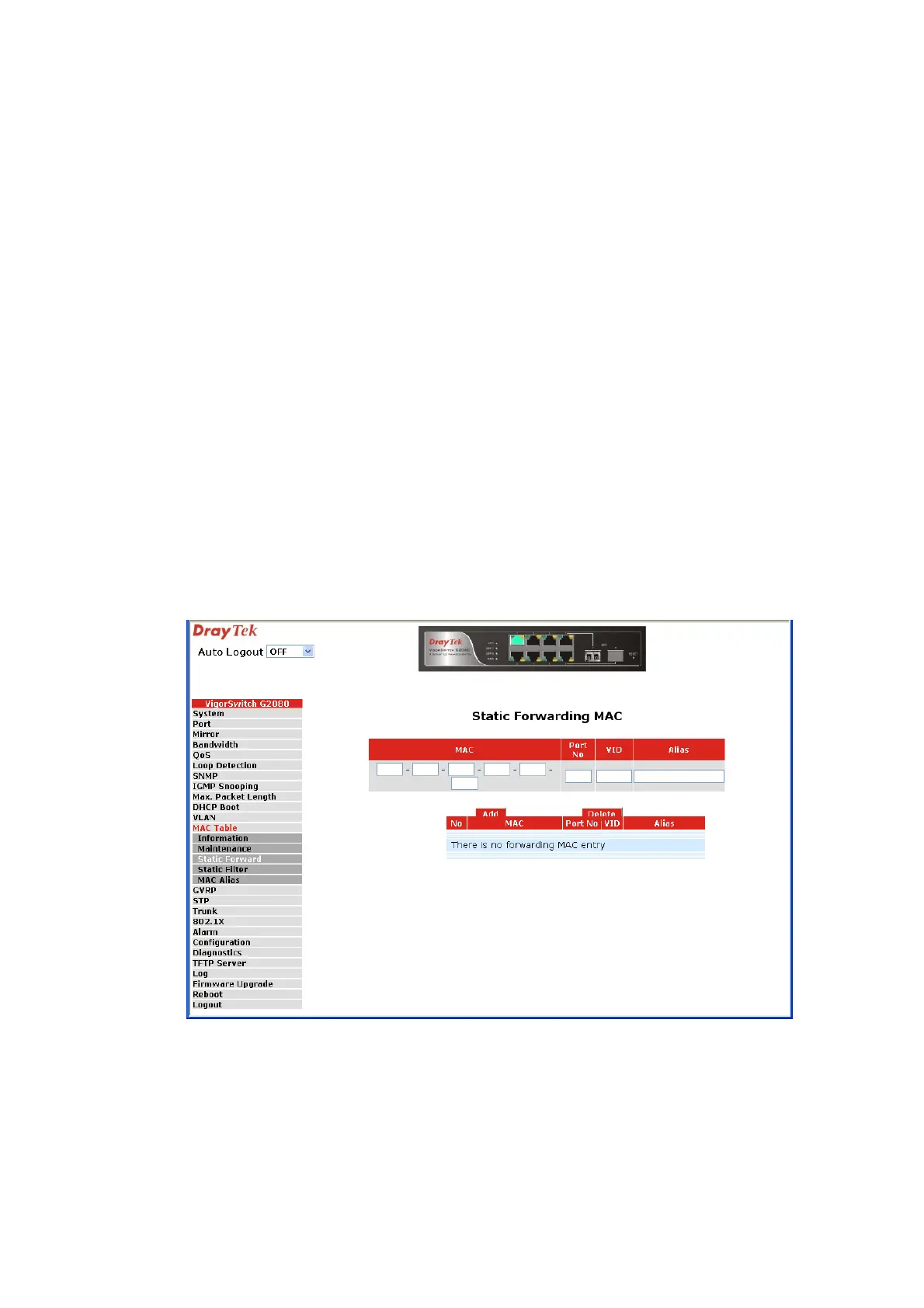
Function Name:
Static Forward
Function Description:
Static Forward is a function that allows the user in the static forward table to access a
specified port of the switch. Static Forward table associated with a specified port of a
switch is set up by manually inputting MAC address and its alias name.
When a MAC address is assigned to a specific port, all of the switch’s traffics sent to this
MAC address will be forwarded to this port.
For adding a MAC address entry in the allowed table, you just need to fill in four
parameters: MAC address, associated port, VID and Alias. Just select the existed MAC
address entry you want and click <Delete> button, you also can remove it.
Parameter description:
MAC: It is a six-byte long Ethernet hardware address and usually
expressed by hex and separated by hyphens. For example,
00 – 40 - C7 - D6 – 00 - 01
Port No: Port number of the switch. It is 1~8.
VID: VLAN identifier. This will be filled only when tagged
VLAN is applied. Valid range is 1 ~ 4094.
Alias: MAC alias name you assign.


 To Next Page
 Loading...