
 Need help?
Do you have a question about the Drip Drop PC-200 and is the answer not in the manual?
Explains the PC-200 controller's purpose, capabilities, and connectivity.
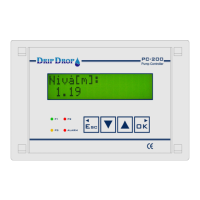
Describes the physical operator unit, its control keys, status LEDs, and display.
Details the main menu options for status, settings, and alarm handling.
Describes the default display showing the current level in the pump pit.
Shows actual values for analogue input 2 if it is configured.
Displays voltage readings for each phase if the voltage relay function is activated.
Shows the status for person or intruder alarm functions and their delay times.
Displays running status, total operation hours, and number of starts for each pump.
Shows total overflow duration and number of overflows if the overflow function is activated.
Displays instant flow rate and accumulated total volume pumped.
Sets the number of pumps and how many are allowed to run concurrently.
Configures how digital and analogue inputs/outputs are used.
Settings for start/stop levels, alternation, and current for each pump.
Settings for alarm levels, mixer functions, and other station-wide parameters.
Configures voltage monitoring, phase rotation, and related protections.
Contains settings for communication, login, clock, defaults, and system maintenance.
Allows manual login or logout from the system.
Sets the start and stop levels for each pump, and low/high alarm levels.
Configures pump alternation, maximum run time, and minimum break time.
Configures current monitoring for pump protection against dry running or overloads.
Sets general times and delays for pump operations like start, stop, and switching.
Defines how pumps alternate, either cyclically or based on running time.
Sets the thresholds for low and high level alarms and their activation.
Configures settings related to the phase rotation of the power supply.
Sets parameters for detecting and responding to undervoltage conditions.
Sets parameters for detecting and responding to overvoltage conditions.
Sets parameters for detecting and responding to a missing phase condition.
Configures communication settings, including baud rate, parity, and protocol.
Allows changing the operator password using arrow keys.
Allows changing the system password using arrow keys.
Sets the internal clock and date of the unit.
Resets the controller to its factory default pump station applications.
Resets the totalizers for pulse inputs.
Clears the recorded running times for pumps.
Adjusts the display contrast for better readability.
Sets the start and stop levels for the pumps and the low/high alarm levels.
Allows manual starting and stopping of pumps under specific conditions.
Provides options to view, acknowledge, and manage alarms.
Displays newly generated alarms and allows for their acknowledgement.
Provides a comprehensive list of all registered alarm events, including history.
Describes how alarms are sent as SMS messages to predefined phone numbers.
Explains how to remotely confirm alarms via SMS messages.
 General
| Brand | Drip Drop |
|---|---|
| Model | PC-200 |
| Category | Controller |
| Language | English |

 To Next Page
