DuraLabel.com | 800.788.5572
4.5 Adjusting Print Speed | 25
CONFIGURING PRINTER DRIVERS
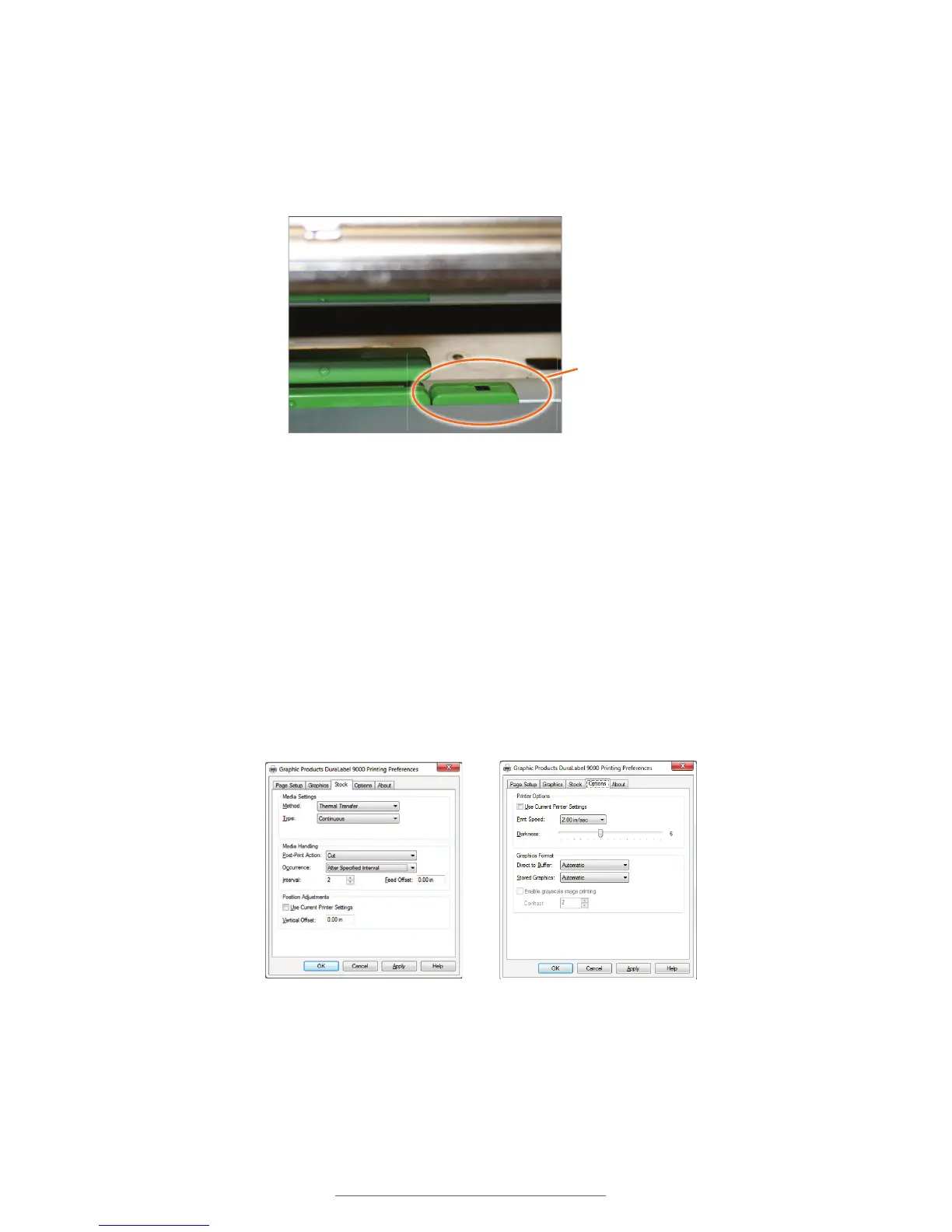
4.3.3 ADJUSTING THE B MARK MEDIA SENSOR
To ensure the media sensor is correctly positioned, check the position of the mark on
the back of the B Mark supply, then, if necessary, adjust the media sensor to ensure it
is positioned under the supply mark.
4.4 Cutting Labels in Intervals
To cut labels in intervals, set “Occurrence” to After Specified Interval. Set the interval to
the number of labels needed, then click Apply to save your settings.
4.5 Adjusting Print Speed
Choose print speed from the Options tab, clicking on the arrow to the right of the Print
Speed drop-down menu. A 2” per-second setting is recommended.
Align the media sensor (circled) under your supply,
ensuring it is in sight of the B Mark for proper
alignment.
Media Sensor
Printing Preferences dialog box, with
Occurrence set to “After SpeciÀed
Interval” on the Stock tab
Printing Preferences dialog box, with
Options tab chosen



 To Next Page