36 | 7.3 Merging Information, Sequencing Labels
DuraLabel.com | 800.788.5572
LABEL DESIGN
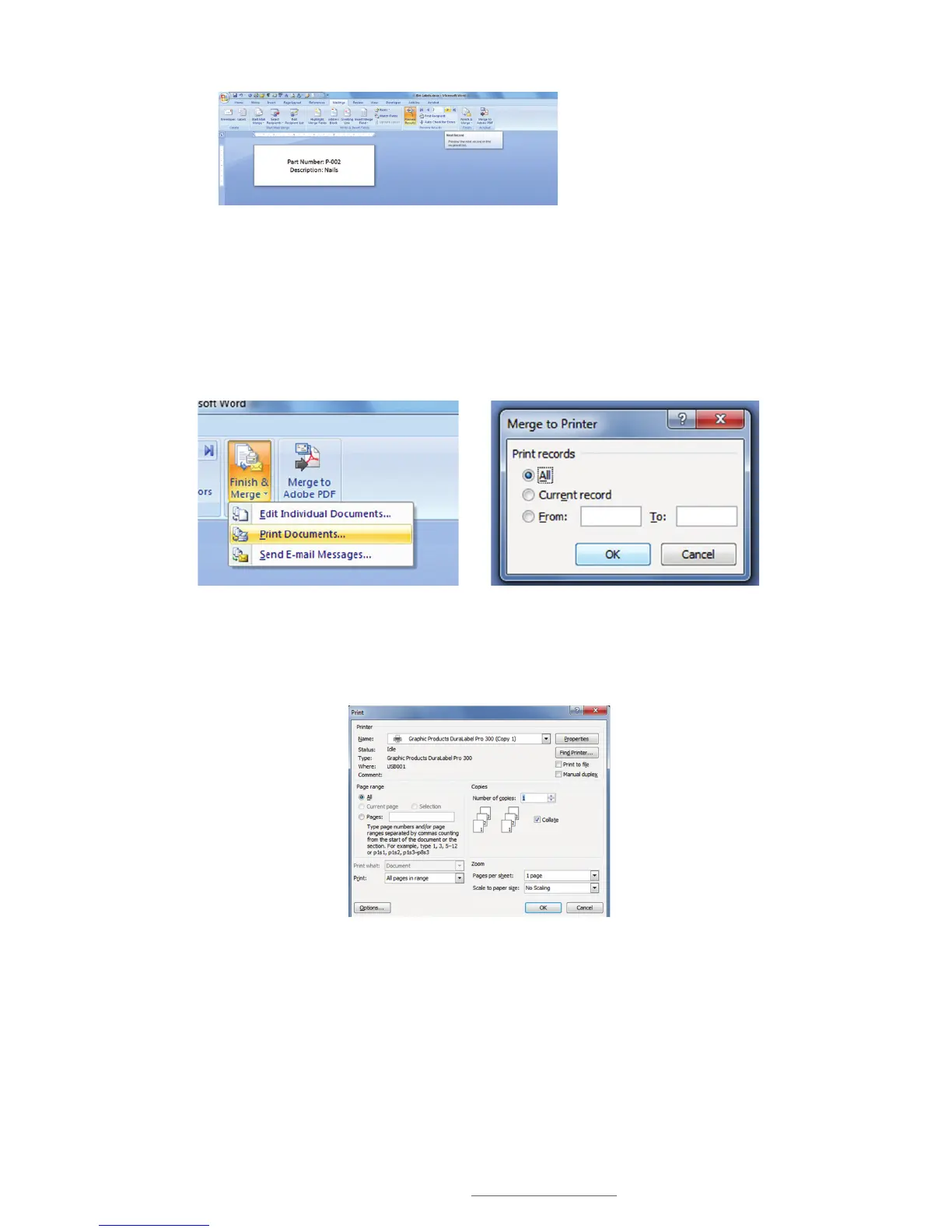
N. Click on the Next Record arrow to display the next label in the sequence (Fig. 16).
O. Click the Finish & Merge button, then click Print Documents from the drop-down
menu that appears (Fig 17).
P. A Merge to Printer selection box appears, offering the option of printing all labels,
the current record, or specifying a range (Fig. 18). Check the appropriate button.
Q. Now select a DuraLabel Printer from the Print dialog box that appears (Fig. 19).
FIGURE 16 Click Next Record arrow
to display the next label in the
sequence.
FIGURE 17 Click Print Documents from the Finish
& Merge drop-down menu to start the process of
printing sequenced labels.
FIGURE 18 Select which labels you wish to print
from the Merge to Printer window.
FIGURE 19 Select the DuraLabel Printer you want
to print your sequenced labels with from the Print
dialog box.



 To Next Page