8 What you need to know about SmartWire-DT
8.5 SWD device parameters
92 SmartWire-DT Gateway EU5C-SWD-EIP-MODTCP 08/17 MN120003Z EN www.eaton.com
start running if the new modules are compatible with the planned Smart-
Wire-DT configuration and the "Compatible devices permissible" device
parameter for these SmartWire-DT modules = "1", is enabled.
8.5.1 Device paramters of the SWD gateway
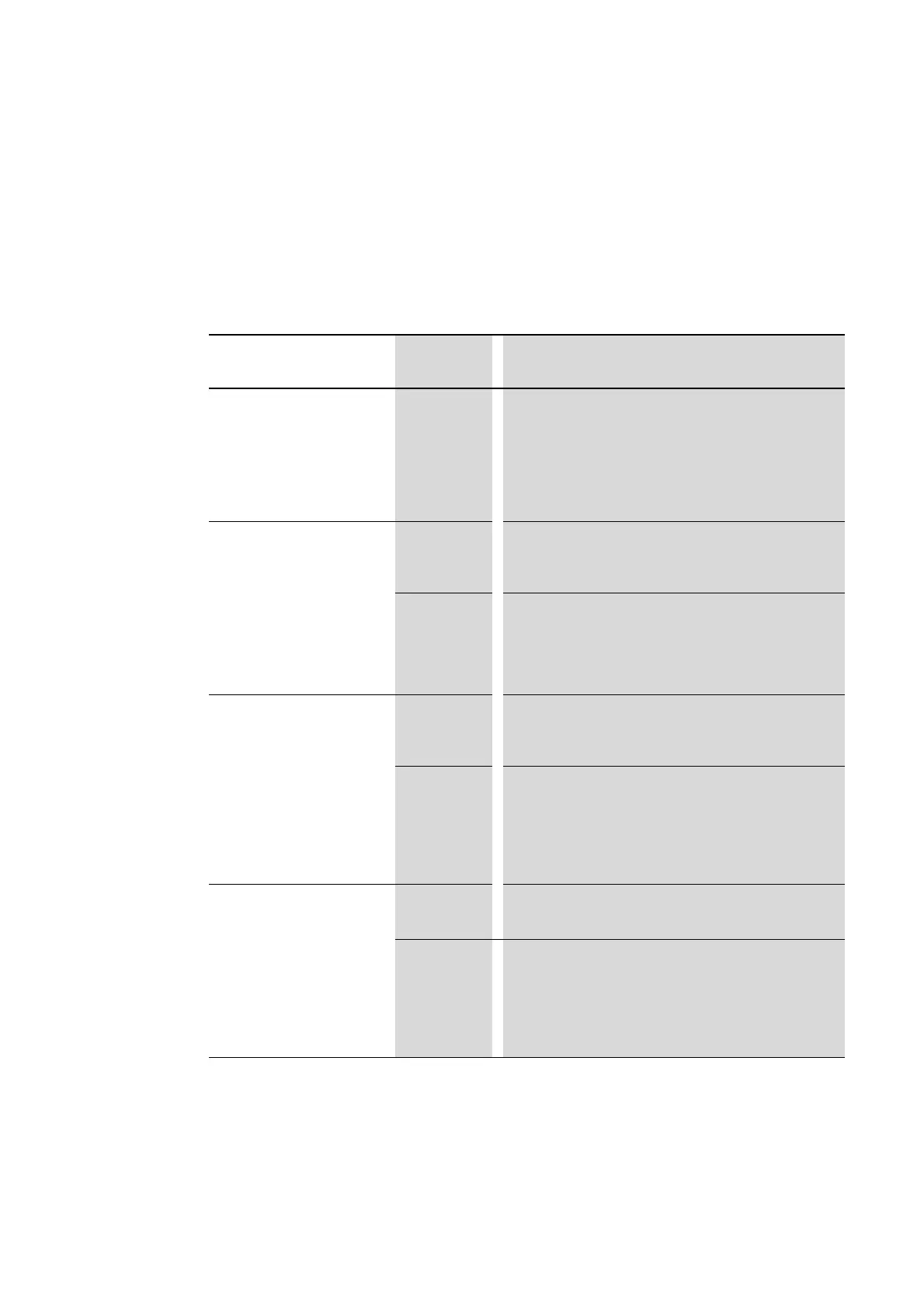
Table 26: Device parameter SWD coordinator
Device parameter adjustable
on SWD coordinator
VALUE Reaction SWD line
SWD Baud rate 125 KBaud
250 KBaud
500 KBaud
1 MBaud
2 MBaud
125 KBaud =setpoint value
Baud rate on SWD line
Setting options:
• 125 KBaud (setpoint value)
250 kBaud (operating system V1.10 and higher)
at gateway relase 05 and operating system V1.50
• 500 KBaud, 1MBaud, 2MBaud
All devices are optional 0 0=Default setting
The device parameter on each SWD module is used to define
whether the module is optional→ Section “ Required module”,
page 93.
1 All SWD modules are optional.
The SWD line can be run with any number of failed SWD modules.
Data will be transferred to the field bus master.
The → Section “ Required module”, page 93 setting in the SWD
modules will have no effect.
Compatible devices permissible
0
0=Default setting
The planned SWD modules in the SWD configuration must comply
with the SWD modules of the stored gateway target configuration.
If they do not, no data will be transferred to the field bus master.
1
Data will be exchanged if the SmartWire-DT modules connected to
the SWD line are identical to or compatible with the SmartWire-DT
modules in the planned SmartWire-DT configuration.
If they do not, no data will be transferred to the field bus master
This is displayed via the status LED on the device.
You will find the list of devices that are compatible with one
another in → Table 30, page 106.
Replacement during operation
permissible
0 0=Default setting;
New SWD modules on the SWD line must always be assigned an
address by importing the target configuration.
1 This setting enables block-by-block hot swapping for SWD
modules without having to explicitly reconfigure them via the
device by pressing the configuration button.
In addition, the "All devices are optional"parameter must be set to
"1".Otherwise, the entire line will be disabled if communications
with one or more SmartWire-DT modules are lost.




 To Next Page