4 Creating a planned SmartWire-DTSmartWire-DT configuration in SWD-Assist
4.9 Exporting the SmartWire-DT modules' I/O data
SmartWire-DT Gateway EU5C-SWD-EIP-MODTCP 08/17 MN120003Z EN www.eaton.com 41
4.9 Exporting the SmartWire-DT modules' I/O data
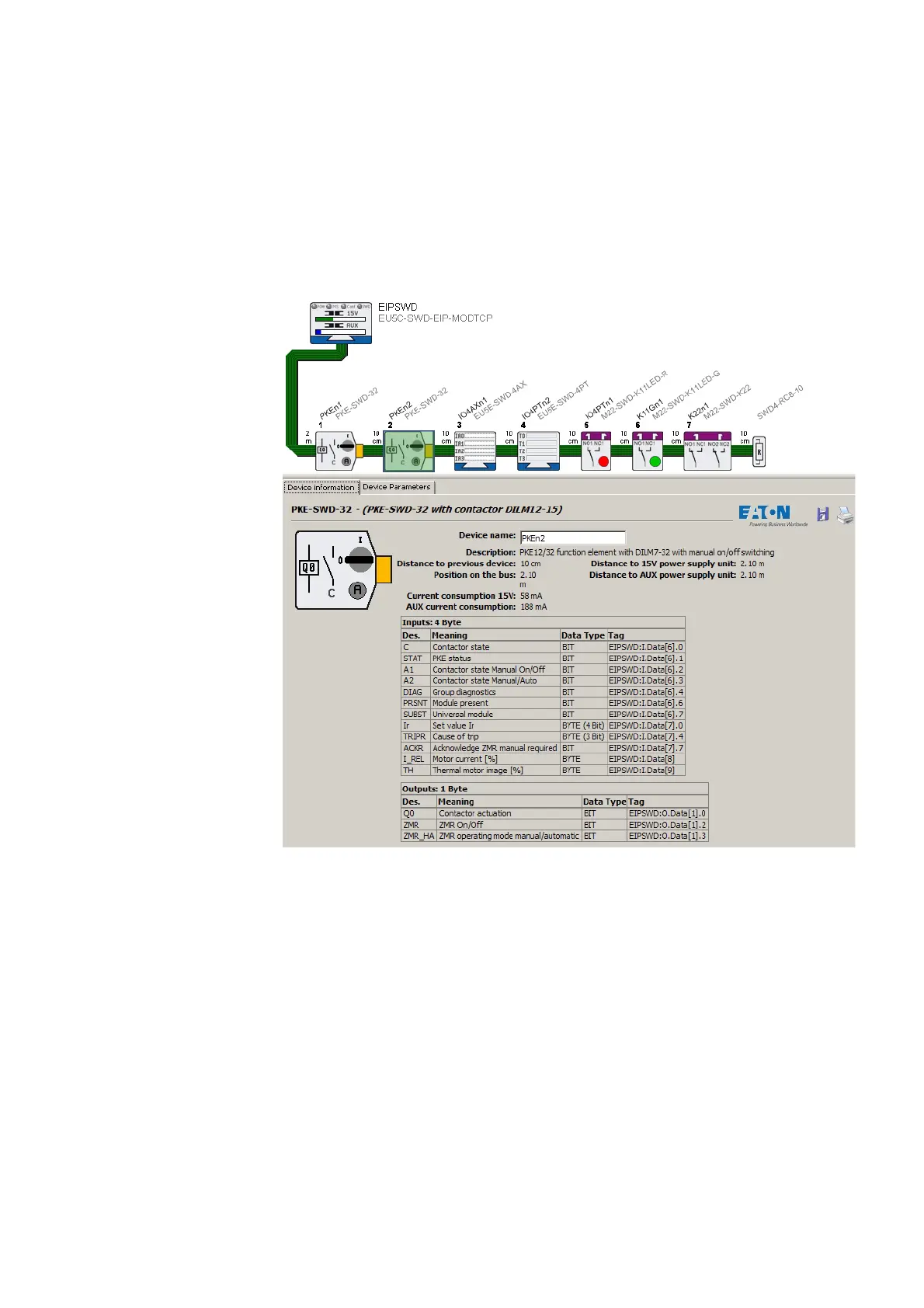
The units' I/O addresses will be mapped to the corresponding field bus I/O
objects based on the field bus protocol that has been selected, i.e., EtherNet/
IP or Modbus/TCP. The SWD-Assist planning program performs this map-
ping, which is shown for every SmartWire-DT module.
Figure 25: I/O addresses for the "PKE-n2" SmartWire-DT module;
EtherNet/IP protocol in SWD-Assist
The process of providing access to the SmartWire-DT modules' I/O data in
the PLC programming environment is made much easier by exporting this
data in a file format that is compatible with the programming environment.
To export the SmartWire-DT modules' I/O data to a CSV or text file, proceed
as follows:
▶ Start the SWD-Assist planning program.
▶ Make sure that the right field bus protocol is selected.
▶ Open the "Project" menu and click on the "Export configuration" option.
This will store all required information in a CSV or text file.




 To Next Page