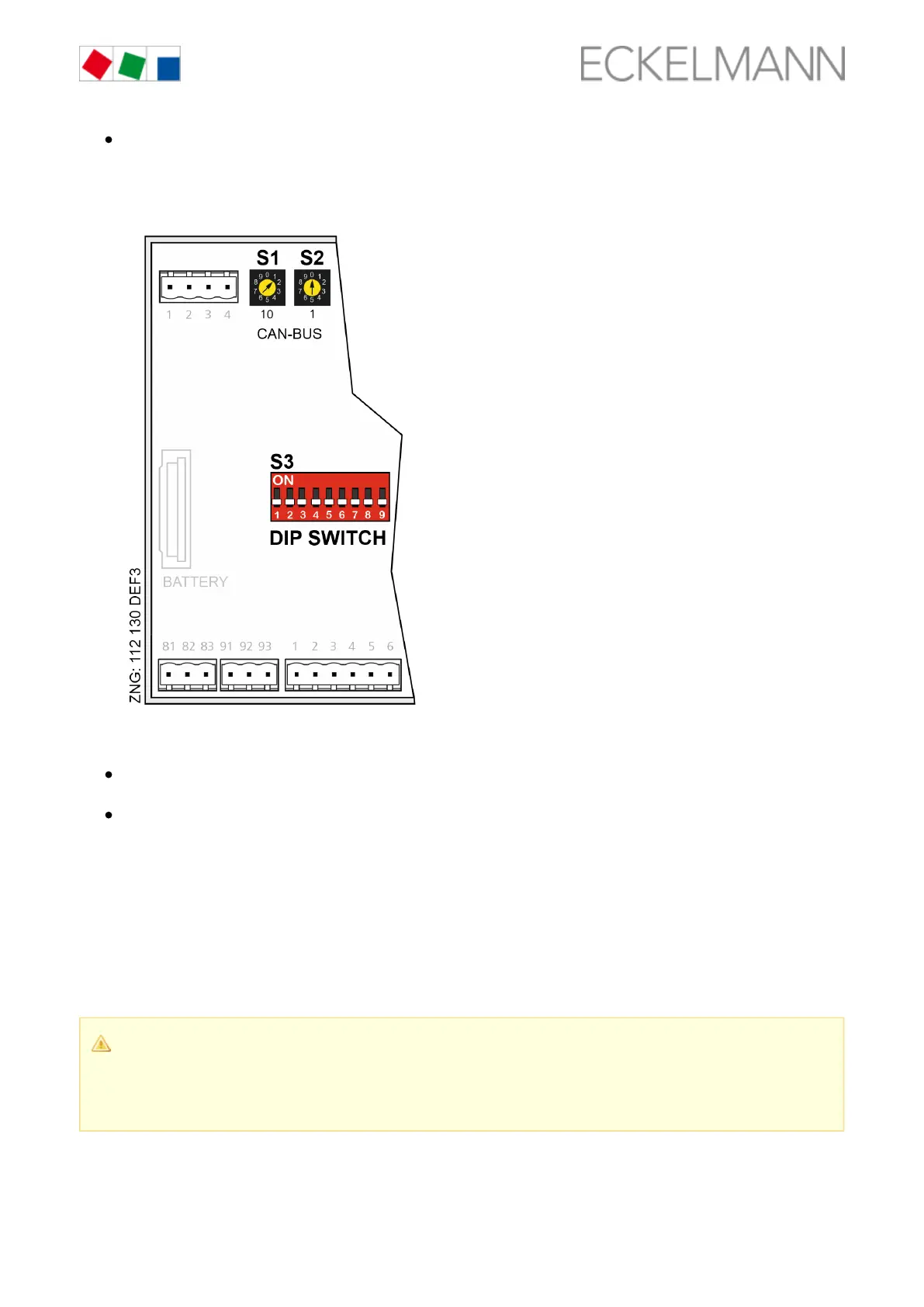
DIP switch S3:
- Controller type setting
- Master / Slave mode
- Setting of special functions, see chapter Setting of the controller type and master/slave mode, page
.45
Settings AFTER application of the power supply
First start / reset controller to factors settings, page 19 (optional setting to default values to reach a
defined initial state for a running operation)
Configuration of the controller, see chapter Basic configuration of the controller, page 48
6.3 Setting the CAN bus address
Setting of the CAN bus address (Kn.nnn = 1..99) is performed using the decade switches and . An S1 S2
individual CAN bus address must first be set at the two decade switches ( , ) on all case controllers that S1 S2
are installed in refrigerated cases commissioning.before
In the case of case controllers that are installed in a switch cabinet, the CAN bus address has been set by the
manufacturer. However, it can be subsequently adjusted.
Risk of confusion! In order to avoid mix-ups, it is recommended to use the position number of the
refrigerated case as CAN bus address. The CAN bus address is inactive if both decade switches are
set to 0 (i.e. the address is 00). The controller is recognised as a bus node. A different CAN bus not
address that must be unique in this system must be allocated to each refrigeration point.



 To Next Page