INSTRUCTIONS MANUAL
-51-
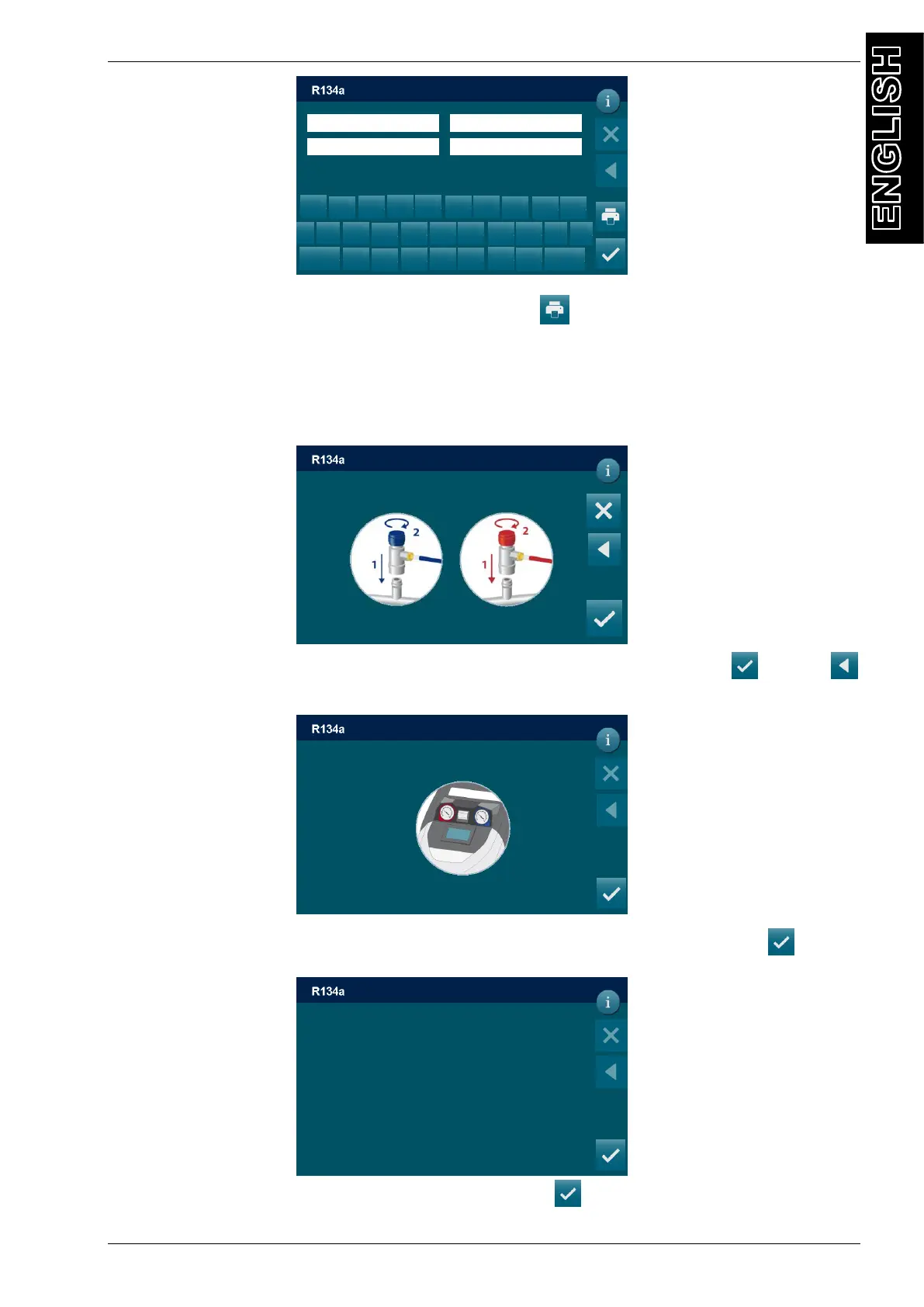
Type the plate of the car,VIN, Km, Operator and press
to confirm. BACK to return back.
A/C PRESSURES CHECK
From MANUAL PROCEDURE select A/C PRESSURES CHECK, the following screen will be
displayed:
Connect and open the coupling connected to the A/C system, then press , press
return back; the following screen is displayed:
Turn on A/C system and check pressure using HP and LP manometers, then press :
Turn off A/C system and the vehicle’s engine then press :
DD/MM/YY XX:XX PM
MANUAL / RECOVERY
VIN
z
< x I
x
c
v b
s
d
f
g h
j k
a l
^
123
q
w
e
r t
y u
o p
n
Connect and open HP and LP couplings
To A/C system and press to continue
DD/MM/YY XX:XX PM
MANUAL / A/C PRESSURE CHECK
Turn on A/C system and check pressure using
HP and LP manometers, then press continue
MANUAL / A/C PRESSURE CHECK
Turn off A/C system and the vehicle’s engine
then press continue
DD/MM/YY XX:XX PM
MANUAL / A/C PRESSURE CHECK



 To Next Page