INSTRUCTIONS MANUAL
-72-
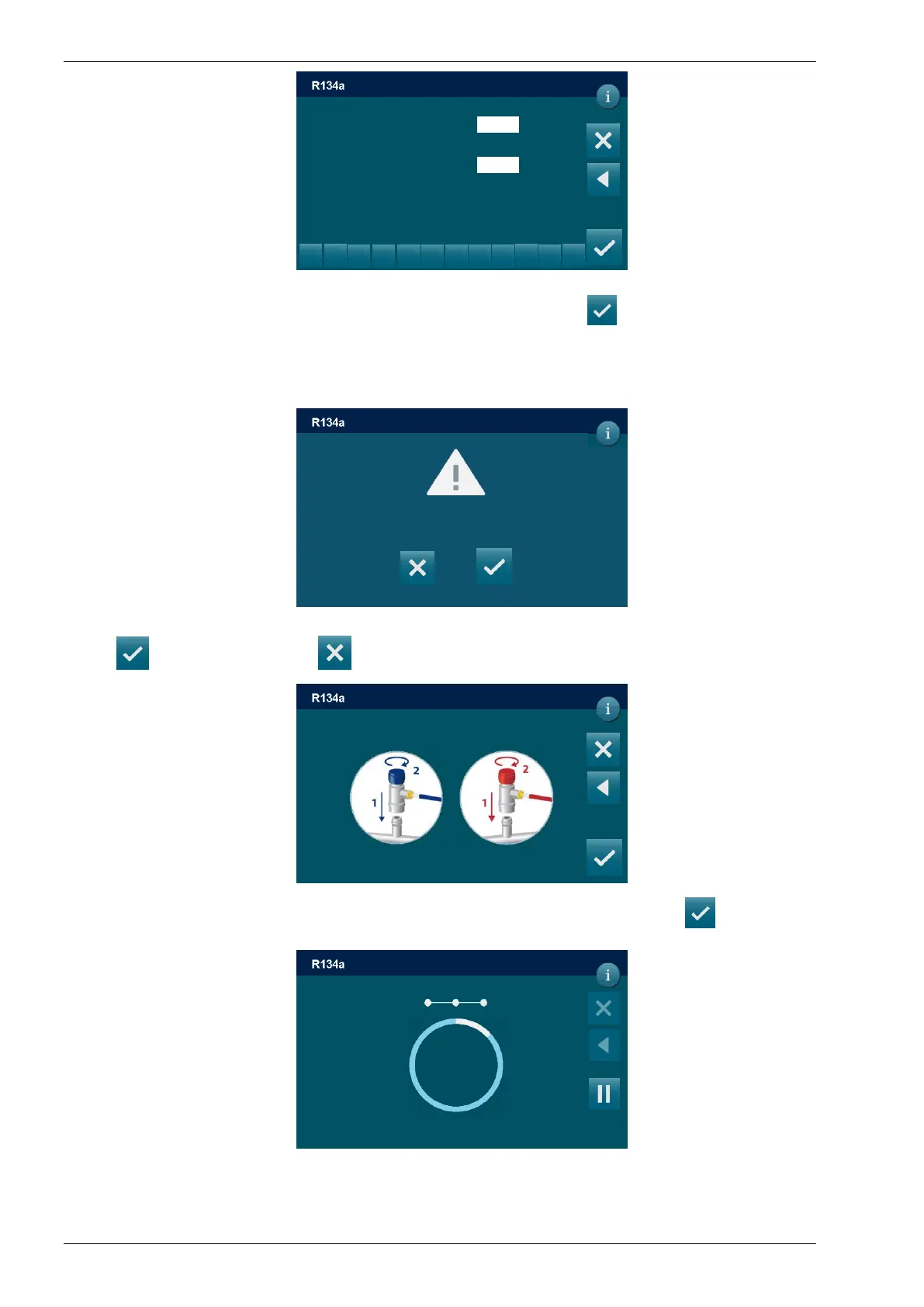
Use the KEYPAD to insert the value of the VACUUM TIME, press to confirm
NOTE: use the VACUUM SETTING to change the duration of the LEACK CHECK.
NOTE: if selected VACUUM TIME is lower 15 minutes the following popup warning will be
displayed:
Press to continue, or press to go back.
Connect and open the coupling connected to the A/C system, then press to start the
vacuum phase
1
min
min
VACUUM TIME
(min 1 – 120 max)
DD/MM/YY XX:XX PM
QUICKSETUP / VACUUM
TIME OF CHECK
(min 1 – 120 max)
2
3
5
6
8
9
.
0
2
The selected vacuum time is lower than 15 minutes
The leak check could not reliable, continue?
Vacuum
DD/MM/YY XX:XX PM
QUICKSETUP / VACUUM
A/C pressure
0 bar
01:57
Connect and open HP and LP couplings
To A/C system and press to continue
DD/MM/YY XX:XX PM
QUICKSETUP / VACUUM



 To Next Page