Parameterisation
Page 24 of 45 MSM-BSM2G-BA-UK-001
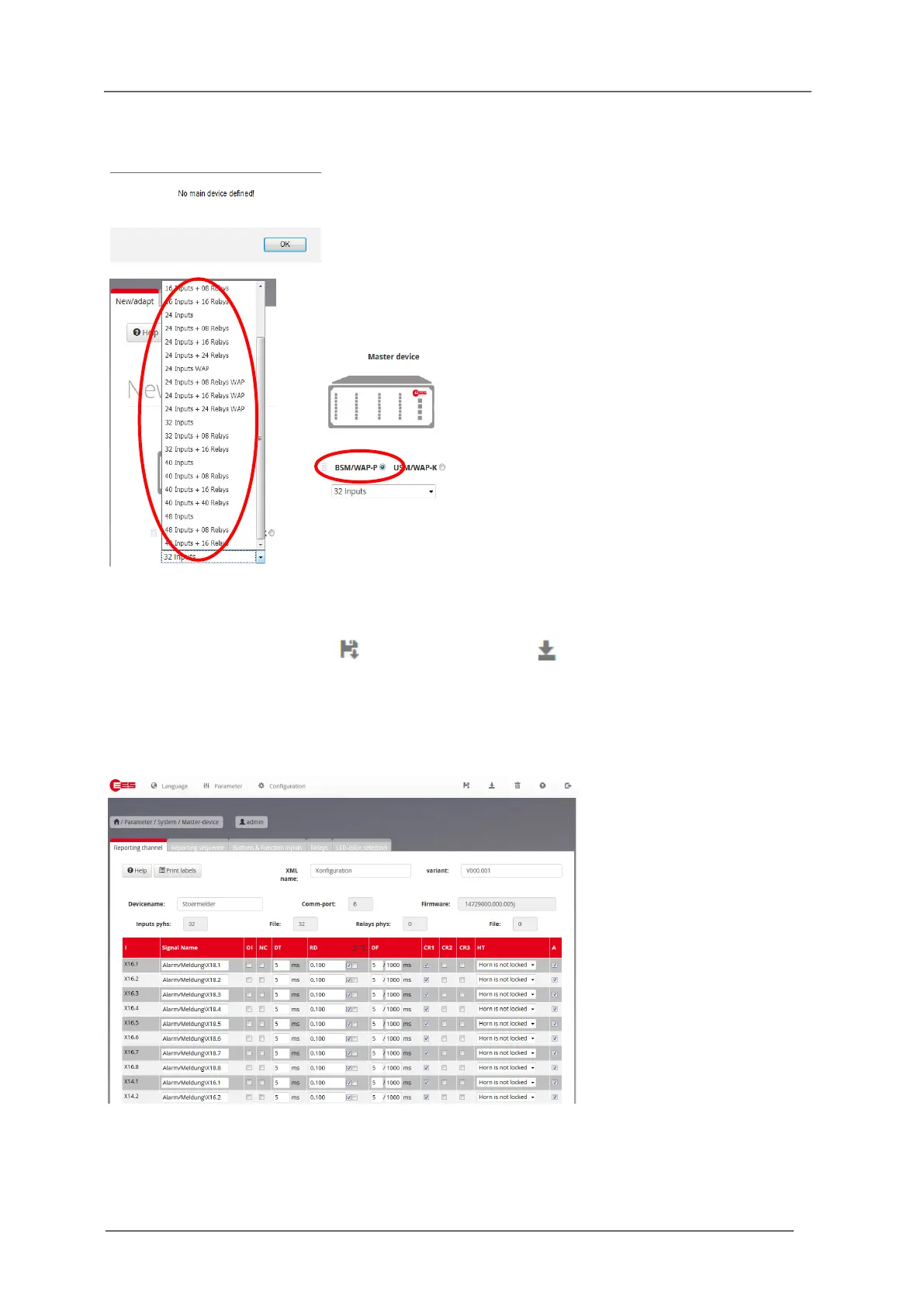
Upon the first start of the software after installation, the user is prompted to choose the device type
that is to be parameterised.
Fig. 6.2 Dialog
Fig. 6.2 Selection of the device type
Please confirm the selection with (Accept configuration) or (accept all 4 configurations – for
cascaded annunciator systems).
This procedure is only required upon the first start of the parameterisation software after installation.
Upon the next start, the last stored device configuration will be retrieved.
Next, the first page for the device parameterisation will be opened.
Fig. 6.3: Parameterisation interface
After accepting the adjacent dialog the page „Device
administration is opened“. Here the respective device according
to the present hardware of the device to be parameterised can
be selected. For the BSM-P, please also select the device
variant „BSM/WAP-P“.
This selection can be changed at a later time, if required.


 To Next Page