34Installation and Service Guide: Color Controller E-46A
Using the E-46A
Overview of Fiery QuickTouch menu options
The following options are available from the Fiery QuickTouch:
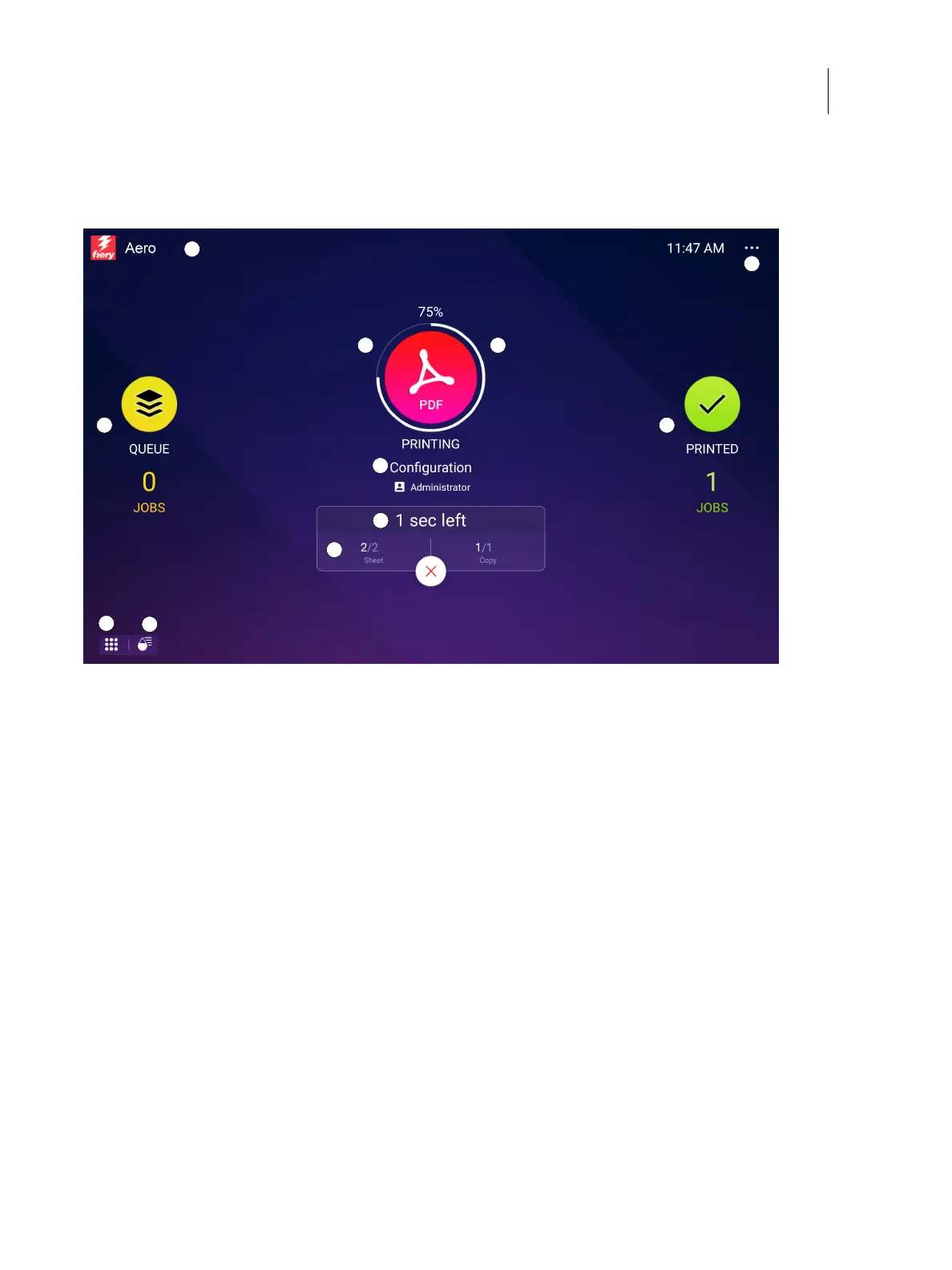
Figure 12: Fiery QuickTouch Home screen
The Home screen is the main interface for job status, and displays various screen elements.
The Queue job list shows queued jobs and detailed information about each job.
1 E-46A name and status
Pressing the Fiery icon shows more information about the
E-46A and the network address.
6 Number of pages and copies that are printing
2 Icon of the print job type
If there are no print jobs being processed, an Idle status
displays.
7 Queued jobs list
Pressing the Queue icon shows a list of jobs that are queued.
3 Printing progress of the active print job 8 Printed jobs list
Pressing the Printed icon shows the printed jobs list.
4 File name of the active print job 9 Quick Launch
The Quick Launch displays additional applications.
5 Time left to complete the active print job 10 Shows consumables
11 Quick Options and current local time
1
2 3
4
5
6
7 8
9
11
10



 To Next Page