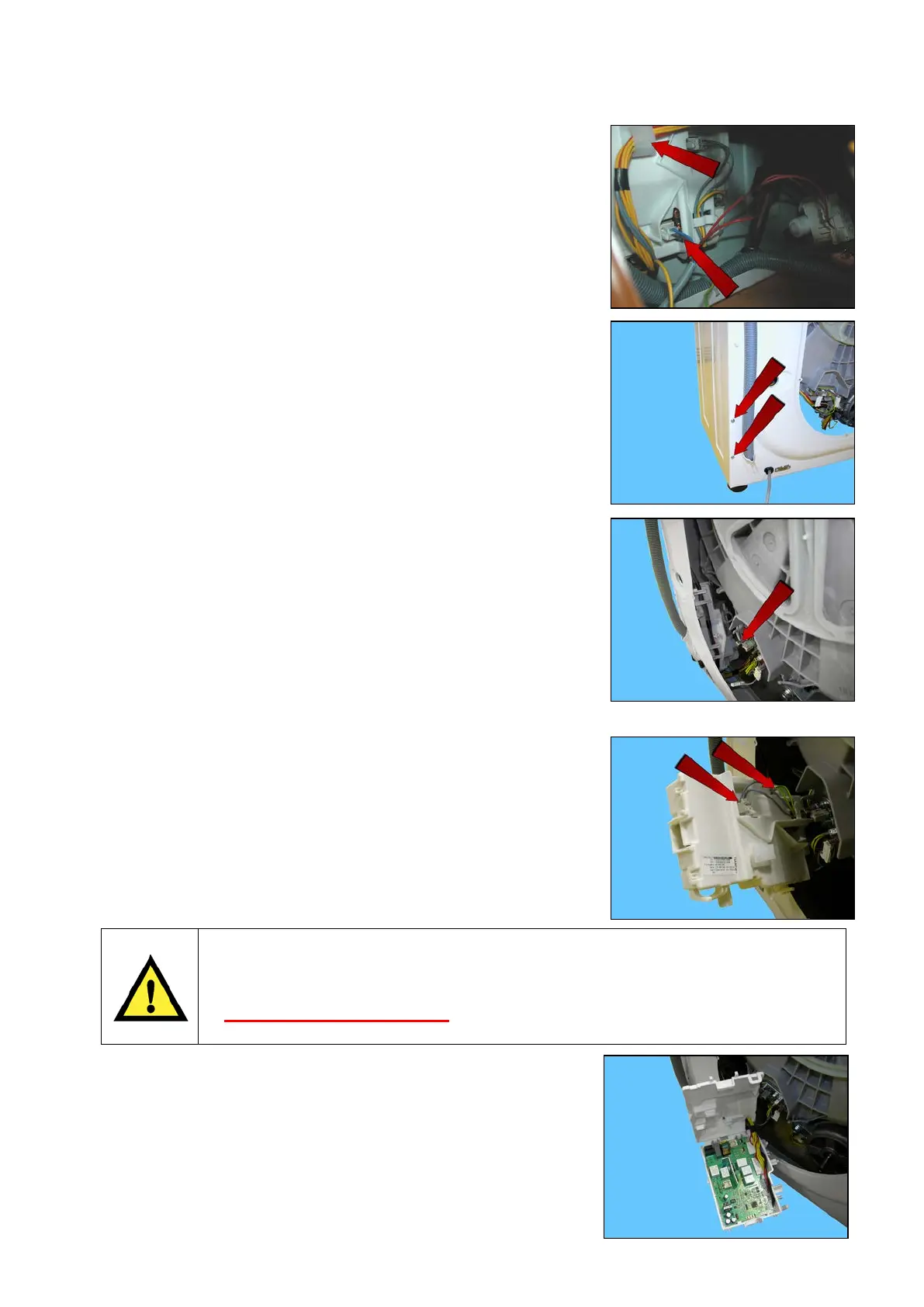
23.4.5 EWM09311 & EWM09312 Main circuit board
Remove the back panel (see relevant chapter).
Pull out the power supply cable connector.
Pull out the wiring from the fixing hook.
Remove the two screws which secure the main board assembly
to the back.
Pull out the connector of the branch of the heating element.
By pushing the washing unit of the appliance inwards, remove the main
board assembly.
Detach the connectors indicated by the arrows.
Disconnect the drain pump power supply connectors.
When handling/replacing the electronic board, use the ESD kit (Cod. 405 50 63-95/4)
to avoid static electricity from damaging the circuit board, see S.B. No. 599 72 08-09
or consult the course <<Electrostatic charges>> at the address
(http://electrolux.edvantage.net
) on the Electrolux Learning Gateway portal.
Open the main board assembly to remove the board and make note of
the cabling layout.
Technical Support - DMM 112/124 599 75 58-67 Rev.04




 To Next Page