SOI/DT 2006-01 dmm 59/71 599 37 47-13
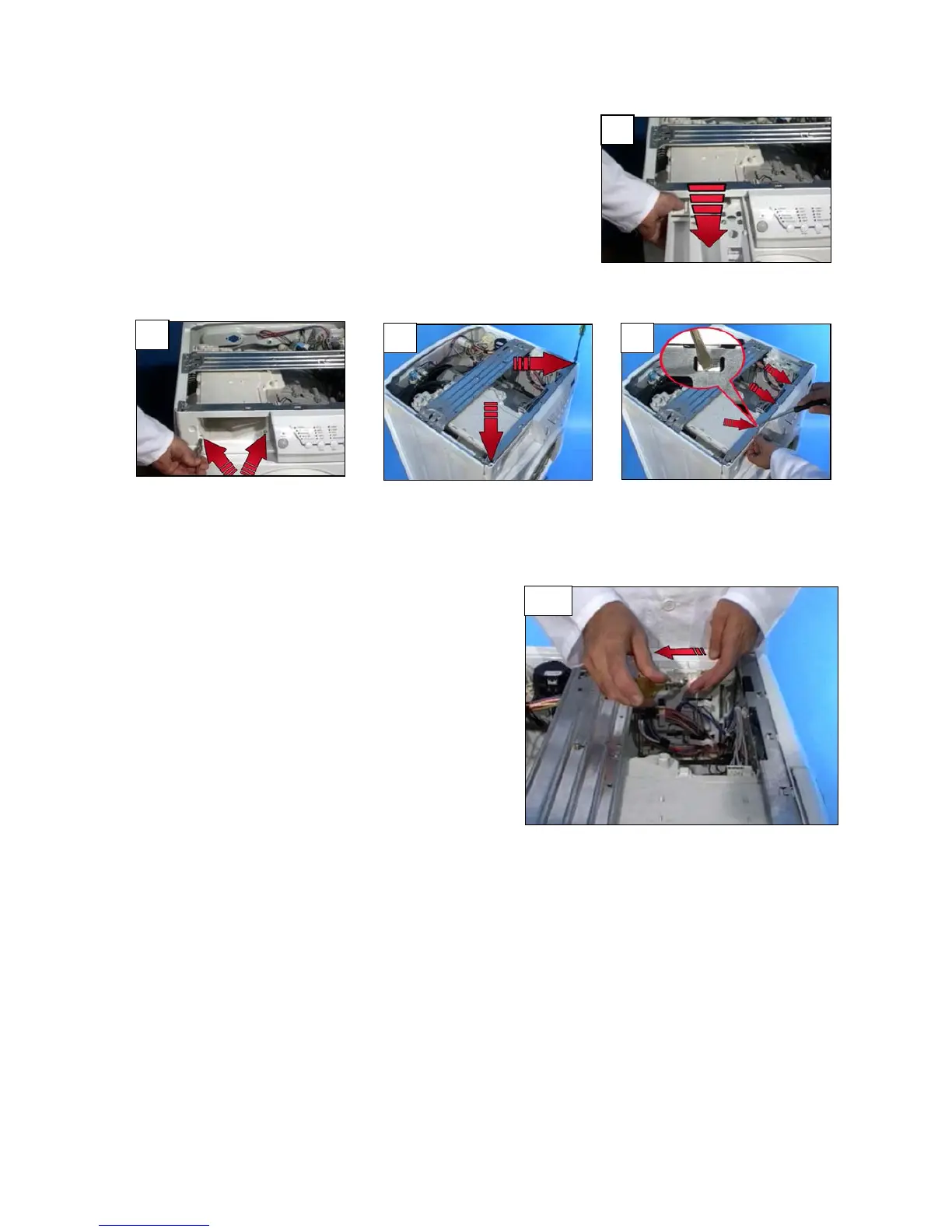
6.1.6 Control panel
a. Extract the detergent drawer.
b. Remove the screws that secure the control panel to the
control panel support.
c. Remove the screws which secure the control panel to the
crosspiece.
d. Release the anchor tabs from the support.
e. Remove the pilot lamp from its housing in the control
panel and (for electronic models) disconnect the wiring
connectors from the display board.
6.1.7 Main PCB
f. Remove the top.
g. Unscrew the fixing screw which fixes the board support
to the side panel.
h. Push the board following the arrow direction and extract
it.
i. Detach the wiring from the supports.
j. Extract the casing-PCB assembly.
k. Detach the connectors.
6.1.8 Control/display board
The way in which these boards are fastened depends on the styling version and the type of electronic
control system (user interface EWM 1000, EWM2000EVO and EWM3000NEW).
To access the board:
l. Remove the control panel
m. Release the PCB casing from the control panel or remove the screws.
For further details, refer to the specific Service Manuals for the various types of electronic control systems.
a
b
c d
g-h



 To Next Page