487 03 29 41
7
29. Door switch and filter switch
Service
manual
29
Loading door switch
Sliding Door
Two switches are installed at the loading door.
Both switches are located in a box behind the
control panel.
The switches are connected in series, which
ensures that the dryer stops automatically if
the loading door or the panel is opened during
operation.
If the dryer does not stop when the loading
door or panel is opened, the switch(es) needs
replacing.
Replacing door/panel switch
1. Disconnect the power supply to the dryer.
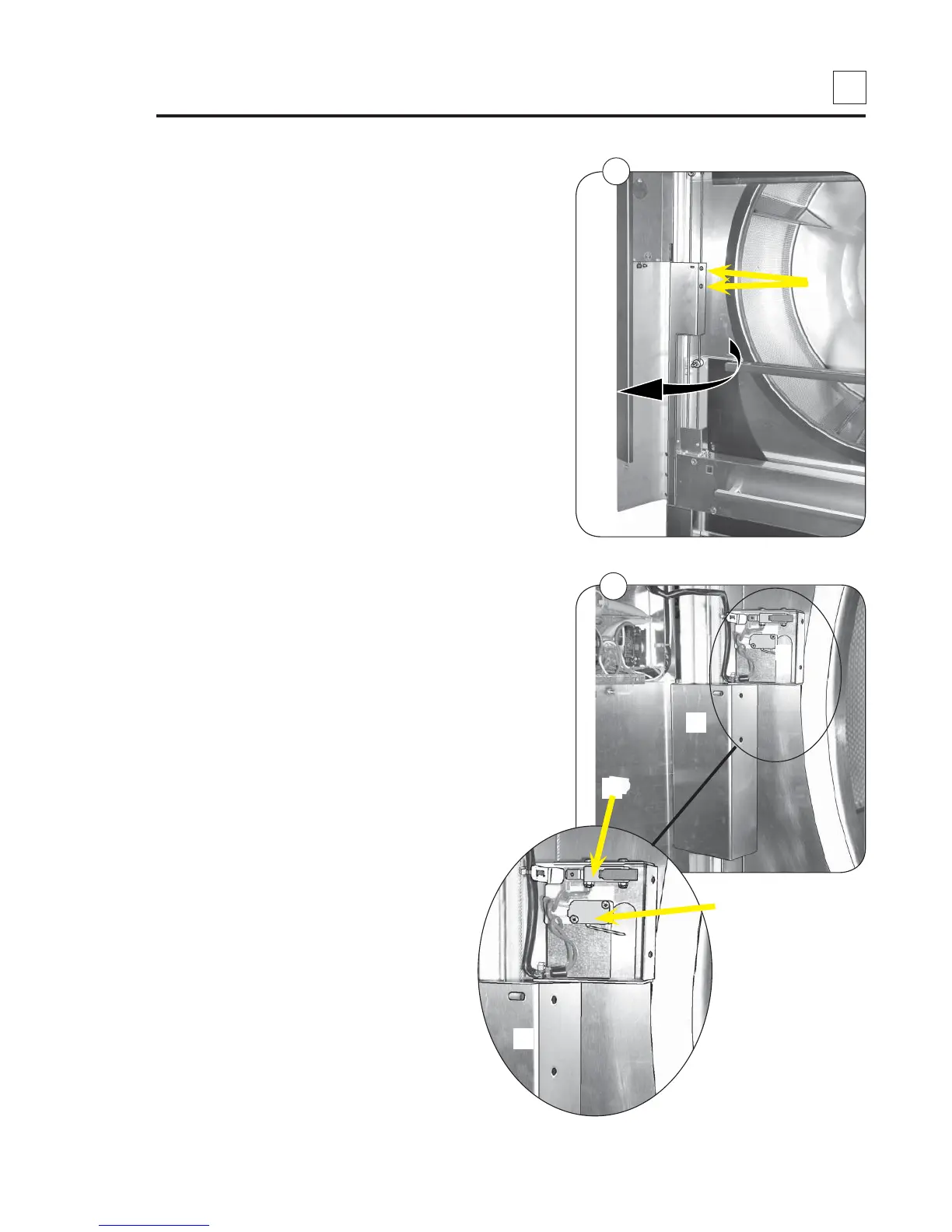
2. Open the control panel and undo the
2 screws A, fig. 1.
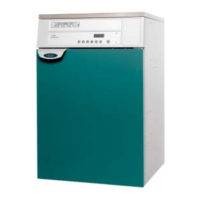
3. Pull the box B containing the 2 switches up
away from the protective screen E.
Dismantle the defective switch from the box,
fig. 2.
C: Loading door switch
D: Control panel switch
4. Disconnect the wires from the switch.
5. Install the new switch.
6. Connect the wires.
7. Re-assemble and test the new switch,
see next page.
1
D
E
B
A
C
2
B
E


 To Next Page