Use and maintenance manual
Page 30
Engineering Department PHONE: +39 0532 829 965 - FAX: +39 0532 829 177
E-Mail: support@elenos.com
3. USER INSTRUCTIONS
3.4.10.
RDS Encoder
Programming
Programming PS Messages
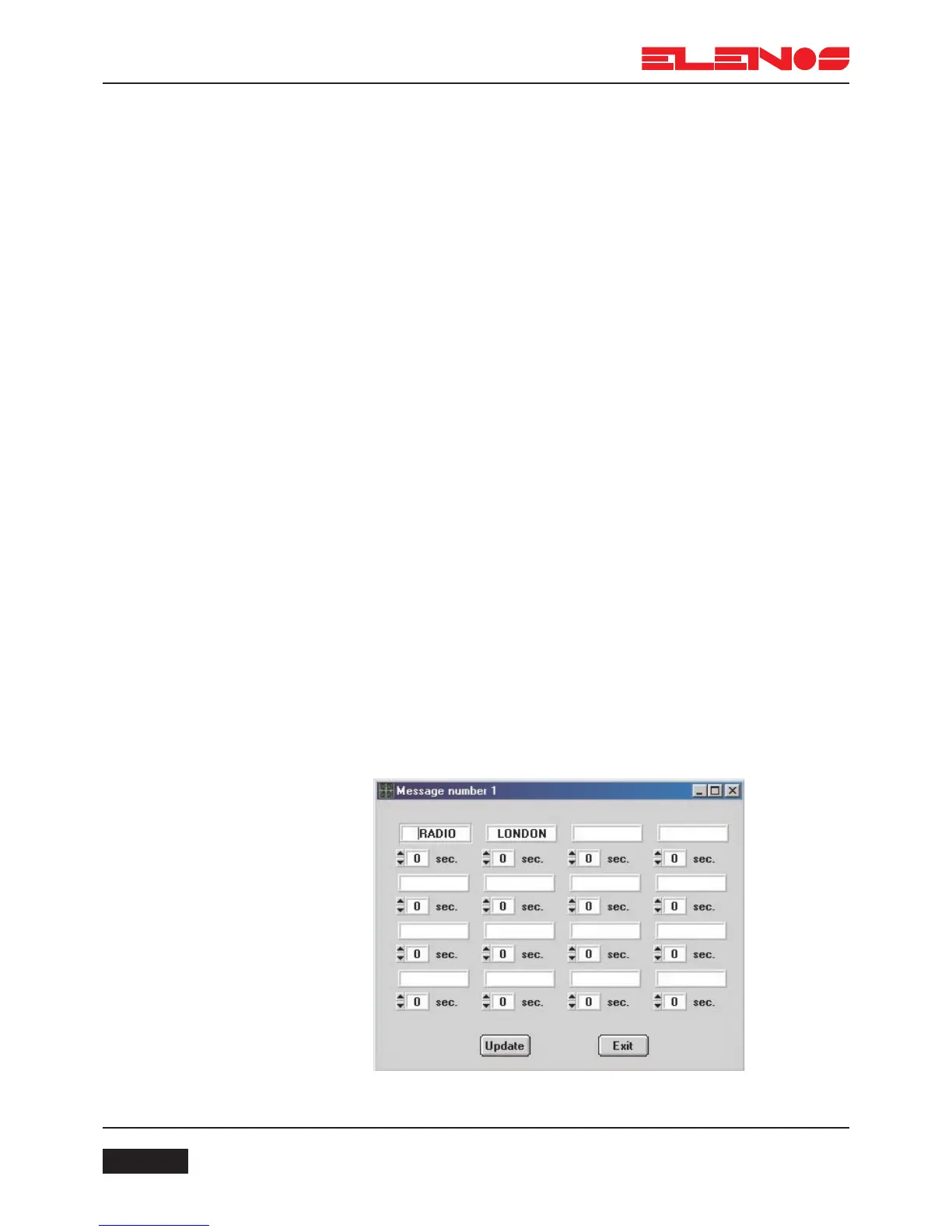
Having pressed one of the keys 1-8, corresponding to the number of the PS mes-
sage to program, a window will appear with 16 fields for the words which make up the
message, and the corresponding times for which the words will be displayed.
The times, in seconds, can be programmed from a minimum of 1 second to
a maximum of 60 seconds and represent the time for which the word will be displayed
before being replaced by the next word. However, if the message is programmed to scroll
(the SC key is lit green in the previous window), the times displayed have no relevance.
N.B.
The fields which are left blank are not transmitted even if a display time of more than one
second has been set.
Procedure for programming a message
1. Double click on the text box where a word is to be entered, and then enter the word
2. Adjust the display time of the word using the UP and DOWN arrows
underneath the text box
3. Repeat steps 1 and 2 for all the other words to be programmed
4. Press the UPDATE key to save the message and exit from the window
Alternatively, press the EXIT key to exit from the window without saving the message
From the main window:
5. Press the ATT key (activate the message)
6. Press the UPDATE key to update (the green ON indicator will light to show the message
is active)
7. It is now possible to insert other messages (upto 8) following the same procedure



 To Next Page