MP500/4N-8-16 Installation
5.3.3 Fastening to the wall
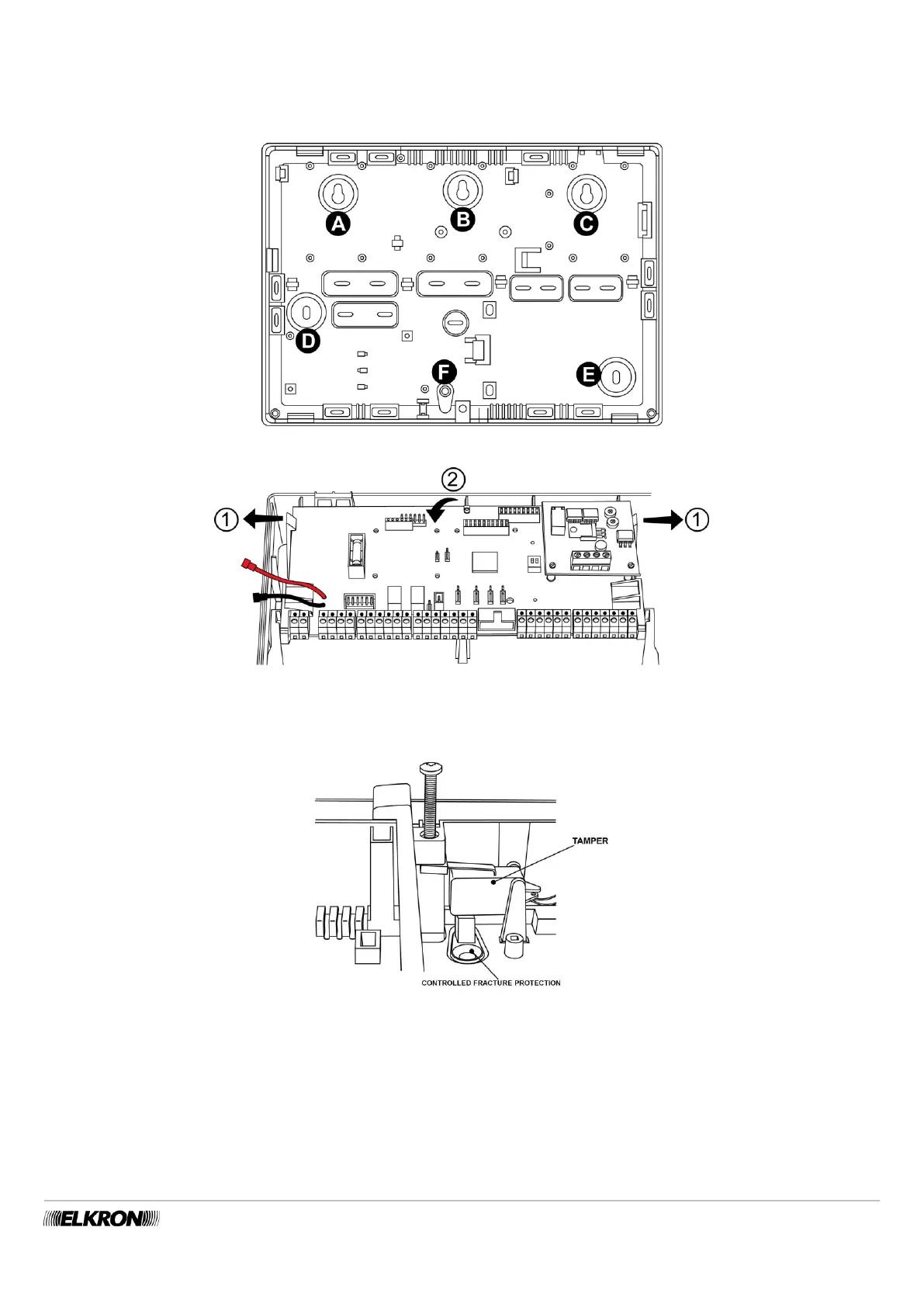
The figure illustrates the holes available for fastening the control panel to the wall with self-locking dowels with a maximum size of 6
mm (not included). For a firm fastening, it is necessary to use at least 4 holes. Holes A and B can be accessed by releasing the mother
board from the clips and turning it (Figure 18 - Releasing the mother board).
Figure 17 - Holes for fastening the MP500/4N - MP500/8
Figure 18 - Releasing the mother board
To guarantee the MP500/4N - MP500/8 control panels protection from tampering and removal, it is necessary to use hole F for
fastening as well. Protection against removal is mandatory for guaranteeing EN50131 grade 3 certification.
Figure 19 - Protection of the MP500/4N - MP500/8 from tampering and removal


 To Next Page