MP500/4N-8-16 Installation
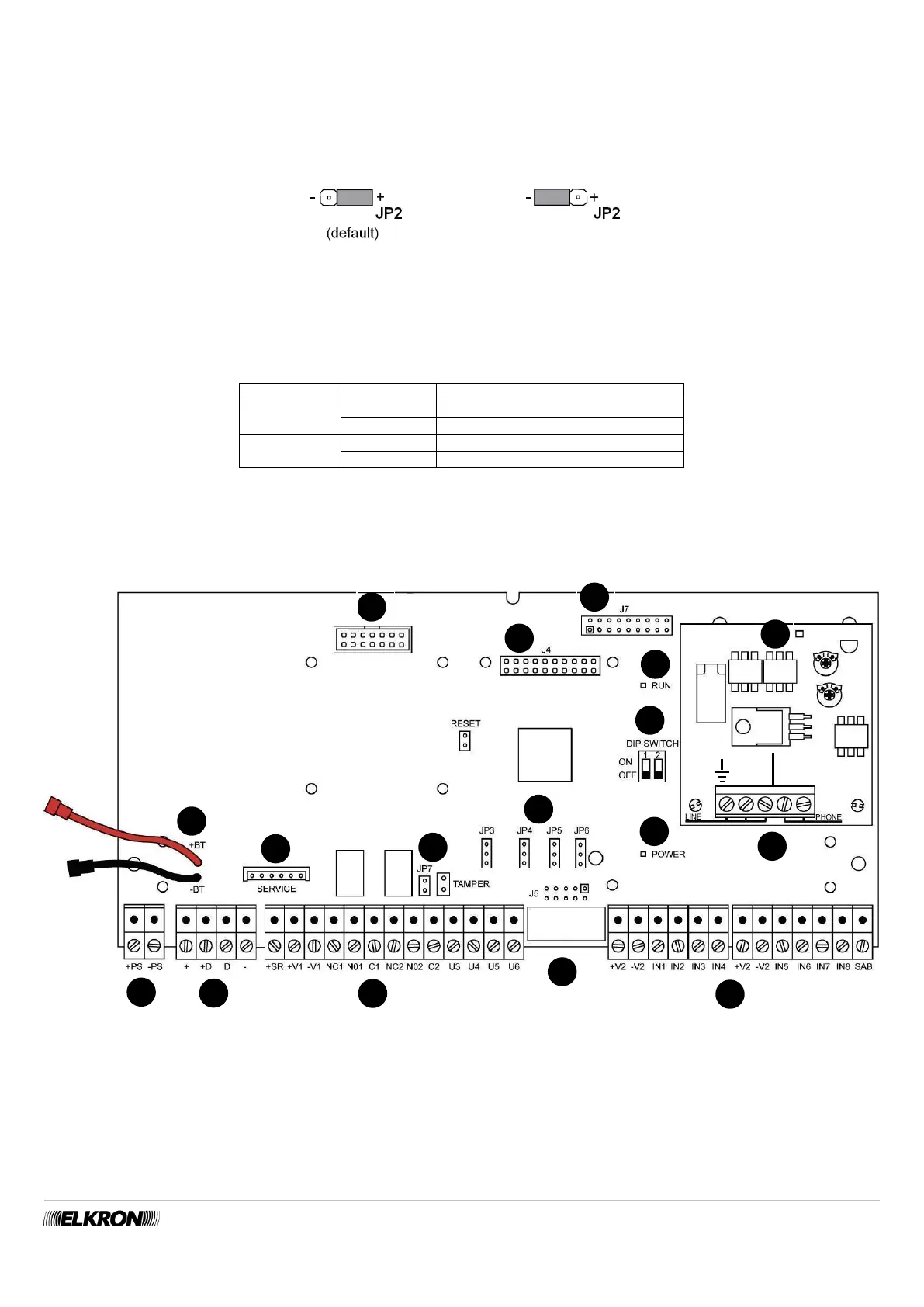
The electric U2 output can be configured as “Positive Reference” or “Negative Reference” by means of the JP2 jumper. The default
configuration is “Positive Reference”.
The electric outputs can be transformed into relay outputs – See Paragraph 5.12.6.2.
The figure illustrates how to position the JP2 jumper (Q).
Figure 32 - Configuration of the electric output hardware
For details on connections (power supplies, inputs, outputs, bus, …) see paragraph 5.12 Connections.
Functions associated do the DIP-switches
To activate the reset functions associated with the DIP-switches, it is necessary to follow the indications found in paragraphs 7.9.4
Resetting hardware installer code and 7.9.5 Resetting hardware to factory settings.
*= if positioned on ON before “POWER ON”
Table 6 - Functions associated with the DIP-switches of the mother board
5.5.2 Description of the main parts of the MP500/8 – MP500/16 control panel
Figure 33 - Connections and main parts of the MP500/8 – MP500/16 control panels
To facilitate the connection operations, the terminals must be unscrewed and reinserted onto the mother board.


 To Next Page