MP500/4N-8-16 Installation
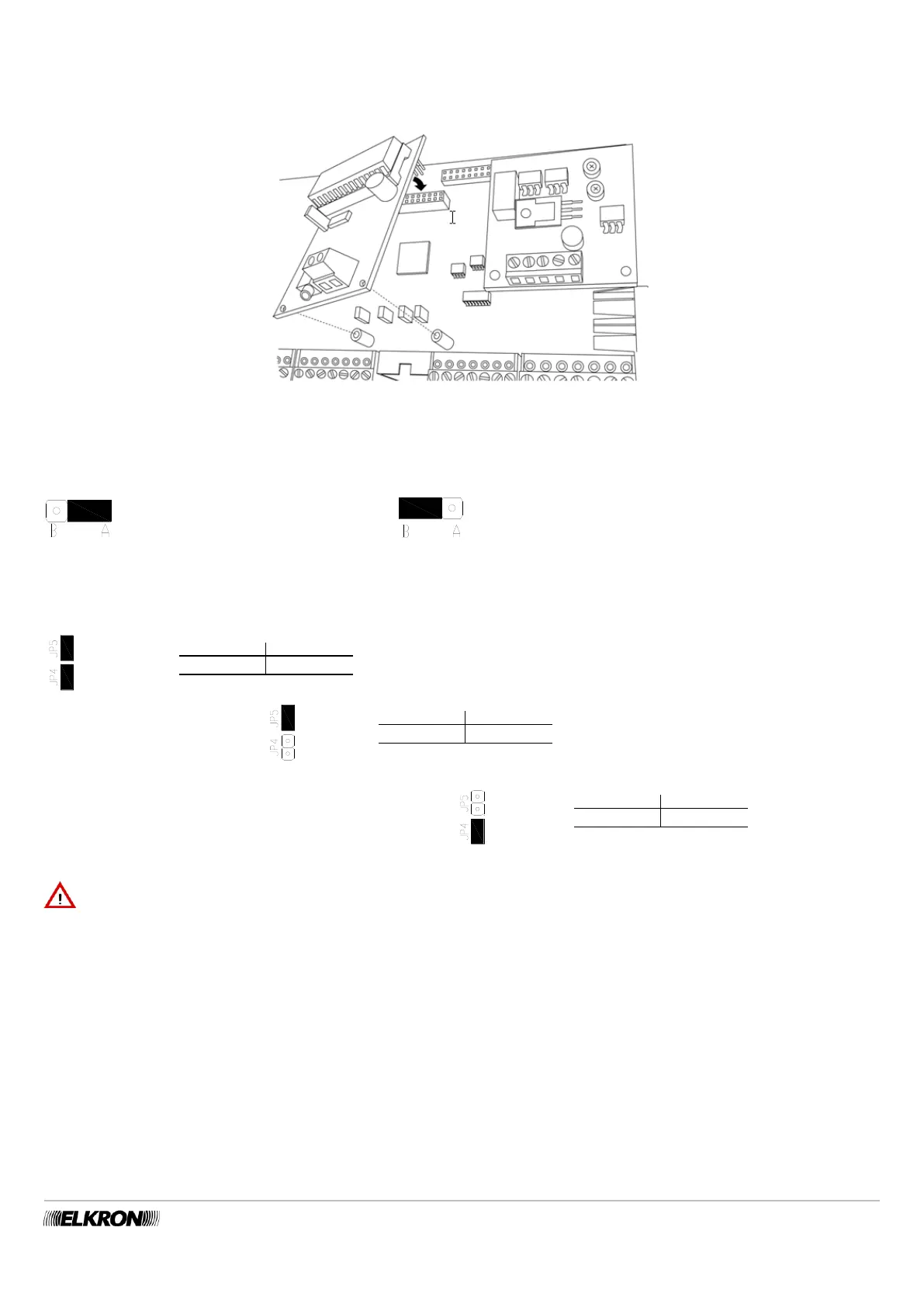
To assemble the vocal synthesis board, follow the instructions below:
Insert the two support spacers included in the two holes D of the board.
Insert the header connector in the special connector (N) of the mother board.
Select the input for the recording of messages by means of the Jumper C
Figure 37 - Assembling the vocal synthesis board
The position of the jumper can also be modified later, without having to disconnect the power to the control panel. The position of the
Jumper has no impact on the listening of the messages.
The recording takes place via a vocal
keypad connected the audio bus.
The recording takes place via the earphone connected to
the dedicated jack.
RECORDING AND LISTENING TO MESSAGES: For information on procedures for recording and listening to message, see the
control panel Programming Manual.
SELECTING LANGUAGES: Use the JP4 and JP5 Jumpers to select the desired language (Figure 36 - E).
IMPORTANT! The connection and disconnection of the optionals and accessories must always be done while the control
panel is disconnected from all power supplies (both mains and battery).
80CT6610111 80CT6615111
JP4-JP5 CLOSED: Italian Spanish
80CT6610111 80CT6615111
JP5 CLOSED: English German
80CT6610111 80CT6615111
JP4 CLOSED: French Slovenian


 To Next Page