21
English
BASIC
OPERATIONS
2-4 Setting Changes
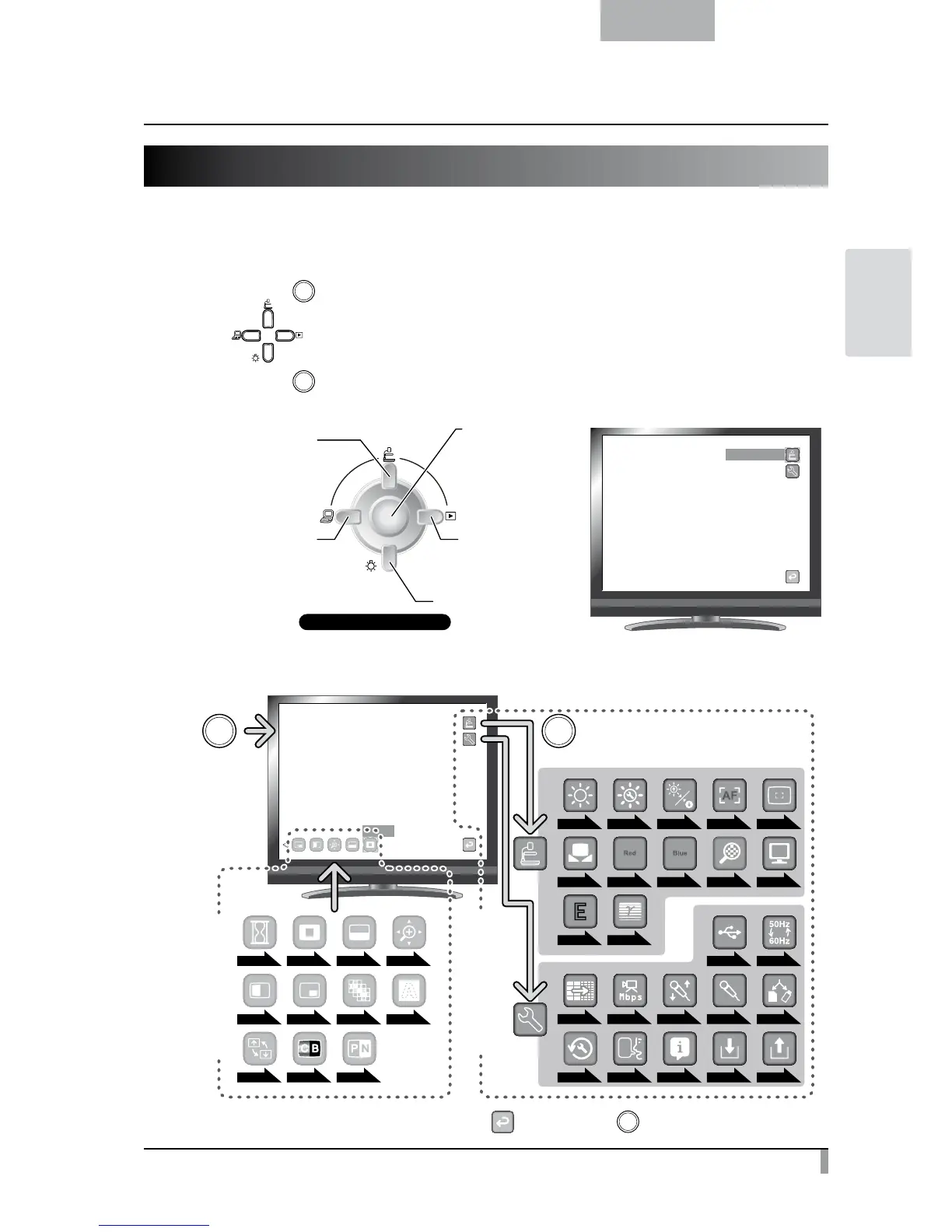
Various settings for this unit are changed through the menu (characters and icons) displayed on the screen.
Changing a Setting
①
Press the [ ] button on the operating panel to display the menu on the screen, and then use the
[
] buttons to move the cursor to the icon you want to operate or set.
②
Press the [ ] button to select the function to be changed.
Front operating panel
Move the cursor up
Move the cursor left
Move the cursor right
Display/hide the menu
on the screen
or Select
Move the cursor down
Camera Controls
List of the Menus
Highlight
Press
Press [Select]
Main unit settings
Support Function
P.22 P.22 P.22P.22 P.22
P.23
P.23
P.24 P.24
P.24
P.23 P.23 P.23P.23
P.23
P.24
P.24
P.25P.25 P.25 P.25
P.25 P.25 P.25 P.25
P.25 P.25 P.25
P.24
P.25
P.24
P.25
P.24
P.24P.24
※
To go back a layer or to hide the menu, select [ ] and press the [ ] button.



 To Next Page