EasyManua.ls Logo

Elmo P30HD - Marker Mask Function

Elmo P30HD
95 pages
Print Icon
To Next Page IconTo Next Page
To Previous Page IconTo Previous Page
Loading...
36
English
BASIC
OPERATIONS
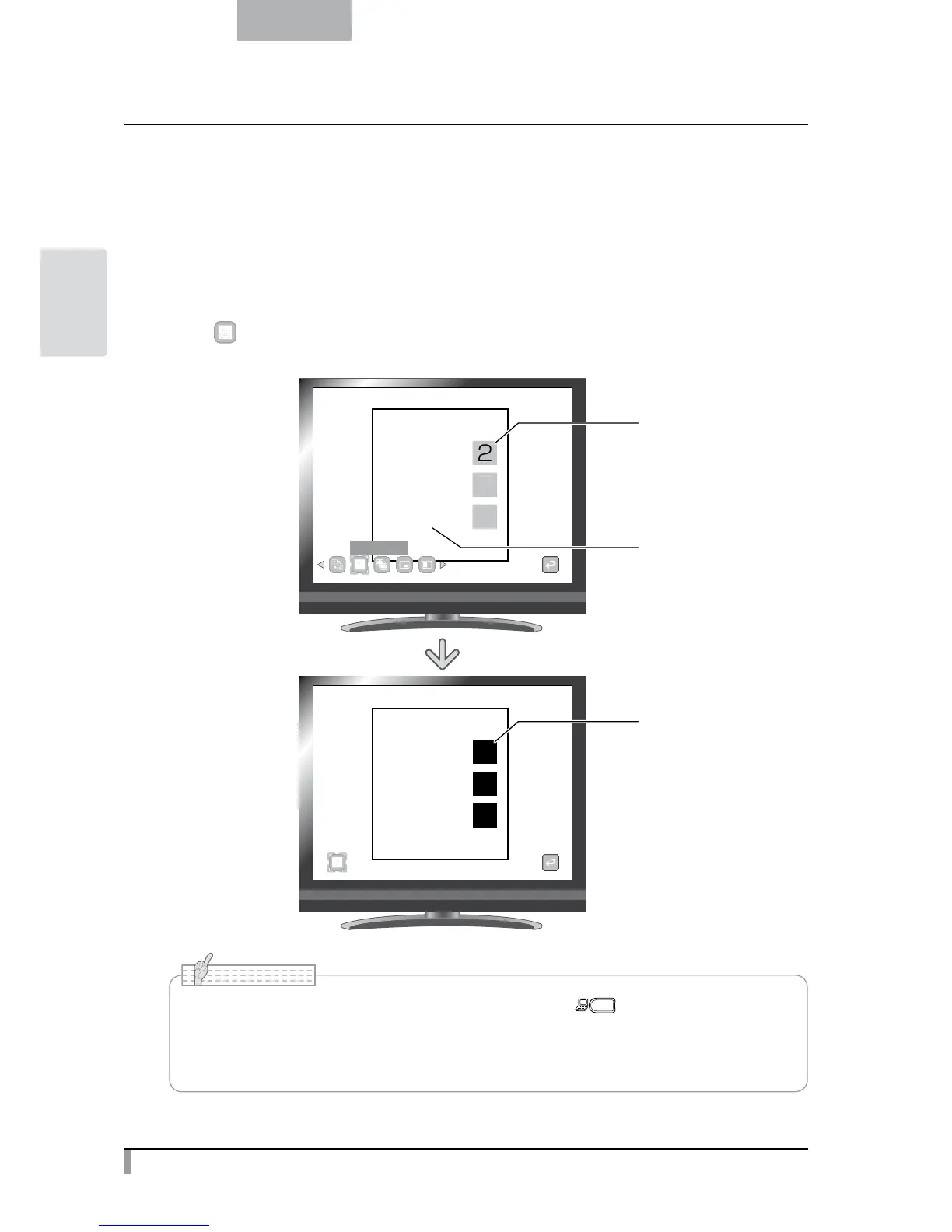
Marker Mask Function
This is a filter to blacken the color section of an image.
For instance, this can be used to temporarily hide colored text, so students can be questioned about the
hidden text.
Marker Mask operations
Press [ ] on the menu to blacken the color section in the image.
1+1=
2
1+2=
3
1+3=
4
2
3
4
1+1=2
1+2=3
1+3=4
Normal
Marker Mask
Marker Mask
Answers are marked
with a color pen
Questions are in black
Areas marked with
a color pen
are blackened
The Marker Mask function can be used only when the [ ] button is selected in the
image selection.
When using the Marker Mask function, the image cannot be saved.
The proper effect of this function may not be obtained depending on the material used.
N o t e

Table of Contents

Other manuals for Elmo P30HD

Related product manuals