77
English
ADVANCED
OPERATIONS
3-5
About RS-232C
Connection via RS-232C
When the RS-232C port is connected to a PC, the unit can be controlled from a
PC.
For setting up
To use communication control, be sure to set up in the order described below.
①
Connect the unit to your PC with an RS-232C cable.
•
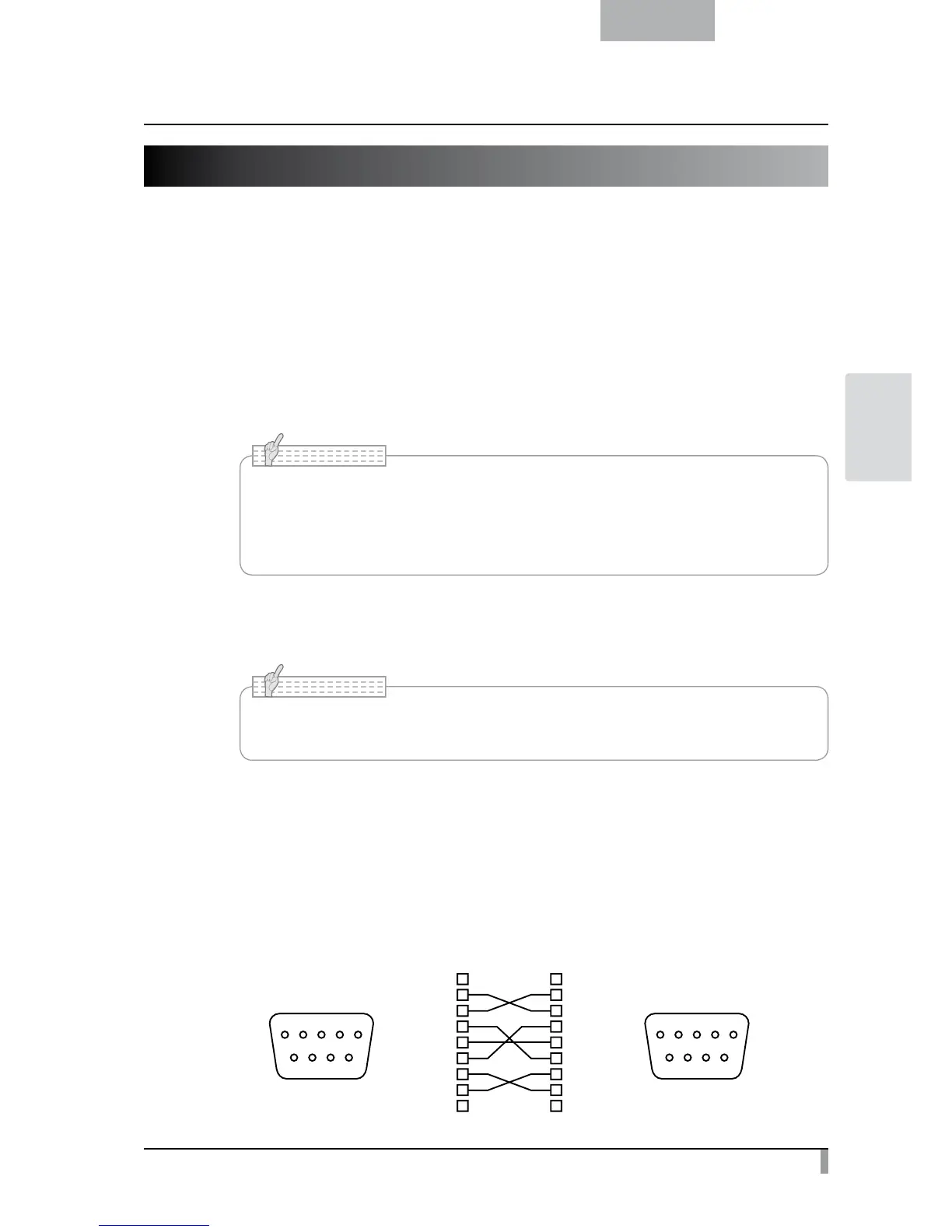
When using a commercially available RS-232C cable, make sure that the pins are
connected as shown below.
• To protect the unit and your PC, be sure to turn OFF the power of each unit before
starting the connection work.
N o t e
②
Start your PC and set the communication mode of the RS-232C to the
communication mode of the unit.
•
For the information how to set the communication mode of the RS-232C, refer to the
instruction manual of your PC.
N o t e
③
Start the program to operate the unit from your PC.
The RS-232C control starts.
■ How to connect the cables
Unit side
㧔
DSUB-9P
㧕
PC side
㧔
DSUB-9P
㧕
PC side
DSUB-9P
(Female)
DSUB-9P
(Female)
9 8 7 6
5 4 3 2 1
CD
RXD
TXD
DTR
SG
DSR
RTS
CTS
RI(CI)
CD
RXD
TXD
DTR
SG
DSR
RTS
CTS
RI
1
2
3
4
5
6
7
8
9
1
2
3
4
5
6
7
8
9
9 8 7 6
5 4 3 2 1



 To Next Page