25
Model 8300
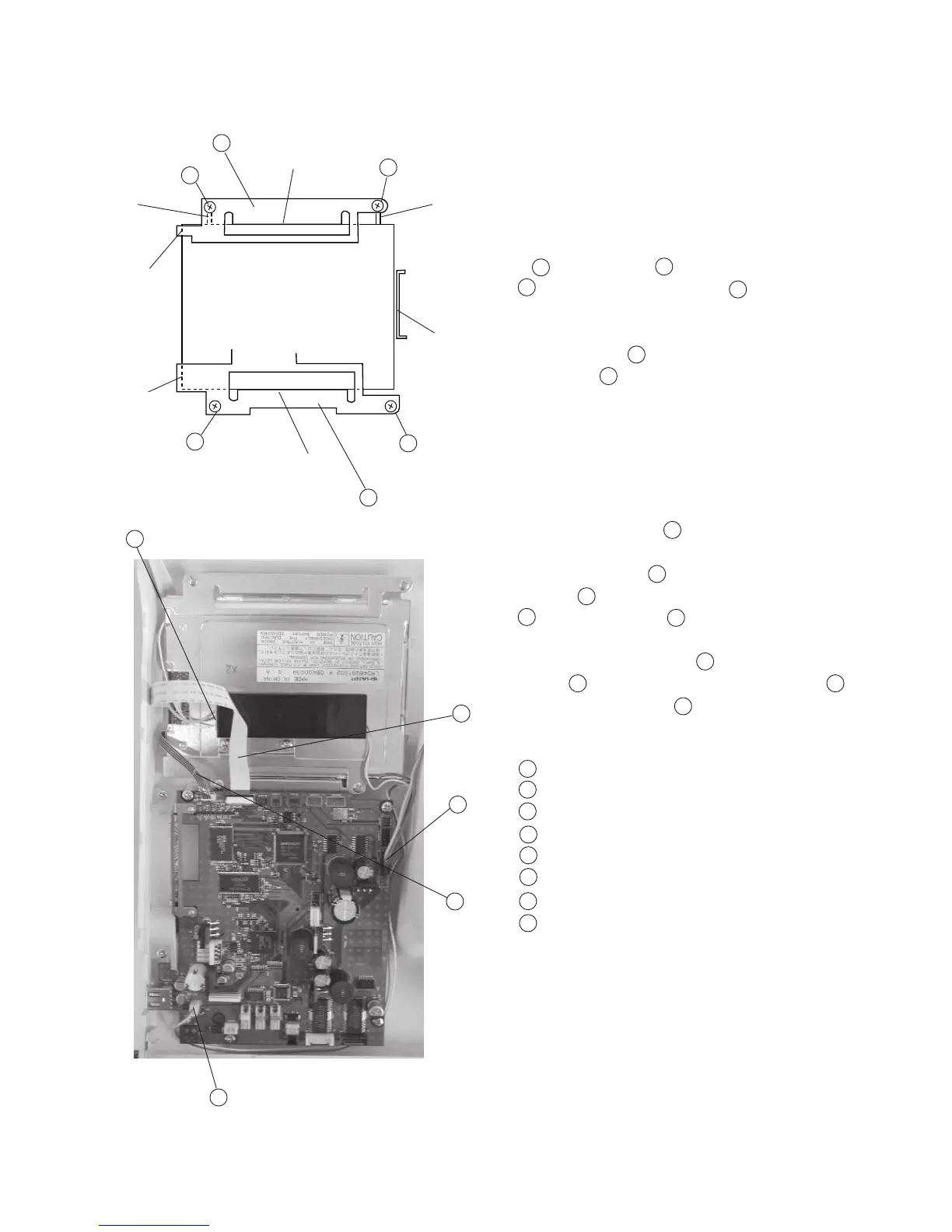
To remove:
1 Remove the front cover. (See page 8)
2 Pull out the Connectors of printed circuit board
F , LCD Harness and Inverter connector
and Touch panel connectors .
3 Remove Screws (4 pieces) and remove the
Touch panel .
To attach:
4 Place the Touch panel and press it against the
Ribs (A), (B), (C).
Fix the Touch panel with the Fixing plate
(bottom) while press it against the Touch panel
and tighten screws .
5 Place the Fixing plate (top) and secure it with
Screws while pressing the Fixing plate (top)
against the Touch panel .
Fixing plate (Top)
Screw
Fixing plate (Bottom)
Touch panel connector
LCD Harness
Printed circuit board F
Touch panel
Inverter
6
5
8
7
2
7
3
7
1
1
7
2
2
1
2
3
4
5
6
8
7
7
8
1
2
3
(A)
(B)
(F)
(C)
(G)
(E)
(D)
5
6
7
8
2
2
2
4
Replacing Touch Panel



 To Next Page