40
Model 8300
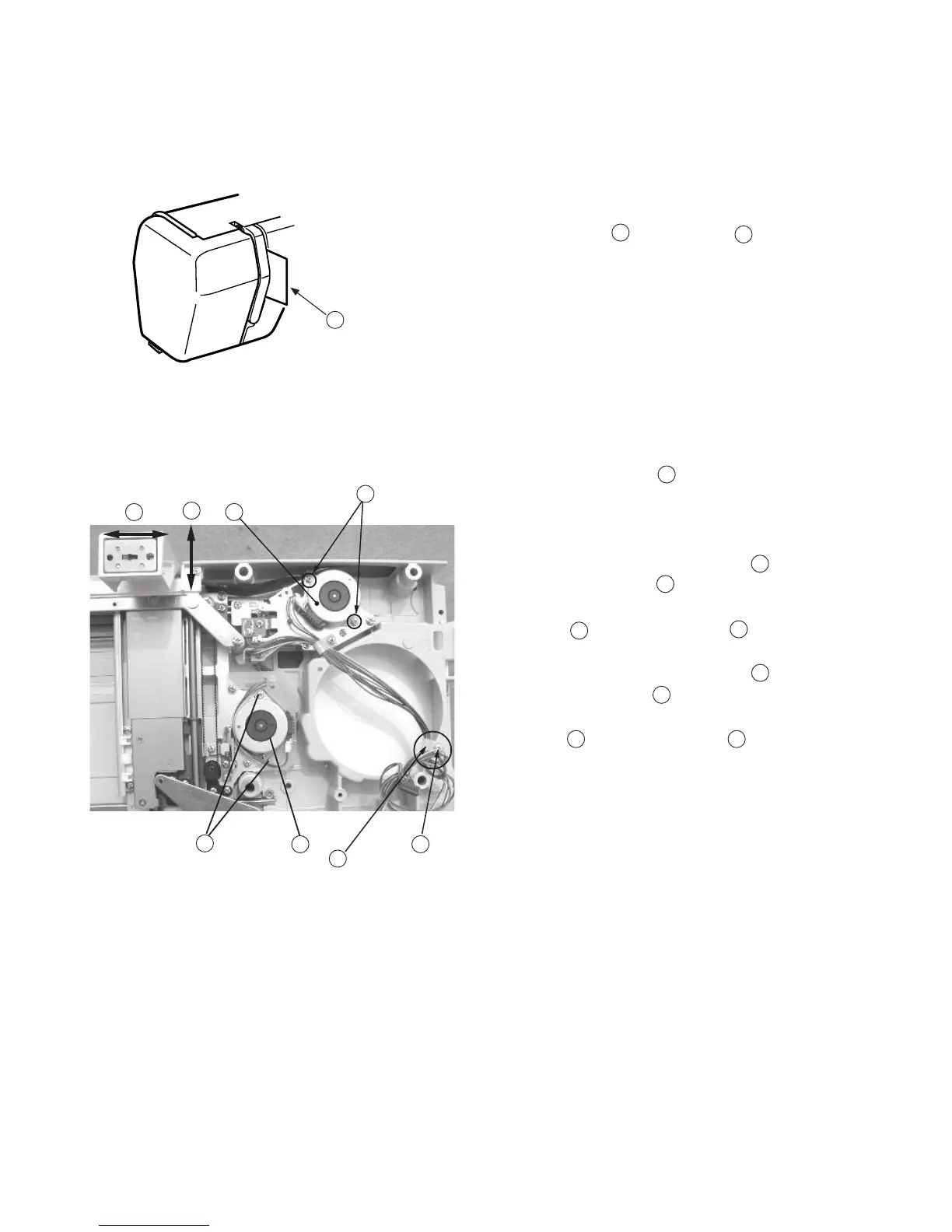
Adjusting Carriage Motor Gear
If the carriage motor gear sounds noisy when sewing the embroidery stitches, follow the
instructions below.
1. Remove the base unit (See page 7).
2. Remove Screw and Nylon clip .
3. Attach the X and Y motor connectors to printed
circuit board “A” (Main board).
4. Turn the power “ON” and select large “A” in Gothic
style and memorize it 3 times.
6. Lower the presser foot after the carriage moves to
the starting position.
7. Insert a piece of paper between the thread
tension disks as shown so that the needle thread
sensor will not work.
8. Run the machine and loosen Screws (2 pieces)
and move the X-Motor to detect the quitest
position, while the carriage is moving in lateral
direction then tighten Screws .
9. Run the machine and loosen Screws (2 pieces)
and move the Y-Motor to detect the quitest
position, while the carriage is moving in vertical
direction then tighten Screws .
10.Return the carriage to the home position and turn
the power “OFF”. Reattach the base unit.
A
B
C
D
E
D
F
G
H
I G
C
D
E
F
A
B
H
G
I



 To Next Page