34
Model 8300
Main
Slave
Brightness
Foot UD Sensor Off
Card / USB PH Sensor Aging
Solenoid
Solenoid Hold
DC1
BobbinCheck
Bobbin
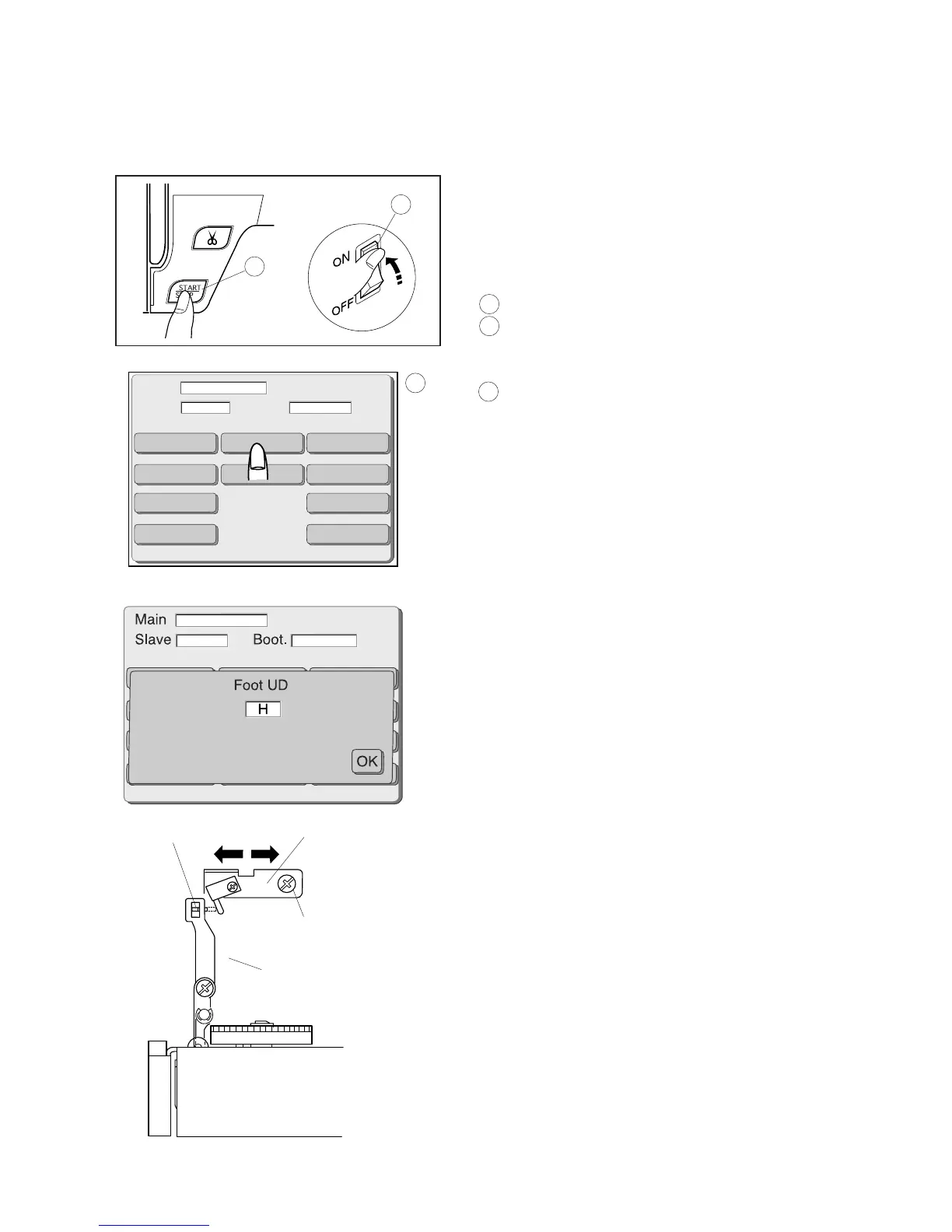
Tension releas lever
Setscrew (A)
Switch bracket
Tension release plate
1 Remove the top cover. (See page 3)
2 Turn the power switch on while pressing the Start/Stop
button. Do not release the button until the LCD screen
shows the adjusting mode.
1 Power switch
2 Start/stop button
3 The LCD screen will show the adjusting mode.
3 Adjusting mode
4 Press the “Foot UD” key.
5 Loosen the screw (A).
Move the switch bracket to adjust its position so that the
LCD screen shows “H” when the foot is raised and
shows “L” when the foot is lowered.
6 Press the “OK” key.
7 Turn the power switch off and then attach the top
cover.
Adjusting the Presser Foot Lifter Sensor
Adjust the presser foot lifter sensor after replacing the presser lifter sensor or circuit
board A.
2
1
3



 To Next Page