31
Model 8300
Main
Slave
Boot.
Solenoid
Key
Key
Key
OK
Tension
Solenoid
Thread
Hold
Thread
Cut
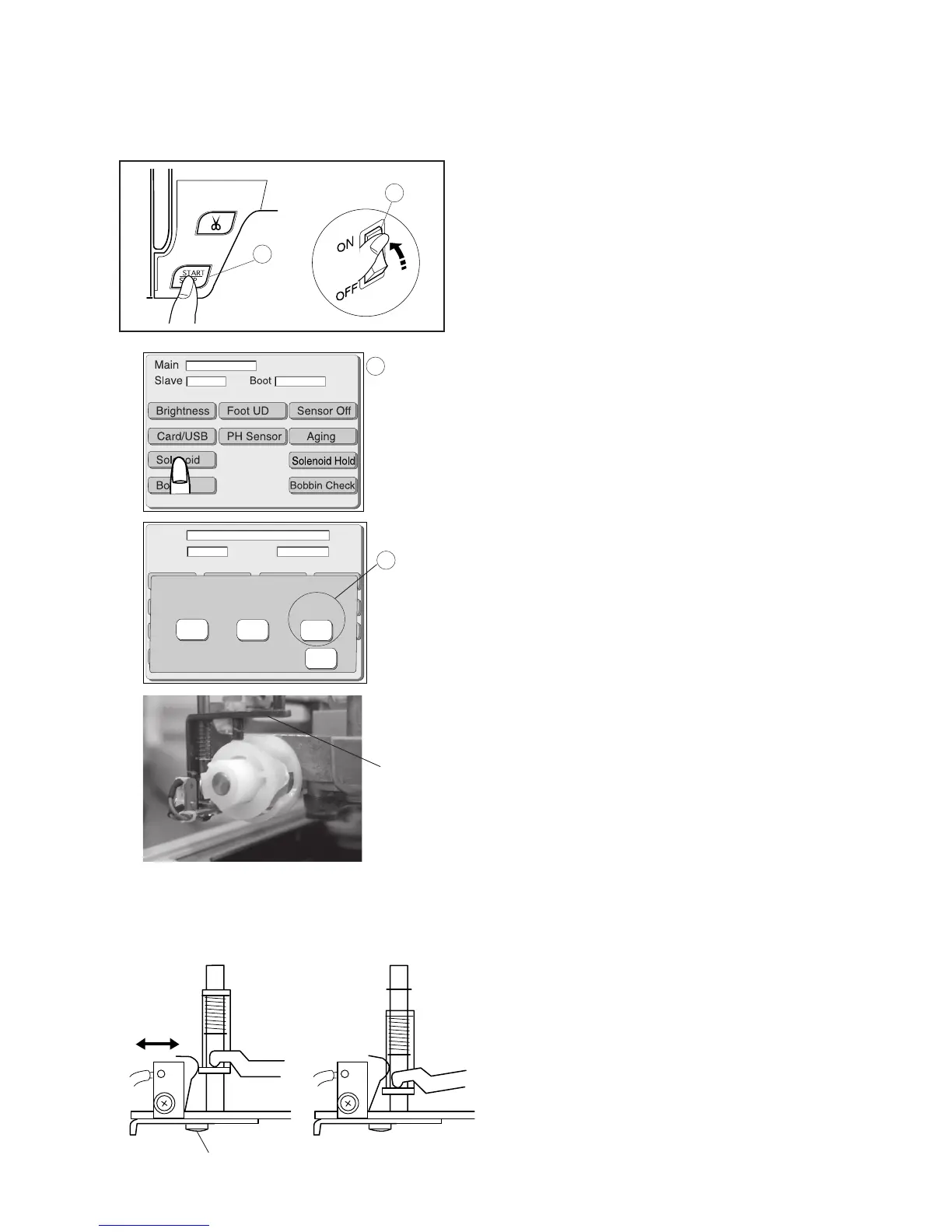
Adjusting thread cutter
Adjust the thread cutter switch as follows.
1 Remove the needle plate, the bed cover and the free
arm cover (see page 8 and 20).
2 Turn the power switch q on while the Start/Stop
button w. Do not release the button unitl the LCD
screen shows the adjusting mode e.
3 Press Solenoid key.
4 Turn the hand wheel to lower the needle bar at its
lowest position.
5 Loosen the screw and adjust the switch so the
driving arm should be lowered as illustrated in
(fig. 2) when the key r is pressed.
6 Tighten the screw.
7 Press the OK key. Turn the power switch OFF.
8 Attach the needle plate, bed cover and the free arm
cover.
(Fig. 1) (Fig. 2)
The driving arm is
raised. (switch ON)
The driving arm is
lowered. (switch OFF)
Driving arm (1)
1
2
4
3



 To Next Page