28
Model 8300
Main
Slave
Brightness
Foot UD Sensor Off
Card / USB PH Sensor Aging
Solenoid
Solenoid Hold
DC1
BobbinCheck
Bobbin
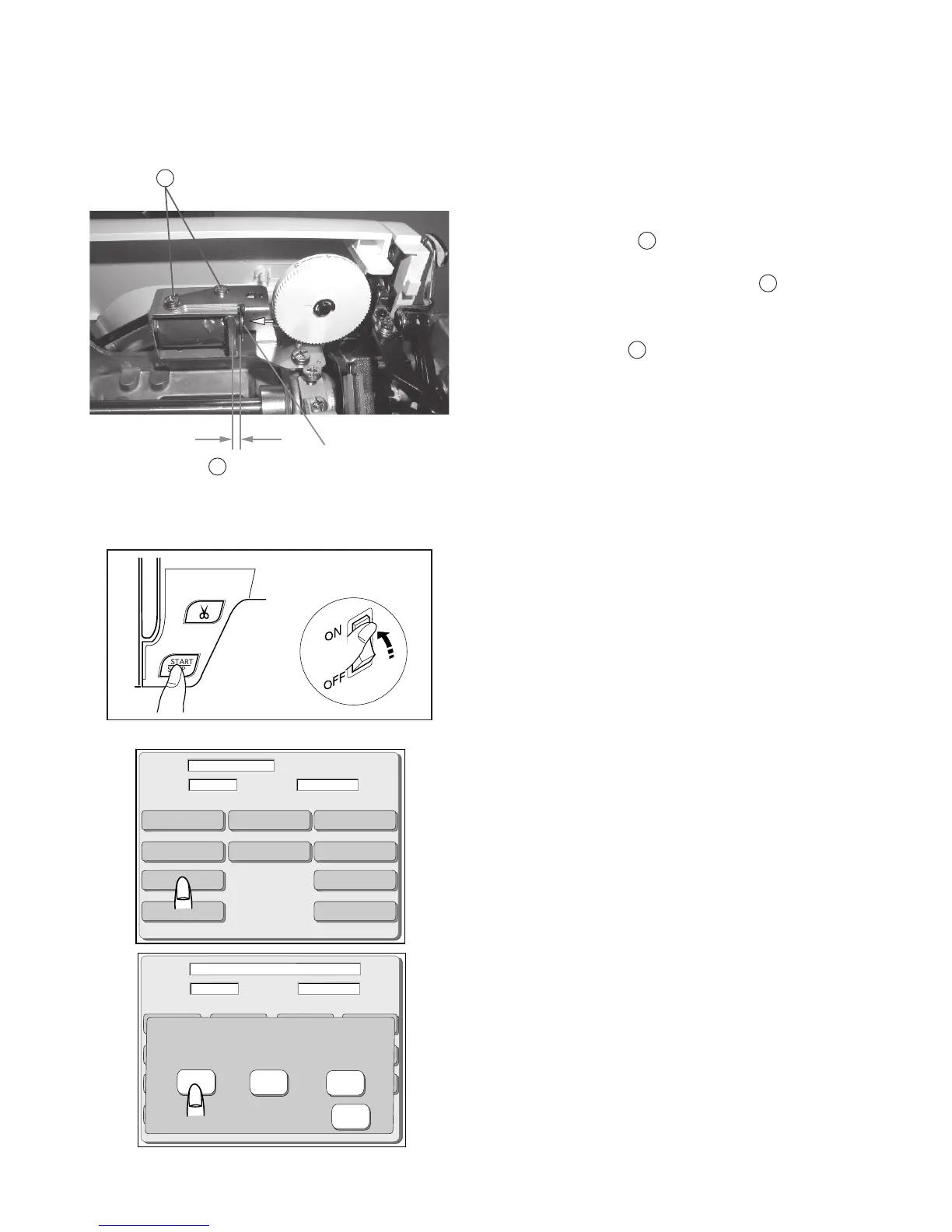
Adjustment of the Solenoid
1. Remove the top cover. (see page 3)
2. Loosen the setscrews .
3. Adjust the clearance of Solenoid 1.6 mm with the
tension disk closed.
4. Tighten the setscrew .
1.6mm
The plunger is drawn
in direction of Arrow
To check:
1. Turn the power switch on while pressing the Start/
Stop button. Do not release the button until the LCD
screen shows the adjusting mode.
2. Press the “Solenoid” key.
3. Lower the presser foot lifter and make sure the
disk holder shut and open automatically when
press the keys.
4. Press the OK key.
5. Turn the power off.
A
A
A
B
B
Main
Slave
Boot.
Solenoid
Key
Key
Key
OK
Tension
Solenoid
Thread
Hold
Thread
Cut



 To Next Page