15
elna 9900
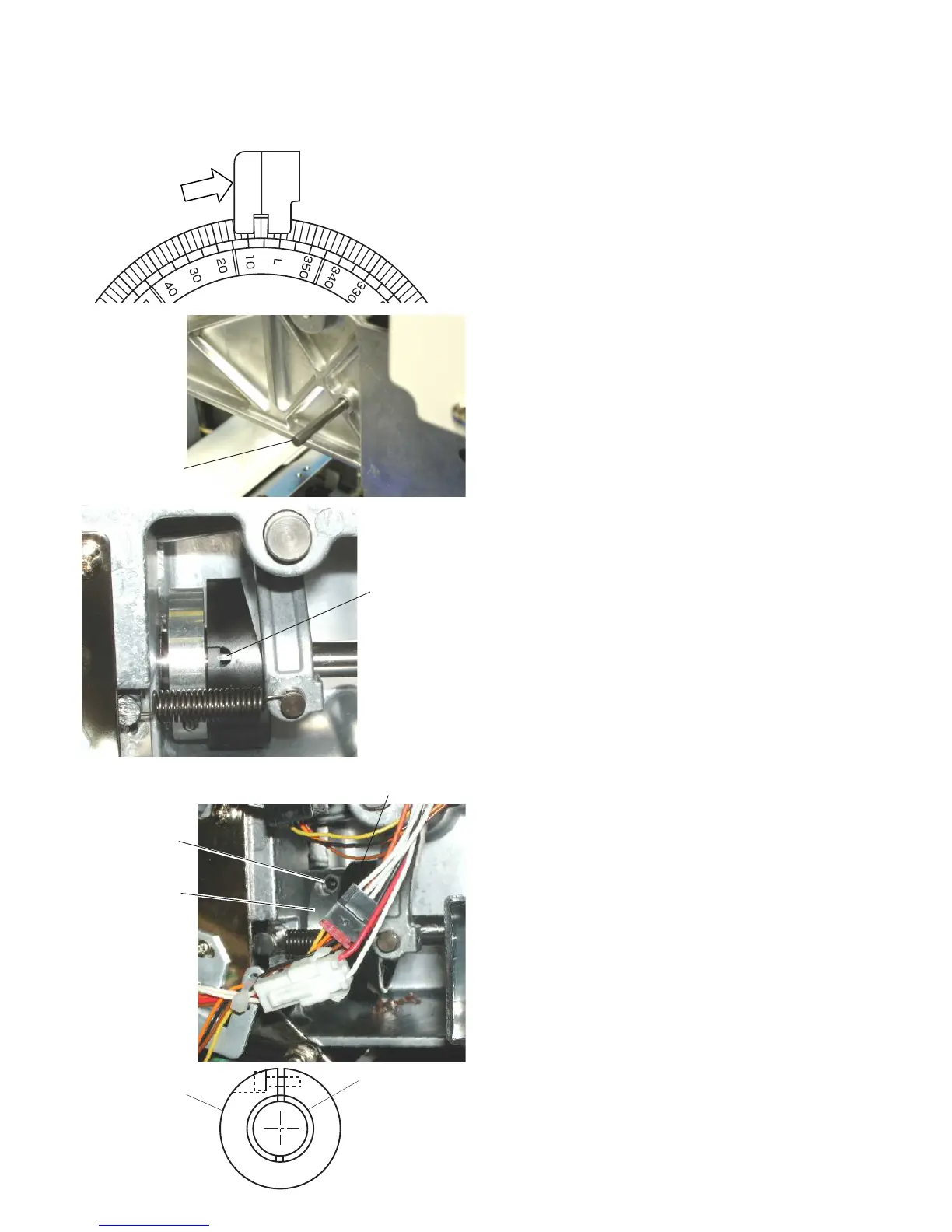
Adjusting the Take-up Lever Timing
To remove:
1. Remove the spool stand, static head cover
(right), right cover and left cover.
2. Turn the handwheel to set the index disk at 6º.
3. Insert the positioning pin from the left side of
the arm.
The positioning pin goes into the pin groove of
take-up lever cam if the timing is correctly
adjusted.
4. If the timing is incorrect, loosen the setscrew on
the cam clamp and turn the take-up lever cam
so the positioning pin can go into the pin grove
on the cam.
Turn the handwheel to set the index disk at 6º.
Tighten the setscrew on the cam clamp while
pressing the take-up lever cam to the side of
the moving head. There should be no gap
between the take-up lever cam and cam clamp.
5. Pull the positioning pin out from the arm.
Turn the handwheel to set the index disk at
270º.
Attach the removed parts.
Positioning pin
Pin groove
Take-up lever cam
Setscrew
Cam clamp
Take-up lever cam
Cam clamp


 To Next Page