31
elna 9900
1. Remove the static head cover (right) (see page 5).
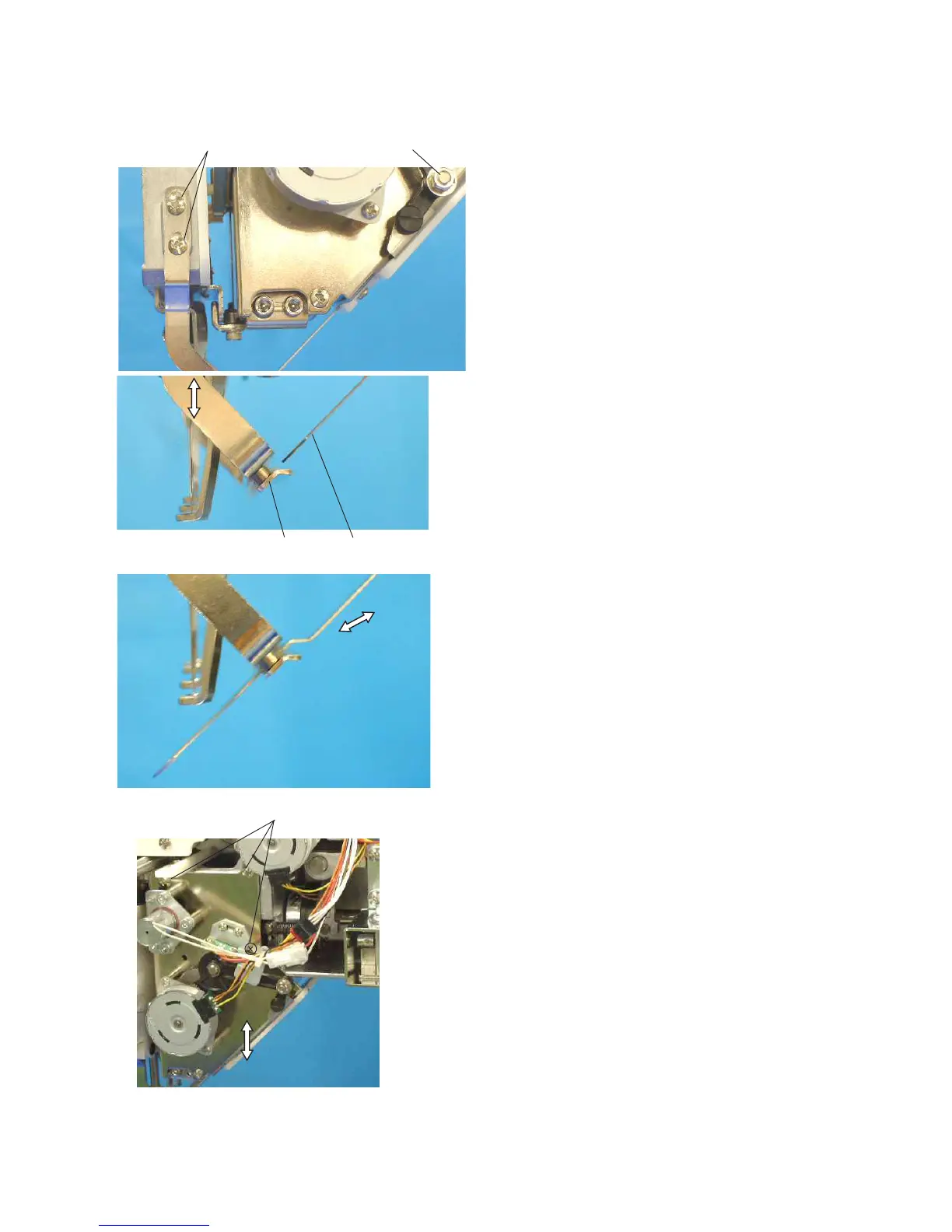
2. Remove the thread catcher panel and lower thread
guide plate (see pages 18 and 19).
3. Loosen the 4 setscrews (A).
4. Pull the thread catcher out to set the tip of the thread
catcher on the lower thread catcher holder.
Move the thread catcher holder up or down so the
lower surface of the thread catcher touches the upper
surface of the lower thread catcher holder.
NOTE:
If an adjustment allowance of the thread catcher holder is
not enough, loosen the 3 setscrews (B) and move the
thread catcher unit.
5. Check if the thread catcher moves smoothly by
moving the rod shaft with your hand.
Tighten the 4 setscrews (A).
6. Press the thread cutter button to test thread cutting
and catching.
7. Attach the parts removed in steps 1 and 2.
Adjusting the Thread Catcher Holder
Setscrews (A)
Rod shaft
Lower thread
catcher holder
Thread catcher
Setscrews (B)



 To Next Page